Core Concepts
This guide explains how Hawiyati works from the inside out — how users are authenticated, how sessions are established and maintained, how service providers receive identity assertions, and how policies and risk signals combine to make dynamic access decisions. Read these concepts before integrating applications or configuring production policies.
This guide explains how Hawiyati works from the inside out — how users are authenticated, how sessions are established and maintained, how service providers receive identity assertions, and how policies and risk signals combine to make dynamic access decisions. Read these concepts before integrating applications or configuring production policies.
Platform Architecture Overview
Hawiyati is composed of specialised microservices communicating over HTTPS and gRPC. The four zones below show where each service lives, what it handles, and how requests flow from external actors through the entry layer into the platform and data layers. Understanding this structure helps with integration, troubleshooting, and capacity planning.
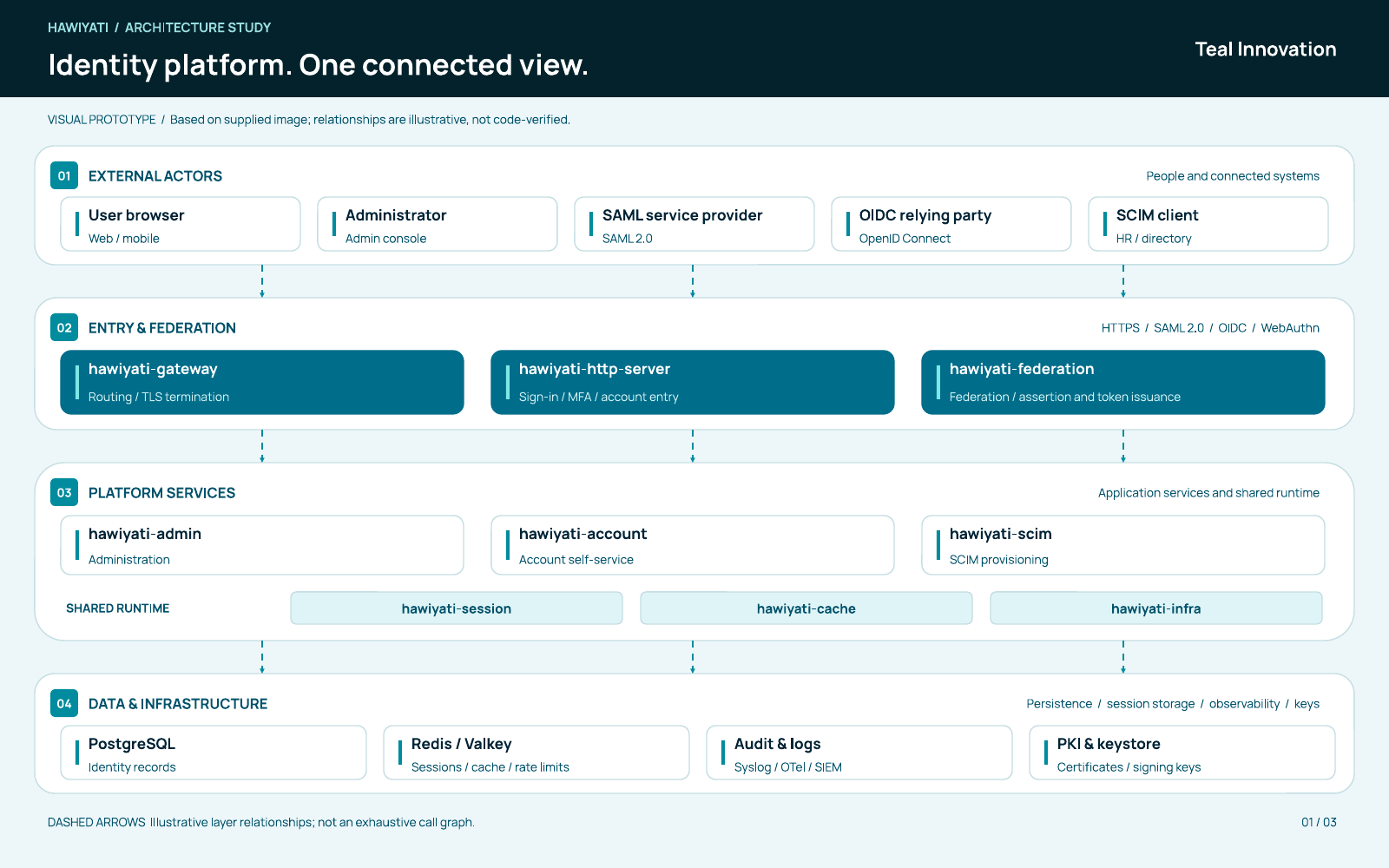
The sections below explain how each zone behaves at runtime. For module ports, gRPC service definitions, and deployment topology, see the Implementation Guide.
How Authentication Works
Authentication in Hawiyati is the process of verifying a user's identity before granting access to a service provider. It runs through a sequenced pipeline: the IdP collects evidence via one or more methods, evaluates it against the user's stored credentials, and upon success issues a session and a federation artifact (SAML assertion or OIDC token set).
Hawiyati is the Identity Provider (IdP). Every login begins when a browser follows a SAML SSO request or OIDC authorization redirect to hawiyati-http-server. From that entry point, the IdP constructs a sequence of authentication steps, drives the user through them, and — when all steps succeed — hands control back to hawiyati-federation to issue the assertion or tokens.
Authentication is stateful within the login flow. A LoginFlowState object is stored in the user's IdP browser session for the duration of the ceremony. It tracks:
| Field | Contents |
|---|---|
providerSequence | Ordered list of authentication steps to execute |
stepIndex | Current position in the sequence |
username | Discovered at or after the first step completes |
amrList | Methods successfully completed so far (included verbatim in OIDC amr) |
loaReached | Highest authentication assurance level achieved so far |
| Per-provider scratch state | Temporary data such as the OTP HMAC or FIDO2 challenge, stored server-side for the step duration |
The flow is complete when stepIndex passes the end of the sequence. The IdP then establishes a session and hands control to the federation layer.
Supported Authentication Methods
Hawiyati supports five authentication methods, each mapped to a named provider in the login engine.
| Method | Provider code | Factor category | AAL | Phishing-resistant | Hardware-bound |
|---|---|---|---|---|---|
| Password | pwd |
Knowledge | AAL1 | No | No |
| TOTP (authenticator app) | totp |
Possession | AAL2 | No | No |
| Email OTP | email_otp |
Possession | AAL2 | No | No |
| SMS OTP | sms_otp |
Possession | AAL2 | No | No |
| FIDO2 / WebAuthn passkey | fido2 |
Possession + Inherence | AAL2 | Yes | Yes |
Factor categories
Knowledge — something the user knows (password). Possession — something the user has (phone, authenticator app, security key). Inherence — something the user is or does (biometric confirmed locally by the device for passkeys). FIDO2 uniquely covers both possession and inherence.
The Login Flow
Every login follows the same pipeline: receive the SSO request, evaluate policy, construct the step sequence, execute each step, then issue the assertion or tokens. The steps below describe the happy path for a policy-driven MFA login.
AuthnRequest or OIDC /authorize. Federation stores the SSO request in IdP browser session.idp.authenticatedUser. If found and policy allows SSO reuse → skip to step 6 (fast path).amr=[pwd], loaReached=AAL1.loaReached to AAL2, appends to amr.idp.authenticatedUser for SSO reuse.AuthnRequest or OIDC /authorize redirect to hawiyati-federation. The SSO request is stored in the IdP browser session.hawiyati-federation evaluates the SP's authentication policy (group, network zone, time window) and determines the required authentication action: ALLOW, MFA_REQUIRED, or DENY.idp.authenticatedUser is set), the flow skips login and jumps directly to step 6. Otherwise, the browser is redirected to the login form.hawiyati-http-server renders the password form. On submission: Argon2id verification (local accounts) or LDAP bind (directory-sourced accounts). Successful completion writes amr=[pwd], loaReached=AAL1 to flow state.amr and raises loaReached to AAL2.hawiyati-federation issues a signed SAML assertion or OIDC authorization code. The IdP browser session now carries idp.authenticatedUser for SSO re-use.A user with status Pending Approval or Suspended is blocked after the password step. The error message does not indicate whether the password was correct — this prevents account status enumeration.
Flow Sequence Construction
The set of authentication steps is determined before the first form is rendered. Two sources drive the sequence.
Source 1 — SP accepted methods (no policy)
When a service provider has no authentication policy, the IdP uses the SP's accepted methods list from its registration record.
| SP accepted methods | Behavior |
|---|---|
List includes pwd | Password form shown first; other methods available as "sign in another way" links |
| Exactly one non-password method | Browser taken directly to that method's form |
| Multiple non-password methods, no password | A method picker screen is shown first |
In this mode, the user can switch between offered methods. A user who selects a method they are not enrolled in will fail at that method's own verification step — the IdP does not pre-filter the picker.
Source 2 — authentication policy
When the SP has an authentication policy, the policy result drives the sequence directly.
| Policy result | Sequence |
|---|---|
| ALLOW | Password only (pwd) |
| MFA_REQUIRED with specific factors | Password, then each required factor in order (e.g. pwd → totp) |
| MFA_REQUIRED with no specific factors | Password, then a method picker offering all enrolled MFA methods |
| DENY | A denial screen — no credentials accepted |
Policy-driven flows do not allow users to switch to alternative methods outside the mandated sequence. The order is fixed by the policy configuration.
Authentication Assurance Levels (AAL)
Hawiyati tracks the highest assurance level (AAL) reached during a login. The loaReached value is included in the session and used by the federation layer when building SAML AuthnContextClassRef or OIDC ACR values.
| Level | Name | How to reach it |
|---|---|---|
| AAL1 | Single factor | Only a knowledge factor (password) was verified. Standard for non-sensitive applications. |
| AAL2 | Multi-factor or phishing-resistant single factor | Any second factor (TOTP, email OTP, SMS OTP) completed after password; OR FIDO2 completed alone as the sole required method. |
A password-only login yields AAL1. Adding any MFA method raises the session to AAL2. A FIDO2-only login also achieves AAL2 and additionally satisfies phishing-resistance requirements for high-assurance applications.
Device Tracking
At the start of each authentication request, Hawiyati reads or issues a hwd_id cookie. This cookie is the basis for the NEW_DEVICE risk signal in the adaptive risk engine.
| Attribute | Value |
|---|---|
| Cookie name | hwd_id |
| Value | Random UUID (cryptographically random) |
| HttpOnly | Yes — not readable by JavaScript |
| Secure | Yes — TLS only |
| SameSite | Lax |
| Max-Age | 400 days |
The cookie contains only a random identifier — no user data, no session state. A user who clears cookies or switches browsers will receive a new device ID, which may trigger a NEW_DEVICE risk signal on their next login from the new browser.
Lockout & Rate Limiting
| Control | Behavior |
|---|---|
| OTP attempt limits | Email OTP and SMS OTP allow a maximum of 5 attempts per issued code. After 5 failed attempts the step enters a locked state; the user must restart the login flow. |
| OTP expiry | A code not used within 5 minutes (300 s) is invalidated. A new code must be requested via the resend button. |
| TOTP replay prevention | Each 30-second window can be used at most once. An already-accepted window is permanently rejected even if the code digits are correct. |
| SMS rate limiting | SMS delivery is rate-limited per phone number via a Redis sliding-window counter. The bucket key is SHA-256(phone) — the phone number itself is never stored in Redis. Limits are configurable per SMS gateway. |
| Password attempt tracking | Failed password attempts are recorded and visible to admins at Admin → Login Attempts. Application-layer lockout is not enforced automatically; administrators can suspend accounts manually. |
Multi-Factor Authentication
MFA requires users to prove identity using more than one factor type. Hawiyati supports four MFA methods in addition to the primary password factor. Each method has distinct security properties, enrollment requirements, and operational considerations. All MFA secrets and hashes are encrypted at rest.
TOTP — Authenticator App
TOTP (Time-based One-Time Password) generates 6-digit codes from a shared secret using RFC 6238. Compatible with any RFC 6238-compliant authenticator app: Google Authenticator, Microsoft Authenticator, Authy, 1Password, Bitwarden, and others.
| Parameter | Value |
|---|---|
| Algorithm | HMAC-SHA1 (RFC 6238 standard; compatible with all apps) |
| Code length | 6 digits |
| Time step | 30 seconds |
| Clock skew tolerance | ±1 step (±30 s) to accommodate slight device clock drift |
| Secret storage | AES-256-GCM encrypted at rest; plaintext in memory only during enrollment and verification |
Replay protection
Each successful TOTP verification records the 30-second time step that was consumed. A code from the same window cannot be reused — the step must be strictly newer than the last accepted step. This prevents an attacker who observes a valid code from using it within its validity window.
The TOTP shared secret is displayed as a QR code during enrollment. After enrollment completes, the plaintext secret is no longer accessible. Administrators cannot retrieve it. If the user loses their device, an admin must delete the credential and the user must re-enroll.
FIDO2 / WebAuthn Passkeys
FIDO2 is the strongest available authentication method. Verification uses the WebAuthn protocol — the server issues a challenge, the user activates their authenticator (hardware key or device biometric), and the authenticator signs the challenge. The signed assertion is verified using the stored public key. The private key never leaves the authenticator.
Why FIDO2 is uniquely strong
| Property | How it works |
|---|---|
| Phishing-resistant | Credentials are bound to the relying party origin (dev.hawiyati.org). A credential registered for this origin cannot be used by a phishing site at any other origin — the WebAuthn assertion includes the origin and the browser validates it cryptographically. |
| Hardware-bound | On hardware security keys (YubiKey, SoloKey, etc.) the private key cannot be exported even if the device is physically seized. On platform authenticators (Face ID, Touch ID, Windows Hello) the key is protected by the device's secure enclave. |
| No shared secret | The server stores public keys only. There is no server-side secret whose extraction would compromise all users. |
| Clone detection | Each successful assertion increments a signature counter on the stored credential. If the received counter is not greater than the stored value, the assertion is rejected as a potential clone. |
Supported authenticators
Enrollment
FIDO2 credentials must be registered in the user's own browser via the WebAuthn API. Administrators cannot register a passkey on behalf of a user. Administrators can:
- Send a FIDO2 enrollment invitation email via Admin → Users → [user] → Send Enrollment Invitation.
- Delete all registered credentials for a user, forcing re-enrollment on their next login.
- View the list of registered authenticators and their creation timestamps.
Email OTP
The email OTP step sends a 6-digit numeric code to the user's registered email address.
| Parameter | Default | Configuration key |
|---|---|---|
| Code length | 6 digits | hawiyati.otp.code-length |
| Time to live | 300 s (5 min) | hawiyati.otp.ttl-seconds |
| Maximum attempts | 5 | hawiyati.otp.max-attempts |
How the code is protected
The plaintext code is emailed and immediately discarded. The server stores only an HMAC-SHA256 of the code (keyed with a server-side pepper). Verification compares HMACs in constant time, preventing timing side-channels. With a 5-attempt online cap, the 1,000,000 possible values search space is exhausted by rate limits before brute force is practical.
Anti-enumeration
The flow uses identical code paths and shows the same form whether or not the user has an email address registered. A user without a registered email receives no delivery and will fail — but the attacker cannot distinguish this from a wrong code by timing or UI differences.
Email masking
The form displays a masked version of the email address (f•••@example.com) to help the user identify which account received the code without exposing the full address.
SMS OTP
The SMS OTP step sends a 6-digit code to the user's registered phone number via a configurable HTTP SMS gateway. Code length, TTL, and attempt limits are identical to email OTP.
Rate limiting
SMS delivery is rate-limited per phone number using a Redis sliding-window counter. The bucket key is SHA-256(phone number) — the plaintext phone number is never stored in Redis. The window size and maximum request count are configurable per SMS gateway. If the rate limit is reached, the form shows an error and no new code is sent.
Phone masking
The form displays ***NNNN where NNNN is the last four digits of the registered phone number.
An SMS gateway must be configured in Admin → Settings → SMS Gateway before this method is functional. Without a gateway, SMS delivery is silently skipped — the user will never receive a code.
Recovery Codes
Recovery codes are emergency one-time credentials that allow a user to authenticate when their primary MFA device is unavailable. Each user can generate a set of recovery codes from their account portal.
| Property | Detail |
|---|---|
| Display | Shown exactly once at generation. The user must save them securely — they cannot be retrieved afterward. |
| Storage | Only an Argon2id hash of each code is stored. The plaintext is never persisted. |
| Single-use | Each code is consumed on use. Used codes are marked as depleted and cannot be reused. |
| Regeneration | The user (or an admin on their behalf) can regenerate the entire set, which invalidates all previously issued codes. |
Recovery codes are excluded from all audit events, debug output, and log files. The raw code value is present only in memory during generation (to display to the user) and during verification (to hash for comparison).
MFA Enrollment & Admin Invitation Flow
Users enroll MFA methods through the account portal. Administrators can trigger enrollment for individual users via an invitation email.
mfa.enrollment.success audit event is written.Two-Layer Session Model
Hawiyati maintains two distinct kinds of session, each with a different purpose and lifetime. Understanding both layers is essential for correctly designing SSO, SLO, and token validation in integrated applications.
| Layer | Cookie | Namespace | Purpose | TTL |
|---|---|---|---|---|
| IdP browser session | IDP_SESSION |
hawiyati:idp:session |
Drives SSO re-use. Holds login flow state and per-SP session list for SLO. | 30 min max-inactive |
| Application session | HAWIYATI_SESSION |
session:<uuid> |
Carries user attributes for the duration of an application interaction. | 1 hour absolute |
IdP Browser Session
The IdP browser session is a Spring WebSession backed by Redis. Session data is JSON-serialized via Jackson.
Cookie attributes
| Attribute | Value | Reason |
|---|---|---|
HttpOnly | Yes | Inaccessible to JavaScript |
Secure | Yes | TLS-only transmission |
SameSite | None | Required for cross-site SSO: when a browser follows a redirect from an SP (e.g. saml.spdemo.org) to the IdP (dev.hawiyati.org), the browser treats this as a cross-site navigation. SameSite=None ensures the IdP session cookie is sent so the SSO fast path can find the existing session. Lax or Strict would break cross-domain SSO. |
Session attributes
| Attribute key | Type | Contents |
|---|---|---|
idp.authenticatedUser | String | Username of the authenticated user. Presence of this key is the SSO fast-path trigger. |
idp.flow | String (JSON) | Serialized LoginFlowState — in-progress authentication state. Written at login start; removed on completion. |
idp.authnRequestXml | String | Raw SAML AuthnRequest XML, held while the browser is at the login form. |
idp.relayState | String | SAML relay state from the originating SSO request. |
idp.activeSamlSessions | List | ActiveSpSession records — one per SP the user has logged into; used for SLO fan-out. |
idp.slo.* | Various | Temporary SLO chain state during an in-progress logout fan-out. |
Application Session
The application session is managed by hawiyati-session (gRPC) and uses a two-level cache for performance at scale.
Storage architecture
L1: Caffeine in-JVM cache — 50,000 entries, expireAfterWrite 60s. Fastest reads; serves most requests without a network call.
L2: Redis — key session:<uuid>, TTL 3600 s. Authoritative store shared across all nodes.
| Path | Behavior |
|---|---|
| Read | L1 checked first. On miss, Redis is queried and the result is written back to L1. |
| Write | Session created in Redis first, then written to L1 to warm the cache immediately. |
| Destroy | Redis key deleted; session ID published on session:invalidate pub/sub. All nodes (including publisher) drop the L1 entry. A pub/sub message of * clears the entire L1. |
gRPC operations
| Method | Description |
|---|---|
CreateSession | Creates a new session; returns session ID and expiry timestamp |
GetSession | Retrieves a session by ID; returns NOT_FOUND if missing or expired |
ValidateSession | Checks whether a session ID exists and has not expired |
DestroySession | Deletes the session and publishes the invalidation event |
SSO Fast Path
When a SAML or OIDC SSO request arrives and the user already has a valid IdP browser session (idp.authenticatedUser is present), the IdP issues the assertion or authorization code directly — no login form is shown. This is standard web-SSO behaviour.
If the attribute is absent (no session or expired session), the SSO request is stored in the session and the browser is redirected to the login form. After successful authentication, the SSO flow resumes automatically.
Even on the fast path, the IdP re-evaluates the SP's authentication policy. If the existing session does not meet the policy's required assurance level, the user is prompted to complete additional factors (step-up authentication) before the assertion is issued.
SAML Assertions & OIDC Tokens
SAML assertion structure
Hawiyati issues a SAML 2.0 Response containing a single signed Assertion. Key elements:
| Element | Detail |
|---|---|
| NameID | Format: urn:oasis:names:tc:SAML:1.1:nameid-format:unspecified; Value: the authenticated principal (username) |
| SubjectConfirmation | Method: bearer; InResponseTo: originating AuthnRequest ID; NotOnOrAfter: issue time + 1 hour |
| Conditions | NotBefore: issue time − 30 s; NotOnOrAfter: issue time + 1 hour; AudienceRestriction: SP entity ID |
| AuthnStatement | SessionIndex: unique UUID; AuthnContextClassRef: PasswordProtectedTransport |
| Signing | The <saml:Assertion> element is signed (not the outer <samlp:Response>). RS256-equivalent via XML-DSig with the IdP's X.509 certificate embedded in <KeyInfo>. |
SP deployments that validate only the outer <samlp:Response> signature will not accept Hawiyati assertions. Verify that your SP library validates the <saml:Assertion> signature specifically.
OIDC tokens
| Token | Algorithm | TTL | Purpose |
|---|---|---|---|
| ID token | RS256 (JWT) | 1 hour | Identity claim for the client. Includes user profile claims based on requested scopes. |
| Access token | RS256 (JWT, RFC 9068) | 1 hour | Bearer credential for resource APIs. Header typ: at+JWT. |
| Refresh token | Opaque | 30 days | Exchanged for a new access token at /oidc/token with grant_type=refresh_token. |
| Authorization code | Opaque | 60 s | Single-use code from /authorize response. Replay attempts return invalid_grant. |
Standard ID token claims
| Claim | Description |
|---|---|
iss | IdP entity ID (issuer) |
sub | Authenticated principal |
aud | Client ID |
exp / iat | Expiry / issued-at (epoch seconds) |
auth_time | When the user actually authenticated (distinct from token issue time) |
nonce | Anti-replay nonce from the authorization request |
at_hash | Left 128 bits of SHA-256 of the access token, base64url-encoded (§3.3.2.11) |
amr | Authentication method references list (e.g. ["pwd","totp"]) |
Single Logout (SLO)
SLO allows a logout from one SP (or the IdP itself) to propagate to all other SPs the user is currently signed into. Hawiyati tracks active SP sessions in idp.activeSamlSessions.
SP-initiated SAML SLO chain
LogoutRequest (HTTP-Redirect binding) to the IdP's SLO endpoint.idp.authenticatedUser from the browser session and builds a pending list of other SP sessions to notify.LogoutRequest to each SP's SLO URL via HTTP-Redirect, waits for a LogoutResponse, then advances to the next SP. Chain state is held in idp.slo.* session attributes.LogoutResponse back to the initiating SP.If an SP's SLO endpoint is unreachable or returns an unexpected response, the chain advances to the next SP. The IdP session is invalidated regardless of SP response. SPs that have no SLO URL registered are skipped.
Revoking an IdP browser session does not terminate any OIDC access tokens or refresh tokens that have already been issued. Tokens are self-contained JWTs with their own expiry. To revoke a token, use the token revocation endpoint.
Session Security Properties
The following properties are fixed and cannot be changed through configuration:
| Property | Detail |
|---|---|
IDP_SESSION is HttpOnly + Secure | Cannot be read by JavaScript; transmitted over TLS only |
| SAML assertions are assertion-signed | The <saml:Assertion> element is signed, not the outer Response |
| OIDC tokens are RS256-signed JWTs | Private key stays in hawiyati-infra; verification requires the public key from the JWKS endpoint |
| Authorization codes are single-use | 60-second TTL; replay returns invalid_grant |
PKCE supported (S256 and plain) | Prevents authorization code interception attacks for public clients and mobile apps |
| Session cookies contain only session ID | All user data is server-side only; no user data in browser-readable form |
SAML vs OIDC: Choosing a Protocol
Hawiyati supports both SAML 2.0 and OpenID Connect for integrating applications. The choice depends on your application type, technology stack, and existing infrastructure.
| SAML 2.0 | OpenID Connect | |
|---|---|---|
| Best for | Enterprise apps, ERP, legacy SaaS with SAML built-in | Web apps, mobile apps, APIs, modern SaaS |
| Config exchange | XML metadata files (IdP ↔ SP) | Discovery document at /.well-known/openid-configuration |
| Identity artifact | Signed XML Assertion | Signed JWT (ID token) |
| Flow | Browser POST/redirect binding | Authorization Code (+ PKCE for public clients) |
| Logout | SLO chain via HTTP-Redirect (sequential) | RP-initiated logout; front-channel or back-channel |
| Token format | XML assertion embedded in response | Compact JWT; access token (RFC 9068); refresh token |
| API access | Not designed for APIs | Access token as Bearer credential for resource APIs |
SAML 2.0 Integration
Service providers integrate with Hawiyati as a SAML 2.0 Identity Provider. The integration requires exchanging metadata and registering the SP in the Hawiyati SP registry.
What the SP needs from Hawiyati
| Artifact | Where to get it |
|---|---|
| IdP Metadata XML | https://<idp-host>/saml/metadata |
| Entity ID | In the metadata: <EntityDescriptor entityID="..."> |
| SSO endpoint (HTTP-POST) | In the metadata: <SingleSignOnService Binding="urn:...HTTP-POST"> |
| Signing certificate | In the metadata: <KeyDescriptor use="signing"> |
| SLO endpoint | In the metadata: <SingleLogoutService> (if SLO is enabled) |
Supported features
OIDC Integration
OIDC clients use Hawiyati's standard discovery endpoint to obtain all required configuration. No manual metadata exchange is needed.
| Endpoint | URL | Purpose |
|---|---|---|
| Discovery | /.well-known/openid-configuration | Full endpoint list, algorithms, and capabilities |
| Authorization | /oidc/authorize | Start the authorization code flow |
| Token | /oidc/token | Exchange code for tokens or refresh |
| UserInfo | /oidc/userinfo | Get user profile claims from access token |
| JWKS | /oidc/jwks | Public key set for token signature verification |
| Logout | /oidc/logout | RP-initiated logout |
Scope-to-claim mapping
| Scope | Claims included |
|---|---|
profile | name, given_name, family_name, preferred_username, picture, locale |
email | email, email_verified |
phone | phone_number, phone_number_verified |
address | address (object with formatted, street_address, locality, region, postal_code, country) |
Claims are populated from user attributes stored in the session. The mapper tries multiple attribute key variants (e.g. email, mail) in order of preference.
Attribute Release
After a successful authentication, Hawiyati releases user attributes to the service provider. The set of attributes released is controlled by the SP's attribute release configuration.
For SAML, attributes appear as <saml:Attribute> elements in the AttributeStatement using urn:oasis:names:tc:SAML:2.0:attrname-format:basic. The internal routing fields principal and recipient are excluded from attribute release.
For OIDC, attributes are included as claims in the ID token and accessible via the UserInfo endpoint, scoped by the scope parameter in the authorization request.
Production Federation Checklist
| # | Check |
|---|---|
| 1 | Use HTTPS public issuer/entity IDs — never localhost URLs in production metadata or redirect URIs |
| 2 | Validate redirect and logout URIs strictly on the IdP side |
| 3 | Rotate signing keys through a documented operational process; test SPs with the new certificate before cutover |
| 4 | Test SSO and logout from both IdP-initiated and SP/RP-initiated flows |
| 5 | For OIDC public clients (mobile, SPA), use PKCE with code_challenge_method=S256 |
| 6 | Verify your SP validates the <saml:Assertion> signature specifically, not only the outer Response |
| 7 | Configure SLO endpoints if SLO is required — SPs without an SLO URL are silently skipped during logout chains |
Authentication Policies
Authentication policies control what happens when a user attempts to sign in to a service provider. Each policy is a named container for ordered rules. Policies are assigned to SPs; a SP with no assigned policy allows all logins without MFA.
A policy is a named container for rules. By itself it does nothing — it must be assigned to at least one service provider.
A rule answers three questions:
- Who — does this rule apply to everyone, or only to members of a specific group?
- Where — does this rule apply anywhere, or only from a specific network zone?
- When — does this rule apply at all times, or only during a configured time window?
If all conditions match, the rule's action is applied. A rule with no conditions is a catch-all — it matches every request and is typically placed last as a baseline policy.
First-Match Rule Evaluation
Rules are evaluated in priority order (lowest number first). The first matching rule wins — subsequent rules are not evaluated, even if they would also match. This is the same first-match semantics used by firewall rulesets.
If no rule matches (or the policy has no rules), the default outcome is Allow.
Always put more specific rules (group-scoped, zone-scoped) before catch-all rules. A catch-all Allow at the top of the list will short-circuit every rule below it. Re-order rules carefully when editing policies.
AND semantics within a rule
All conditions in a rule are ANDed — every condition must match for the rule to fire. To express OR logic (e.g. "require MFA if the user is in Group A OR Group B"), create two separate rules at the same priority level.
Rule Conditions
Who (group condition)
| Option | Behavior |
|---|---|
| Everyone | No group condition. The rule applies to all users regardless of group membership. |
| Members of group | Rule applies only when the authenticating user is a member of the selected local or LDAP-imported group. If the referenced group is deleted, the condition never matches (the rule is silently skipped). |
Where (network zone condition)
| Option | Behavior |
|---|---|
| Anywhere | No network condition. The rule applies regardless of the client IP address. |
| From network zone | Rule applies only when the client IP falls within one of the zone's CIDR ranges. Network zones are named collections of IPv4 CIDR blocks managed at Admin → Network Zones. |
When (time window condition)
| Option | Behavior |
|---|---|
| Any time | No time condition. The rule applies at any time of day on any day. |
| During time window | Rule applies only when the current server time falls within the configured start/end window on the selected days. Evaluation uses the hawiyati-federation server's local system clock. |
Time-window rules are evaluated in the server's system timezone. If the server is in a different timezone from users, schedule window times accordingly. Document the timezone in policy descriptions.
Rule Actions
| Action | Effect |
|---|---|
| Allow | Permit the login without requiring a second factor. |
| Require MFA | Prompt the user for a second factor. Optionally restrict to specific methods (TOTP, FIDO2, EMAIL_OTP, SMS_OTP). Leave unchecked to accept any enrolled method. |
| Deny | Reject the login immediately with "Access denied by policy." The user cannot proceed. |
When specific MFA methods are required and the user has not enrolled any of them, the login is blocked — the user cannot satisfy the requirement with an unenrolled method.
Common Policy Patterns
Every login to the assigned SP will require a second factor. Suitable for sensitive internal applications.
Users on the office network authenticate without MFA. Users connecting from outside are prompted for a second factor.
The privileged group must use strong MFA. All other users are allowed without MFA. The specific rule fires first for privileged members.
Logins are only allowed Monday to Friday, 08:00–18:00 server time. All other attempts are denied.
During business hours, logins succeed without MFA. Outside business hours, a second factor is required.
Break-glass members can authenticate with password only. All others require MFA. Monitor audit events from this group closely.
Cache Propagation
All policy changes take effect within seconds — no service restart is required. When a policy is saved, created, deleted, or reassigned, the admin console publishes an invalidation message to the Redis sp-config:invalidate channel. The hawiyati-federation service clears its in-memory policy cache on receipt.
Network zone edits (adding or removing CIDRs) propagate via the same mechanism — you do not need to re-save policies that reference a modified zone.
In the rare case where the Redis pub/sub message is dropped, the in-memory cache expires naturally within a few seconds. A policy change will always be fully effective within approximately 10 seconds after saving.
The Adaptive Risk Engine
The risk engine evaluates each authentication attempt against contextual signals — behavioral and environmental factors that indicate whether a login is unusual. Based on the resulting risk score, the engine can leave the policy decision unchanged, require stronger MFA, or block access entirely.
NEW_DEVICE (hwd_id cookie vs. known-device list) · GEO_VELOCITY (MaxMind GeoIP2, impossible travel) · LOGIN_VELOCITY (sliding window counter) · KNOWN_BAD_IP (threat feed / manual blocklist)< medium_threshold → LOW · ≥ medium_threshold → MEDIUM · ≥ high_threshold → HIGH · ≥ critical_threshold → CRITICAL. Final level = max(score level, max override level).Risk assessment runs in parallel with policy evaluation at each login. The final access decision is always the stricter of the policy action and the risk action.
| Policy action | Risk action | Final action |
|---|---|---|
| Allow | MFA_ANY | MFA_ANY (risk is stricter) |
| MFA_ANY | Allow | MFA_ANY (policy is stricter) |
| MFA_STRONG | DENY | DENY (risk is stricter) |
| DENY | MFA_ANY | DENY (policy is stricter) |
Strictness order
Actions are ranked: ALLOW < MFA_ANY < MFA_STRONG < DENY. The engine always applies the stricter one.
Risk levels and default actions
| Risk level | Score range | Default action | User experience |
|---|---|---|---|
| LOW | < medium threshold | Allow | No change to the normal login flow |
| MEDIUM | ≥ medium threshold | MFA (any method) | Prompted for any enrolled second factor |
| HIGH | ≥ high threshold | MFA (FIDO2 only) | Prompted specifically for a FIDO2 hardware key or passkey |
| CRITICAL | ≥ critical threshold | Deny | Login blocked: "Access denied: risk level too high" |
Default level actions can be overridden per-level at Admin → Risk → Level Actions.
Risk Signals
Four signals are evaluated on each login. Each can be independently enabled, disabled, and configured with a fail mode.
Detects logins from an unrecognized browser or device. Hawiyati issues a hwd_id cookie (UUID, 400-day lifetime) to each browser. On each login, the cookie is checked against the user's known-device list.
- KNOWN_DEVICE — No additional risk (0 points). Device is in the trusted list.
- NEW_DEVICE — Unrecognized device for a user with at least one known device on record. Contributes MEDIUM risk.
- DEVICE_TRUST_EXPIRED — Device was trusted but the trust window has lapsed. Contributes MEDIUM risk.
- REVOKED_DEVICE_SEEN — An administrator-revoked device has reappeared. Contributes HIGH risk.
Skipped for users with no known devices on record (enrollment baseline — first login never raises this signal).
Detects logins from physically implausible locations relative to the user's recent activity. Requires a MaxMind-compatible GeoIP2 database file — not included; must be licensed separately.
- GEO_OK — Location consistent with history (0 points).
- NEW_COUNTRY — Login from a country the user has not previously authenticated from. Contributes MEDIUM risk.
- IMPOSSIBLE_TRAVEL — Implied travel speed since the last known login exceeds
maxTravelKmh(default 900 km/h). Contributes HIGH risk with a HIGH minimum-level override.
Skipped for private/reserved IPs, when the GeoIP database is not loaded, or when no previous login location is on record.
Detects brute-force and credential-stuffing attacks by counting recent failed logins. Default window: 15 minutes.
- USER_FAILED_HIGH — This username had ≥ 5 failed logins within the window.
- IP_FAILED_HIGH — This IP had ≥ 10 failed logins for any username within the window.
- IP_MANY_USERS — This IP attempted ≥ 5 distinct usernames within the window (credential stuffing indicator).
All three factors are independent and can fire simultaneously. Combined score for this signal capped at 30 points.
Matches the client IP against an administrator-imported list of known-bad CIDR ranges. Hawiyati does not ship with any pre-loaded blocklist data.
- KNOWN_MALICIOUS_IP, CREDENTIAL_STUFFING_IP, TOR_EXIT, ANON_PROXY, DATACENTER, OTHER
Each category has independently configurable points and minimum-level overrides. Returns clean if no blocklist has been imported.
Signal fail modes
| Fail mode | Behavior on error |
|---|---|
| OPEN (default) | Signal is skipped — contributes no points. Assessment continues with remaining signals. Use when availability matters more than conservative security (e.g. GEO_VELOCITY if the GeoIP database is sometimes unavailable). |
| CLOSED | Signal contributes a HIGH minimum-level override. Access requires FIDO2 MFA until the error is resolved. Use for security-critical signals like IP_REPUTATION. |
Scoring & Risk Levels
Each signal evaluates the request and contributes 0–30 points. Points are summed across all enabled signals and capped at 100. The total score is then mapped to a risk level using configurable thresholds.
Some signal factors set a minimum-level override — this forces the risk level to be at least that value regardless of the numeric score. For example, IMPOSSIBLE_TRAVEL always forces HIGH, even if the total score would map to MEDIUM.
Engine Modes
| Mode | Behavior | Typical use |
|---|---|---|
| OFF | Risk assessment is skipped entirely. No signals evaluated. No overhead. | Development, initial deployment, explicit opt-out |
| MONITOR | Signals are evaluated and assessments are recorded, but the risk action never overrides the policy action. Users are not blocked or stepped up by the risk engine. | Pre-enforcement tuning; measuring would-have-blocked rate |
| ENFORCE | The risk action overrides the policy action when stricter. This is the production operating mode. | Production with tuned thresholds |
Start in MONITOR, review the dashboard daily for several days of real traffic. The "would have step-up or block" metric shows the impact ENFORCE mode would have had without affecting users. Tune thresholds until the false-positive rate is acceptable, then switch to ENFORCE.
Risk Engine Configuration
Score thresholds
Configured at Admin → Risk → Settings → Thresholds. Thresholds must be strictly ascending (medium < high < critical). Any score below the medium threshold maps to LOW.
Tuning parameters
| Parameter | Default | Description |
|---|---|---|
maxTravelKmh | 900 | Speed above which GEO_VELOCITY fires IMPOSSIBLE_TRAVEL. 900 km/h ≈ commercial jet speed. |
loginVelocityWindowMinutes | 15 | Sliding window for failed-login counting. |
loginVelocityUserFailThreshold | 5 | Per-user failure count that triggers USER_FAILED_HIGH. |
loginVelocityIpFailThreshold | 10 | Per-IP failure count that triggers IP_FAILED_HIGH. |
loginVelocityIpUserThreshold | 5 | Distinct usernames per IP that triggers IP_MANY_USERS. |
storeIpMode | RAW | RAW: full IP stored. TRUNCATED: last octet/64 bits zeroed for privacy compliance. |
IP reputation blocklist management
Import blocklists at Admin → Risk → IP Reputation. Format: one CIDR per line; lines starting with # are comments. Supported categories: KNOWN_MALICIOUS, CREDENTIAL_STUFFING, TOR_EXIT, ANON_PROXY, DATACENTER, OTHER.
Use the Dry Run button to preview the import before committing. Use Replace with the same source label for feed refreshes. Entries expire automatically after their expiresAt date (default 30 days from import).
GeoIP database
Configure the filesystem path to a MaxMind-compatible .mmdb file at Admin → Risk → Settings → GeoIP Database. Hawiyati computes and stores a SHA-256 checksum of the file to detect unexpected replacements. Use Admin → Risk → GeoIP Test to verify a lookup before enabling the GEO_VELOCITY signal.
Risk Engine Operations Guidance
| Scenario | Recommendation |
|---|---|
| Starting risk enforcement for the first time | Start in MONITOR. Review dashboard daily. Tune until the "would-have-blocked" rate is acceptable. Then switch to ENFORCE. |
| High false-positive rate on GEO_VELOCITY | If users frequently travel internationally, increase maxTravelKmh or reduce NEW_COUNTRY signal weight. Consider setting GEO_VELOCITY fail mode to OPEN if the GeoIP database availability is unreliable. |
| Suspicious device seen | Revoke the device in Admin → Risk → Devices. Revoking marks it so any future appearance raises a HIGH signal. Do not delete — deletion removes the history. |
| Refreshing IP blocklist feeds | Re-import with Replace checked and the same source label. Use a regular cadence (e.g. weekly) since IP reputation data ages quickly. Expired entries stop matching automatically. |
| New signal rollout | Enable the signal in MONITOR mode first. The dashboard shows its contribution without user impact. Move to ENFORCE only after validating the signal's quality against real traffic. |
| Emergency access after enforcement problems | Switch risk mode to MONITOR or OFF at Admin → Risk → Settings. This takes effect within seconds via Redis pub/sub — no restart required. Document and review the bypass window in the audit log. |
Even in MONITOR mode, every risk assessment is stored in the risk assessment event table (not the main audit event table, but visible in Admin → Risk → Dashboard). These records feed the "would have challenged" metrics and are retained for the configured lookback window.