Administration Guide
This guide covers everything available in the Hawiyati admin console — user and group management, application (SP) registration, authentication policy configuration, the adaptive risk engine, audit log search and export, SCIM provisioning, and system settings. Access the admin console at https://localhost:8095 or your configured hostname.
This guide covers everything available in the Hawiyati admin console — user and group management, application (SP) registration, authentication policy configuration, the adaptive risk engine, audit log search and export, SCIM provisioning, and system settings. Access the admin console at https://localhost:8095 or your configured hostname.
The sections below cover administration capabilities. For a full module map with ports, gRPC boundaries, and deployment topology, see the Implementation Guide.
Admin Console
The Hawiyati admin console is a WebFlux + Thymeleaf web application running on port 8095. It is the primary interface for all platform administration tasks.
Accessing the console
Navigate to https://localhost:8095 (development) or your configured admin hostname. On first login, use the bootstrap administrator credentials set during installation. All subsequent logins use Hawiyati's own authentication — the admin console is itself a protected application.
The admin console enforces HTTPS. Do not expose port 8095 on a public interface. In production, place it behind a private load balancer or VPN gateway accessible only to operations personnel.
Admin operator roles
Every admin account has one of three roles. Roles are set at account creation and cannot be self-elevated.
| Role | Badge | Permissions |
|---|---|---|
| SUPER_ADMIN | Super Admin | Full access — create/delete admin accounts, change system settings, view all audit logs, manage all entities |
| ADMIN | Admin | Manage users, groups, applications, policies, and risk configuration; cannot create/delete admin accounts or change system-wide settings |
| VIEWER | Viewer | Read-only access to all pages; cannot modify any configuration or user data. Suitable for auditors and on-call engineers who need visibility without write access. |
Dashboard
The admin console home page shows a live snapshot of platform health:
Navigation structure
| Menu item | Purpose |
|---|---|
| Users | View, create, edit, suspend, and delete end-user accounts |
| Groups | Create and manage groups used in policy conditions |
| KYC Queue | Review and approve/reject identity document submissions |
| Applications | Register SAML SPs and OIDC clients, assign policies |
| Policies | Create and manage authentication policy rule sets |
| Network Zones | Define named IP CIDR ranges used in policy conditions |
| Risk | Configure the adaptive risk engine, signals, blocklists |
| Audit Log | Search and export structured security events |
| Live Sessions | View active user sessions; revoke individual sessions |
| Settings | System-wide settings: session TTL, password policy, SMTP, LDAP, branding |
Users & Groups
Hawiyati maintains a single identity schema for all users regardless of their origin — local accounts, LDAP/AD, SCIM-provisioned, or external SQL. The Users page shows accounts from the currently active user store.
User sources
| Source | How users arrive | Authentication |
|---|---|---|
| LOCAL | Created by an admin or through self-service registration | Argon2id-hashed password stored in Hawiyati's own DB |
| LDAP / Active Directory | Synced from a directory server, or just-in-time on first successful login | Pass-through LDAP bind — password never stored in Hawiyati |
| SCIM | Pushed by an external HR/IGA/AD-sync system via the SCIM 2.0 API on port 8098 | Local credential set by the provisioning system, or reset by the user |
| External SQL | Users exist in a customer-managed relational database; Hawiyati reads them | Password verified against the external database's hash |
The active user store is set at Admin → Settings → User Stores. Switching stores takes effect immediately for new login attempts. Users from inactive stores remain in the database but cannot authenticate until their source is activated again.
User status model
The authoritative state is two boolean flags on the user record: active and pendingApproval. The admin console renders these as a computed status label.
| Display status | active | pendingApproval | Can authenticate? |
|---|---|---|---|
| ACTIVE | true |
false |
Yes — full access |
| ACTIVE_LIMITED | true |
true |
Limited — basic login only, no SP access until approved |
| INACTIVE | false |
false |
No — account suspended |
| PENDING APPROVAL | false |
true |
No — awaiting admin approval |
| MIGRATED UNCLAIMED | false |
true + migrated flag |
No — bulk-imported, awaiting account claim by the real user |
ACTIVE_LIMITED is a presentation label — it is not a database column. Do not look for it in the schema. The source of truth is always the two boolean flags. A user with active=true, pendingApproval=true has a valid credential but is restricted pending post-registration review.
Creating a user
Navigate to Admin → Users → Add User and complete the form.
| Field | Requirement | Notes |
|---|---|---|
| Username | Required | 3–30 chars; letters, digits, underscores, hyphens. Unique, immutable after creation. |
| Required | Valid email address. Admin-created accounts are marked email_verified=true automatically. | |
| Password | Required | Min 8 chars. Hashed with Argon2id on save — never stored in plaintext. |
| Phone number | Optional | E.164 format — e.g. +213555123456. Required for SMS OTP MFA. |
| First name, Last name | Optional | Used in claims and email notification templates. |
| Locale | Optional | fr / en / ar. Affects notification email language. Defaults to fr. |
Admin-created users can sign in immediately. No invitation email is sent unless you trigger one manually from the user's detail page (Send TOTP Invitation or Send Passkey Invitation).
Editing a user
Navigate to Admin → Users → [username] → Edit. Editable fields: email, phone number, first name, last name, locale, and active status.
Username cannot be changed after creation — it is the stable lookup key used across audit logs, group memberships, and application session records. If the wrong username was used, create a new account and delete the old one (after verifying there is no open audit compliance requirement to retain the history).
Suspending an account
In Edit mode, set Active to off. Existing sessions are not terminated immediately — the user is blocked on the next request that requires session validation, or when their current session expires. To force immediate session termination, revoke active sessions from Admin → Live Sessions.
Deleting a user
Navigate to Admin → Users → [username] → Delete. This permanently removes the user record and all associated data: credentials, group memberships, consent records, device registrations, KYC submissions. Active sessions in Redis remain until TTL expiry.
Deletion is permanent. If you need to preserve the account for compliance review, suspend instead of deleting. Deletion removes all audit linkages for that username from the user record; the audit events themselves remain in audit_events.
Groups
Groups are named collections of users used as conditions in authentication policies. Navigate to Admin → Groups.
| Group type | Description | Membership management |
|---|---|---|
| Local | Created and managed in the Hawiyati console | Add/remove members via Admin → Groups → [group] → Members |
| LDAP / AD | Imported during directory sync | Read-only in Hawiyati; managed in the directory server |
Every membership change publishes an invalidation to the Redis sp-config:invalidate channel. Downstream policy caches clear within seconds — no service restart is needed.
Use groups, not per-user policy exceptions. Authentication policies operate on groups. Assigning users to named groups ("Privileged Users", "Contractors", "Remote Workers") makes policies predictable and auditable.
Credential Management
Administrators can manage all authentication factors for any user account. These are high-privilege operations — every action is logged.
Reset password
Navigate to Admin → Users → [username] → Reset Password. Sets a new password immediately. The previous password is invalidated. The new password must be at least 8 characters and is hashed with Argon2id before storage. Communicate the new password through a secure out-of-band channel — the admin console does not display the password after submission.
Logged as: end_user.reset_password
TOTP authenticator
Two options for admin-assisted TOTP enrollment:
/idp/enroll/totp). The user signs in with their password to verify identity, scans the QR code, and completes enrollment independently. Requires SMTP to be configured.Reset TOTP: Removes the stored TOTP secret. The user's MFA preference reverts to PWD_ONLY until re-enrolled. Logged as: end_user.reset_totp
FIDO2 / Passkeys
FIDO2 credential registration must happen in the user's own browser — WebAuthn binds the credential to the user's device and the relying party ID. Administrators cannot register a passkey on behalf of a user.
| Admin action | Nav path | Description |
|---|---|---|
| Send passkey invitation | Admin → Users → [username] → Send Passkey Invitation | Sends a branded email linking to /idp/fido2/enroll. User signs in, registers their passkey. |
| Clear all FIDO2 keys | Admin → Users → [username] → Remove All Passkeys | Deletes every registered FIDO2 credential. Use when a user loses all their devices. Logged as: end_user.delete_fido2. |
KYC Review Queue
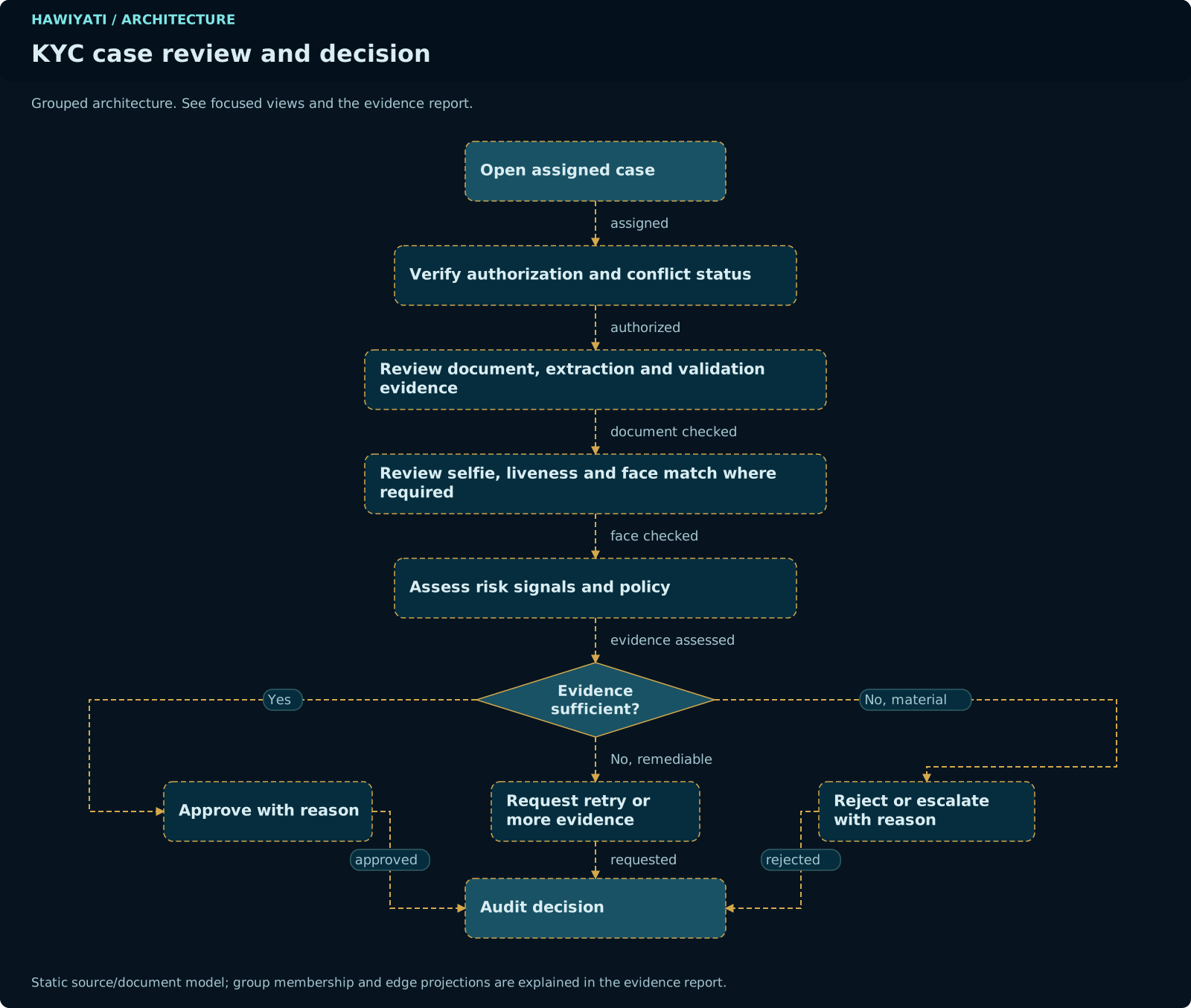
KYC (Know Your Customer) document verification is an optional registration step that requires users to submit a government-issued identity document. When enabled per registration policy, submitted documents appear in the KYC queue for admin review.
Navigate to Admin → KYC Queue. The queue shows all pending submissions in chronological order (oldest first).
| Action | Effect | Audit event |
|---|---|---|
| Approve | Sets submission status to APPROVED and user's kyc_status to APPROVED. A confirmation email is sent if SMTP is configured. The user can now access applications that require KYC. |
kyc.approve |
| Reject | Sets submission status to REJECTED. A rejection email is sent with the required rejection reason. The user may resubmit unless the policy prevents it. |
kyc.reject |
Rejection reason is required and is sent to the user. Write clear, actionable reasons — for example: "Document image is blurry — please resubmit a clear photo of your national ID." Vague rejection messages increase re-submission errors and support tickets.
KYC status values
| Status | Meaning |
|---|---|
| (none) | User has not submitted any KYC documents |
PENDING | Documents submitted, awaiting admin review |
APPROVED | Documents verified and approved |
REJECTED | Review completed; submission rejected — user may resubmit |
Applications (Service Providers)
Service providers (SPs) are the applications that use Hawiyati as their identity provider. Navigate to Admin → Applications to manage SP registrations.
Adding a SAML SP
https://[hawiyati-host]/idp/saml2/metadata and import it into the SP. The metadata includes the IdP's Entity ID, SSO endpoint, and signing certificate.uid (username), email, givenName, sn, groups.Adding an OIDC client
| Field | Requirement | Notes |
|---|---|---|
| Client ID | Auto-generated or custom | Unique identifier for the OIDC client. Used in the client_id parameter. |
| Client secret | Auto-generated | Shown once at creation. Used only for confidential clients (server-side apps). Public clients use PKCE instead. |
| Redirect URIs | Required; one or more | Exact match only. Wildcard URIs are not supported. Include all environments (dev, staging, prod) separately. |
| Grant types | Required | authorization_code (with PKCE) is the only supported grant for new integrations. refresh_token is available when enabled. |
| Scopes | Optional | Default: openid profile email. Additional scopes can be added per application. |
| Token lifetime | Optional | Access token TTL (default: 300s), ID token TTL (default: 3600s), refresh token TTL (if enabled). |
After creating the OIDC client, configure the SP to use the OIDC discovery document at: https://[hawiyati-host]/.well-known/openid-configuration
Authentication Policies
Policies control what happens when a user signs in to a service provider. Each policy contains an ordered list of rules. The IdP evaluates rules top-to-bottom and applies the first rule whose all conditions match (first-match semantics, like a firewall ruleset). If no rule matches, the default outcome is Allow.
Rule anatomy
Each rule answers four questions:
| Dimension | Options | Notes |
|---|---|---|
| Who (group) | Everyone or Members of a specific group | ALL conditions in a rule are ANDed. For OR logic (Group A or Group B), create two separate rules at the same priority level. |
| Where (network zone) | Anywhere or From a named network zone (CIDR list) | Create network zones at Admin → Network Zones or inline from the rule editor. |
| When (time window) | Any time or During a configured time window (days + HH:mm range) | Time is evaluated against the server's local timezone. Document this in policy descriptions if the server timezone differs from users' locale. |
| Action | Allow / Require MFA / Deny | When Require MFA is selected, optionally restrict to specific methods: TOTP, FIDO2, EMAIL_OTP, SMS_OTP. Leave unchecked to accept any enrolled method. |
Policy evaluation flow
Common policy patterns
Require MFA for all users
Office network bypass — MFA only from outside
Strong MFA for privileged group, any MFA for others
Business-hours-only access
After-hours step-up
A catch-all Allow rule at the top of the list will short-circuit every rule below it. Always put more specific rules (group-scoped, zone-scoped, time-scoped) before catch-all rules.
Deleting a group that is referenced by a policy condition does not automatically update the policy. The condition silently never matches. After deleting a group, review all policies that referenced it and remove or update the affected rules.
Assigning a policy to an SP
Navigate to Admin → Applications → [application] → Authentication Policy → Assign. Select the policy and save. Each SP can have at most one policy. To remove a policy without assigning a replacement, select "No policy (allow all)". Changes take effect immediately via Redis cache invalidation.
Network Zones
Network zones are named collections of IPv4 CIDR ranges used in authentication policy conditions. Navigate to Admin → Network Zones to manage zones independently, or create zones inline from the policy rule editor.
| Field | Description |
|---|---|
| Name | Unique across all zones. Used in policy rule conditions. |
| Description | Optional. Document the purpose — e.g., "Corporate HQ office network 192.168.1.0/24". |
| CIDR ranges | One or more IPv4 CIDR blocks. A client IP must match any one CIDR in the zone. An empty CIDR list means the zone never matches. |
Zone edits (add/remove CIDRs, rename) take effect immediately via Redis invalidation — no service restart required. Adding or removing CIDRs from a zone propagates instantly to all policies that reference that zone.
Risk Engine
The adaptive risk engine evaluates each authentication attempt against behavioral and contextual signals. Based on the resulting risk score, it can leave the policy decision unchanged, require stronger MFA, or block access entirely — automatically, at each login, alongside policy evaluation.
Operating modes
Set the mode at Admin → Risk → Settings → Mode.
| Mode | Behavior | When to use |
|---|---|---|
| OFF | Risk assessment is skipped entirely. No signals evaluated. No overhead. | Initial setup, troubleshooting, or when risk engine is not needed. |
| MONITOR | Signals are evaluated and assessments recorded, but the risk action never overrides the policy action. Use to measure what enforcement would look like without affecting users. | Pre-production tuning. Run for several days of real traffic and review the dashboard. |
| ENFORCE | The risk action overrides the policy action when it is stricter. Production operating mode. | After tuning in MONITOR mode and confirming acceptable false-positive rates. |
Start in MONITOR, review the dashboard for several days of real traffic, tune thresholds and weights, then switch to ENFORCE. False positives in MONITOR mode are visible without causing user impact.
Risk assessment pipeline
Risk signals
NEW_DEVICE
Detects logins from an unrecognized browser/device. Hawiyati issues a hwd_id cookie (UUID, 400-day lifetime) to each browser. On each login, the cookie is checked against the user's known devices list.
| Factor | Risk contribution |
|---|---|
KNOWN_DEVICE | 0 points — no additional risk |
NEW_DEVICE | MEDIUM — unrecognized device for a user with at least one known device on record |
DEVICE_TRUST_EXPIRED | MEDIUM — device was trusted but the trust window has lapsed |
REVOKED_DEVICE_SEEN | HIGH — an admin-revoked device has reappeared |
First login baseline: a user's very first login does not raise a NEW_DEVICE signal. Subsequent logins from a different browser do.
GEO_VELOCITY
Detects logins from physically implausible locations. Requires a MaxMind-format GeoIP2 database file (licensed separately; path configured at Admin → Risk → Settings → GeoIP Database).
| Factor | Risk contribution |
|---|---|
GEO_OK | 0 points |
NEW_COUNTRY | MEDIUM — login from a country the user has not previously authenticated from |
IMPOSSIBLE_TRAVEL | HIGH + HIGH minimum-level override — implied travel speed exceeds configured max (default: 900 km/h ≈ jet speed) |
LOGIN_VELOCITY
Detects brute-force and credential-stuffing attacks by counting recent failed logins in a sliding time window (default: 15 minutes).
| Factor | Threshold (default) | Risk |
|---|---|---|
USER_FAILED_HIGH | ≥ 5 failed logins per username in window | MEDIUM-HIGH |
IP_FAILED_HIGH | ≥ 10 failed logins per IP in window | MEDIUM-HIGH |
IP_MANY_USERS | ≥ 5 distinct usernames attempted per IP in window | HIGH — credential-stuffing indicator |
IP_REPUTATION
Checks the client IP against an administrator-maintained blocklist. Navigate to Admin → Risk → IP Reputation to import CIDR blocklists. Hawiyati does not ship with pre-loaded data.
| Factor | Description |
|---|---|
KNOWN_MALICIOUS_IP | IP on a threat intelligence blocklist |
CREDENTIAL_STUFFING_IP | IP associated with credential-stuffing campaigns |
TOR_EXIT | Tor exit node |
ANON_PROXY | Anonymous proxy or VPN commonly used to hide origin |
DATACENTER | Datacenter or cloud provider IP range |
Signal fail modes
| Fail mode | On error | When to use |
|---|---|---|
| OPEN (default) | Signal skipped — contributes no points. Assessment continues with other signals. | Signals where availability matters more than conservative security (e.g., GEO_VELOCITY when GeoIP database may be unavailable) |
| CLOSED | Signal contributes a HIGH minimum-level override — access requires FIDO2 MFA or better until the error is resolved. | Security-critical signals where a database error should be treated as suspicious (e.g., IP_REPUTATION) |
Risk level actions (defaults)
| Risk level | Default action | User experience |
|---|---|---|
| LOW | ALLOW | No change to normal login flow |
| MEDIUM | MFA_ANY | Prompted for any enrolled second factor |
| HIGH | MFA_STRONG | Prompted specifically for FIDO2 hardware key or passkey |
| CRITICAL | DENY | Login blocked — "Access denied: risk level too high" |
Override defaults at Admin → Risk → Level Actions.
Audit Logs
Hawiyati records a structured audit event for every security-relevant action — authentication attempts, configuration changes, user and group mutations, token issuance, and administrator activity. Navigate to Admin → Audit Log to search and export events.
Search filters
| Filter | Behavior |
|---|---|
| Category | Exact match. One of: authentication, configuration, iam, process, token, federation, access. |
| Action | Exact match against the action code (e.g., authentication.login.success). |
| Actor | Partial match (case-insensitive) against the actor's username. |
| Outcome | Exact match: success, failure, or unknown. |
| From / To | Inclusive time range. ISO 8601 format or date picker. |
| Search | Free-text search across the event message and resourceId fields. |
Every search an administrator performs is logged as an audit.query event in category access. Every export is logged as audit.export. The audit trail cannot be quietly reviewed — reviewing it always leaves a trace.
Event structure — always-present fields
| Field | Type | Description |
|---|---|---|
@timestamp | ISO 8601 | When the event occurred (UTC) |
service | string | Module that emitted the event (e.g., hawiyati-http-server) |
category | string | High-level category code |
action | string | Specific action code (e.g., authentication.login.success) |
outcome | string | success, failure, or unknown |
severity | string | INFO for success/unknown; WARN for failure. Set automatically — cannot be overridden. |
actor | string | Username of the person or system that performed the action |
message | string | Human-readable summary of the event |
Export
Navigate to Admin → Audit Log → Export. Two formats:
| Format | Use case | Columns / structure |
|---|---|---|
| CSV | Spreadsheet analysis in Excel or Google Sheets | 11 columns: event_time, source_service, category, action, outcome, severity, actor_username, source_ip, resource_type, resource_id, message. Formula injection protected (values beginning with =, +, -, @ are tab-prefixed). |
| JSON | Log pipeline, SIEM ingestion, programmatic analysis | Each row is a full event object (NDJSON). Sensitive detail keys auto-redacted to "***". |
Maximum export size: 50,000 rows (configurable via hawiyati.audit.export.max-rows). For larger histories, narrow the time window and batch-export.
Event sinks (where events go)
| Sink | Default | Description |
|---|---|---|
| Structured JSON log | Always on | Written to the application log as NDJSON on the audit logger. Cannot be disabled. Route via Logback to a dedicated file for log-shipper ingestion. |
| Database (JPA async) | On | Persisted to PostgreSQL audit_events table. Powers the in-console search interface. Async micro-batch writer: 100 events/flush, 1s flush interval, 10,000-event queue capacity. |
| CEF syslog | Off | Common Event Format for SIEM ingestion (Splunk, QRadar, ArcSight). Enable with hawiyati.audit.cef.enabled: true. |
Retention
Events cannot be deleted until they are at least 30 days old (configurable via hawiyati.audit.retention.min-days). A background job removes events older than the retention floor on a schedule. Set retention.enabled: false to accumulate indefinitely.
SCIM 2.0 Provisioning
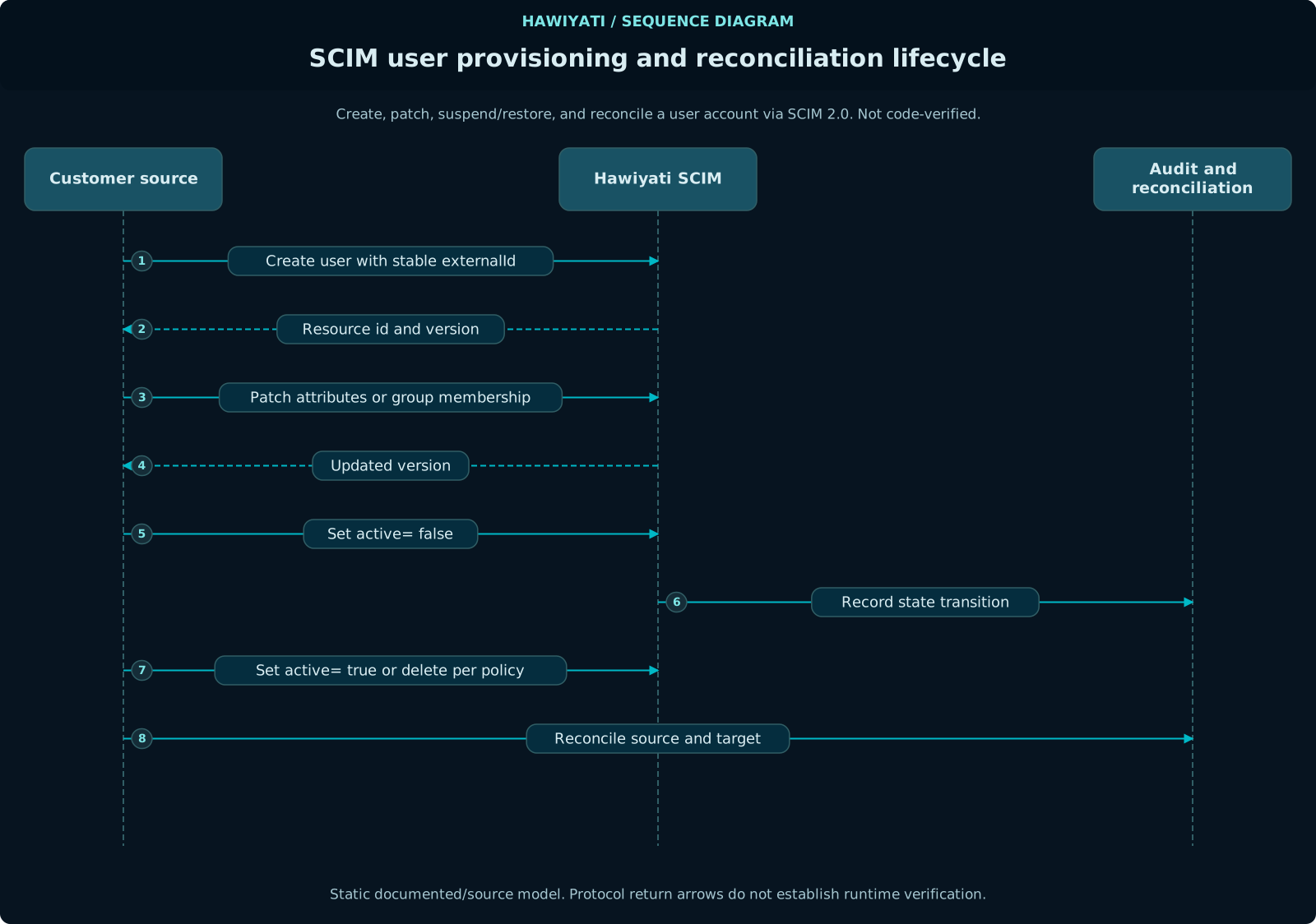
SCIM (System for Cross-domain Identity Management) allows external systems — HR platforms, identity governance tools, AD sync agents — to create, update, and deactivate users in Hawiyati automatically via the SCIM 2.0 API on port 8098.
Enabling SCIM
https://[hawiyati-host]:8098/scim/v2/ with the header Authorization: Bearer <token>.source_type = SCIM. Check Admin → Audit Log for end_user.create events with actor system.SCIM API endpoints
| Method | Path | Operation |
|---|---|---|
GET | /scim/v2/Users | List users (paginated, filterable) |
POST | /scim/v2/Users | Create a user |
GET | /scim/v2/Users/{id} | Get a user by ID |
PUT | /scim/v2/Users/{id} | Replace a user (full update) |
PATCH | /scim/v2/Users/{id} | Update a user (partial) |
DELETE | /scim/v2/Users/{id} | Delete a user |
GET | /scim/v2/ServiceProviderConfig | Discovery |
GET | /scim/v2/Schemas | Schema discovery |
GET /scim/v2/Groups returns HTTP 501 Not Implemented. Group provisioning is on the roadmap. For now, manage group memberships through the admin console or direct API calls after SCIM user provisioning.
SCIM attribute mapping
| SCIM attribute | Hawiyati field | Notes |
|---|---|---|
userName | username | Required, unique |
emails[0].value | email | Required |
name.givenName | first_name | |
name.familyName | last_name | |
phoneNumbers[0].value | phone_number | E.164 format required |
preferredLanguage | locale | |
active | active | Set to false to deactivate the account |
urn:...externalId | external_id | Hawiyati SCIM extension field only |
The Hawiyati SCIM extension includes only: externalId, sourceInstanceId, pendingApproval. Credential, assurance level, and MFA fields are explicitly excluded from the SCIM schema — these are managed through Hawiyati's own admin interface or user self-service flows, never via SCIM.
Token security
SCIM tokens are validated by SHA-256 hash comparison — the plaintext token is never stored. An invalid or revoked token returns HTTP 401. Rotate tokens periodically: generate a new token, update the provisioning source, verify provisioning works, then revoke the old token. SCIM tokens do not expire automatically.
Settings & Branding
Navigate to Admin → Settings for system-wide configuration. Only SUPER_ADMIN accounts can modify settings.
Session settings
| Setting | Default | Description |
|---|---|---|
| Session TTL | 8 hours | How long a Hawiyati session stays valid without user activity. |
| Session absolute timeout | 24 hours | Maximum session duration regardless of activity. |
| MFA grace period | 0 | How long a completed MFA step is remembered (skips repeat MFA prompt within the same session). 0 = MFA re-prompted on every SP access. |
| Concurrent session limit | unlimited | Maximum simultaneous active sessions per user. Oldest sessions are terminated when the limit is exceeded. |
Password policy
| Setting | Default | Description |
|---|---|---|
| Minimum length | 8 | Minimum password character count. |
| Require uppercase | false | At least one uppercase letter required. |
| Require digit | false | At least one digit required. |
| Require special character | false | At least one non-alphanumeric character required. |
| Password history | 0 | Number of previous passwords that cannot be reused. 0 = no history enforcement. |
| Lockout threshold | 10 | Failed consecutive login attempts before account is locked. |
| Lockout duration | 30 minutes | How long the account remains locked after threshold is hit. 0 = locked until admin unlocks. |
Notification gateway (SMTP & SMS)
| Setting group | Fields |
|---|---|
| SMTP | Host, port, TLS mode (STARTTLS / SSL), username, password, from address, from display name |
| SMS gateway | HTTP endpoint URL, HTTP method (POST/GET), auth header, request body template, response success pattern |
Test both gateways before relying on them for MFA OTP delivery — use the built-in send test functionality after configuration.
LDAP / Active Directory connector
| Field | Description |
|---|---|
| LDAP URL | ldap:// or ldaps:// server URL |
| Bind DN | Service account DN for Hawiyati to use when querying the directory |
| Bind password | Service account password — stored encrypted |
| User search base | DN under which to search for user objects |
| User search filter | LDAP filter for user objects (e.g., (objectClass=person)) |
| Username attribute | LDAP attribute that maps to the Hawiyati username (e.g., sAMAccountName or uid) |
| Group search base | DN under which to search for group objects |
| Group membership attribute | LDAP attribute on groups that lists member DNs (e.g., member) |
| Sync interval | How often Hawiyati syncs the LDAP directory (default: 15 minutes) |
External SQL Identity Store
Hawiyati can authenticate users directly against a customer-owned relational database (PostgreSQL, MySQL, or Microsoft SQL Server) without migrating the user table. On the first successful login, Hawiyati automatically creates a lightweight shadow record that carries the user's profile and group memberships — the password always stays in the external database.
Connection and table mapping
| Field | Description |
|---|---|
| Name | Human-readable label for this store (shown in the Admin console) |
| Database type | POSTGRES, MYSQL, or MSSQL |
| JDBC URL | Full JDBC connection string, e.g. jdbc:postgresql://db.example.org:5432/myapp |
| DB username | Database login that Hawiyati uses to run read-only queries |
| DB password | Stored AES-256 encrypted in Hawiyati's configuration database |
| User table | Table or view containing user records (default: users) |
| Username column | Column holding the login name (default: username) |
| Password column | Column holding the stored password hash (default: password_hash) |
| Email column | Column mapped to the user's email address (default: email) |
| First name column | Optional — mapped to the user's given name |
| Last name column | Optional — mapped to the user's family name |
| Active column | Optional boolean column; when present, a false value blocks login |
| WHERE clause | Optional extra filter appended to every query, e.g. deleted_at IS NULL |
Password hash algorithm
| Algorithm | When to use |
|---|---|
BCRYPT | Default. Works with hashes produced by bcrypt (any cost factor $2a, $2b, $2y). |
ARGON2 | Argon2id hashes (Spring Security v5.8 defaults). |
PBKDF2 | PBKDF2WithHmacSHA256 hashes. |
SHA256 | Legacy plain SHA-256 hex digest. Migrate to bcrypt as soon as practical. |
Activation
Configure and test the store first (Test connection button), then click Activate. Hawiyati immediately routes all new login attempts through the external database. To revert, click Deactivate — the active store reverts to Local and existing shadow users retain their profiles.
The activation API endpoints are:
POST /api/v1/sql-stores/{id}/activate and
POST /api/v1/sql-stores/{id}/deactivate.
User sync
Optional scheduled sync (Sync users button or cron) imports all rows from the external table and pre-creates shadow records. This is not required for login to work, but it lets admins search, group-assign, and pre-provision users before they first sign in.
Branding
| Setting | Description |
|---|---|
| Organization name | Shown in login page header, email templates, and consent pages |
| Logo | Upload an SVG or PNG (max 200 KB). Displayed on the login page and account portal. |
| Primary color | Hex color code applied to buttons and link accents on user-facing pages |
| Login page heading | Custom text shown above the login form (supports plain text; HTML is escaped) |
| Support contact | Email or URL shown on error pages and the account portal help section |
| Privacy policy URL | Linked on the self-service registration page and consent screens |
Audit Event Reference
Every operation generates an audit event visible in Admin → Audit Log. Key events by category:
Authentication events
| Action code | Outcome | Trigger |
|---|---|---|
authentication.login.success | success | User authenticated successfully |
authentication.login.failure | failure | Authentication failed (wrong credential, bad OTP, policy deny, etc.) |
authentication.logout | success | User signed out (IdP-initiated or SP-initiated SLO) |
authentication.mfa.totp.success | success | TOTP second factor passed |
authentication.mfa.totp.failure | failure | TOTP code invalid or expired |
authentication.mfa.fido2.success | success | FIDO2/WebAuthn assertion passed |
authentication.mfa.fido2.failure | failure | FIDO2 assertion failed |
authentication.session.expired | unknown | Session TTL elapsed without explicit logout |
IAM (users & groups) events
| Action code | Trigger |
|---|---|
end_user.create | Admin creates a user |
end_user.save | Admin edits a user profile or status |
end_user.reset_password | Admin resets a password |
end_user.reset_totp | Admin removes TOTP enrollment |
end_user.enroll_totp | Admin completes TOTP enrollment on behalf of user |
end_user.delete_fido2 | Admin removes all FIDO2 credentials |
end_user.approve | Admin approves a pending self-registration |
end_user.reject | Admin rejects a pending self-registration |
end_user.delete | Admin deletes a user account |
user_group.create | Admin creates a group |
user_group.add_member | Admin adds a user to a group |
user_group.remove_member | Admin removes a user from a group |
user_group.delete | Admin deletes a group |
kyc.approve | Admin approves a KYC document submission |
kyc.reject | Admin rejects a KYC document submission |
Policy & configuration events
| Action code | Trigger |
|---|---|
auth_policy.create | Admin creates a new policy |
auth_policy.save_rules | Admin saves the rule list (full replace) |
auth_policy.delete | Admin deletes a policy |
auth_policy.assign_sp | Admin assigns a policy to a service provider |
auth_policy.unassign_sp | Admin removes a policy from a service provider |
network_zone.create | Admin creates a network zone |
network_zone.update | Admin edits a zone |
network_zone.delete | Admin deletes a network zone |
risk.settings.mode.update | Risk engine mode changed |
risk.reputation.import | IP reputation blocklist imported |
risk.device.revoke | Admin revoked a known device |
Best Practices
Authentication policies operate on groups. Assign users to named groups ("Privileged Users", "Contractors", "Remote Workers") and write policies against those groups. Avoid policies that reference specific usernames — they are fragile, hard to audit, and don't scale.
Password and TOTP resets are high-privilege operations. A malicious or mistaken reset can downgrade a user's security posture. Review the audit log periodically for end_user.reset_password and end_user.reset_totp events and verify they were intentional.
Deletion removes all audit linkages for that username from the user record. If there is any chance you need the account history for compliance review, suspend the account first and delete only when retention requirements are confirmed.
Generate a new token, update the provisioning source, verify provisioning is working, then revoke the old token. SCIM tokens do not expire automatically — set a calendar reminder to rotate them quarterly.
Assign the policy to the SAML SP demo (port 8090) or OIDC SP demo (port 8092) and walk through a test login before applying the policy to production applications. A misconfigured catch-all Deny rule will lock all users out of the SP immediately.
Run the risk engine in MONITOR mode for at least one week of real production traffic before switching to ENFORCE. The dashboard shows exactly how many additional challenges would have been issued — tune until the false-positive rate is acceptable.
IP reputation data ages quickly. Use the expiry feature and a regular import cadence (weekly with Replace) to keep data current. Stale blocklist data is less harmful than no data — expired entries stop matching automatically.