Migration Guide
This guide covers migrating user populations and service providers to Hawiyati — from pre-migration planning through bulk import, account claim rollout, database migration sequencing, phased delivery, and production cutover. It applies to both greenfield deployments and brownfield migrations running Hawiyati alongside an existing IdP.
This guide covers migrating user populations and service providers to Hawiyati — from pre-migration planning through bulk import, account claim rollout, database migration sequencing, phased delivery, and production cutover. It applies to both greenfield deployments and brownfield migrations running Hawiyati alongside an existing IdP.
The sections below cover migration strategies, bulk import, account claim rollout, and database sequencing. For a full module map with ports, gRPC boundaries, and deployment topology, see the Implementation Guide.
This guide covers migrating user populations and service providers to Hawiyati — from pre-migration planning through bulk import, account claim rollout, database migration sequencing, phased delivery, and production cutover. It applies to both greenfield deployments and brownfield migrations running Hawiyati alongside an existing IdP.
Migration Strategy Overview
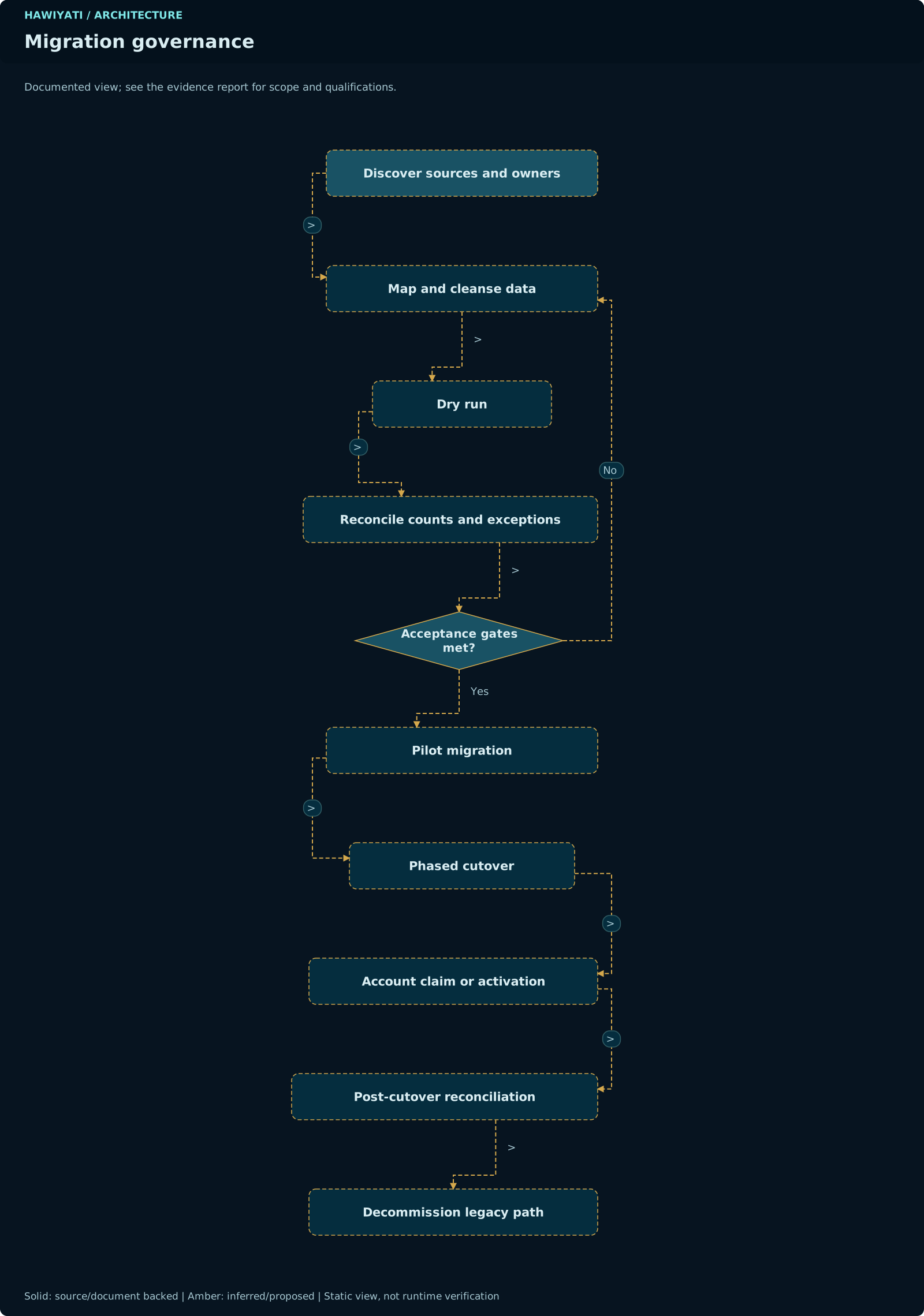
Hawiyati supports three primary migration scenarios. Choose based on your existing identity infrastructure, risk tolerance, and timeline.
Why Migrate to Hawiyati
Key drivers for migrating identity infrastructure to Hawiyati:
- Data sovereignty: All user data and credentials remain on your infrastructure. No cloud routing of authentication requests.
- Regulatory compliance: Assurance levels L0–L4 aligned with NIST SP 800-63A-4. Built-in KYC workflows for government and regulated industries.
- Consolidation: Replace fragmented LDAP directories, legacy RADIUS servers, and ad-hoc SSO integrations with a single, auditable identity platform.
- Modern protocols: Full SAML 2.0 and OIDC (Authorization Code + PKCE) support. SCIM 2.0 inbound provisioning. FIDO2/WebAuthn passkeys.
Migration Types
| Type | Description | Risk | Recommended When |
|---|---|---|---|
| Greenfield | New Hawiyati deployment with no existing IdP. Users register fresh or are imported with no prior SSO. | Low | New application launches, startup environments, or when no existing user base needs migration. |
| Brownfield — Parallel Run | Hawiyati deployed alongside existing IdP. SPs migrated one at a time. Users claimed gradually. | Medium | Production systems with active users. Most common migration pattern. |
| Full Cutover | Hard cutover: all SPs and users switched to Hawiyati on a fixed date. Old IdP decommissioned immediately. | High | Small user populations, legacy IdP decommission deadline, or when a parallel run is not operationally feasible. |
The Brownfield Parallel Run approach is strongly recommended for production environments. It allows SP-by-SP migration, gradual user claim, independent rollback per SP, and monitoring before full cutover. The additional operational overhead is offset by significantly reduced risk.
Phased Rollout Benefits
- Parallel run: Old and new IdPs operate simultaneously. Traffic can be routed back to the old IdP per SP if issues arise.
- Gradual user claim: Users are imported in MIGRATED_UNCLAIMED state and claim their accounts on their own timeline. No forced password reset for all users on day one.
- Rollback window: Each SP has an independent rollback point until its claim rate reaches the threshold (typically 80%+).
- Risk isolation: A problem with one SP's migration does not affect others.
Pre-Migration Planning
User Inventory
Before importing users, establish a complete inventory of your existing user population:
| Inventory Item | Questions to Answer | Impact on Migration |
|---|---|---|
| Total user count | How many users need to be imported? | Batch sizing, claim notification volume |
| User source systems | LDAP, Active Directory, local DB, legacy IdP, Excel/CSV? | Determines extraction method and attribute mapping |
| Credential availability | Can password hashes be exported? Are they bcrypt, PBKDF2, Argon2id? | If hashes unavailable, all users must set new passwords during claim |
| Active SSO users | Which users actively use SSO vs just have accounts? | Prioritize active users for claim notifications |
| Contact info completeness | Do all users have email and/or E.164 phone numbers? | Required for claim notification delivery |
| Group memberships | What groups exist? Which are used in authorization policies? | Groups must be created in Hawiyati before user import |
SP Inventory
List all service providers to migrate and determine their integration requirements:
| Field | Collect For Each SP |
|---|---|
| Application name | Human-readable name for the admin console |
| Current protocol | SAML 2.0, LDAP bind, Kerberos, basic auth, custom? |
| Target protocol | SAML 2.0 or OIDC in Hawiyati |
| SP metadata / config | EntityID, ACS URL (SAML) or redirect_uri (OIDC) |
| Required attributes | Which user attributes does the SP expect? NameID format? |
| Required assurance level | Does the SP require MFA, KYC verification, or a minimum L-level? |
| SLO support | Does the SP support Single Logout? Required for full SSO lifecycle. |
| Migration priority | Which SPs migrate first? (low-risk internal tools → production apps) |
Data Mapping
Map legacy user attributes to Hawiyati schema fields before import:
| Legacy Field | Hawiyati Field | Notes |
|---|---|---|
| username / sAMAccountName / uid | users.username |
Must be unique. Lowercase recommended. |
| mail / email | users.email |
Required if SMS not available |
| mobile / telephoneNumber | users.phone_number |
Must be E.164 format (+213XXXXXXXXX) |
| givenName / sn | users.given_name, users.family_name |
Used in notification templates |
| Password hash | credentials.hashed_value |
Only Argon2id hashes accepted. Other algorithms require re-set during claim. |
| memberOf / groups | group_memberships |
Groups must exist in Hawiyati before import |
| employeeID / objectGUID | users.external_id |
Preserves link to source system; also settable via SCIM externalId |
Bulk Import
Hawiyati supports importing existing user populations via CSV file or the Admin API batch endpoint. Imported users are placed in the MIGRATED_UNCLAIMED state and cannot log in until they claim their account.
CSV Import Format
Password hashes (argon2id_hash) may be included if available from the source system. Only Argon2id hashes are accepted — bcrypt, PBKDF2, or MD5 hashes cannot be imported and users with those credentials must set new passwords during the claim flow. If argon2id_hash is omitted, the user must set a new password during claim.
Batch Import API
Import Validation Rules
- At least one of
emailorphone_numberis required per user - Phone numbers must be E.164 format (e.g.,
+213551234567) - Email addresses must be syntactically valid and unique within the tenant
- Usernames must be unique and contain only letters, digits, dots, underscores, hyphens
- Group names must already exist in Hawiyati before import (pre-create groups first)
- Duplicate usernames: configurable behaviour —
skip_existing(default),fail_on_duplicate, orupdate_existing
Always run a dry-run import against a staging environment using a representative sample (500–1000 users) before importing your full population. Verify data mapping, group assignment, and notification delivery before proceeding.
MIGRATED_UNCLAIMED State
Imported users are placed in the MIGRATED_UNCLAIMED state immediately after bulk import. This is a deliberate holding state that prevents login until the user has verified their identity and set credentials.
Database Representation
The state is stored as two boolean flags on the users table. There is no separate status column — the state is computed from the combination:
| State | active |
pending_approval |
Can Login? |
|---|---|---|---|
| ACTIVE | true |
false |
Yes |
| ACTIVE_LIMITED | true |
true |
Restricted (awaiting approval) |
| INACTIVE | false |
false |
No |
| MIGRATED_UNCLAIMED | false |
true |
No — must claim account first |
ACTIVE_LIMITED is a computed presentation state derived from active=true, pending_approval=true. It does NOT exist as a value in any database column. Code and queries must check both flags, never a hypothetical status enum value.
What MIGRATED_UNCLAIMED Means
- The user record exists in Hawiyati with imported profile data
- Login attempts are rejected with a prompt to claim the account
- A claim token is generated and can be dispatched via email or SMS
- The account transitions to ACTIVE only after successful claim (identity verification + credential enrollment)
Monitoring Unclaimed Accounts
Track claim progress in the Admin Console under Users → filter by Status = MIGRATED_UNCLAIMED. The bulk import report also shows: total imported, claim token dispatched, claimed, failed dispatch.
Account Claim Rollout
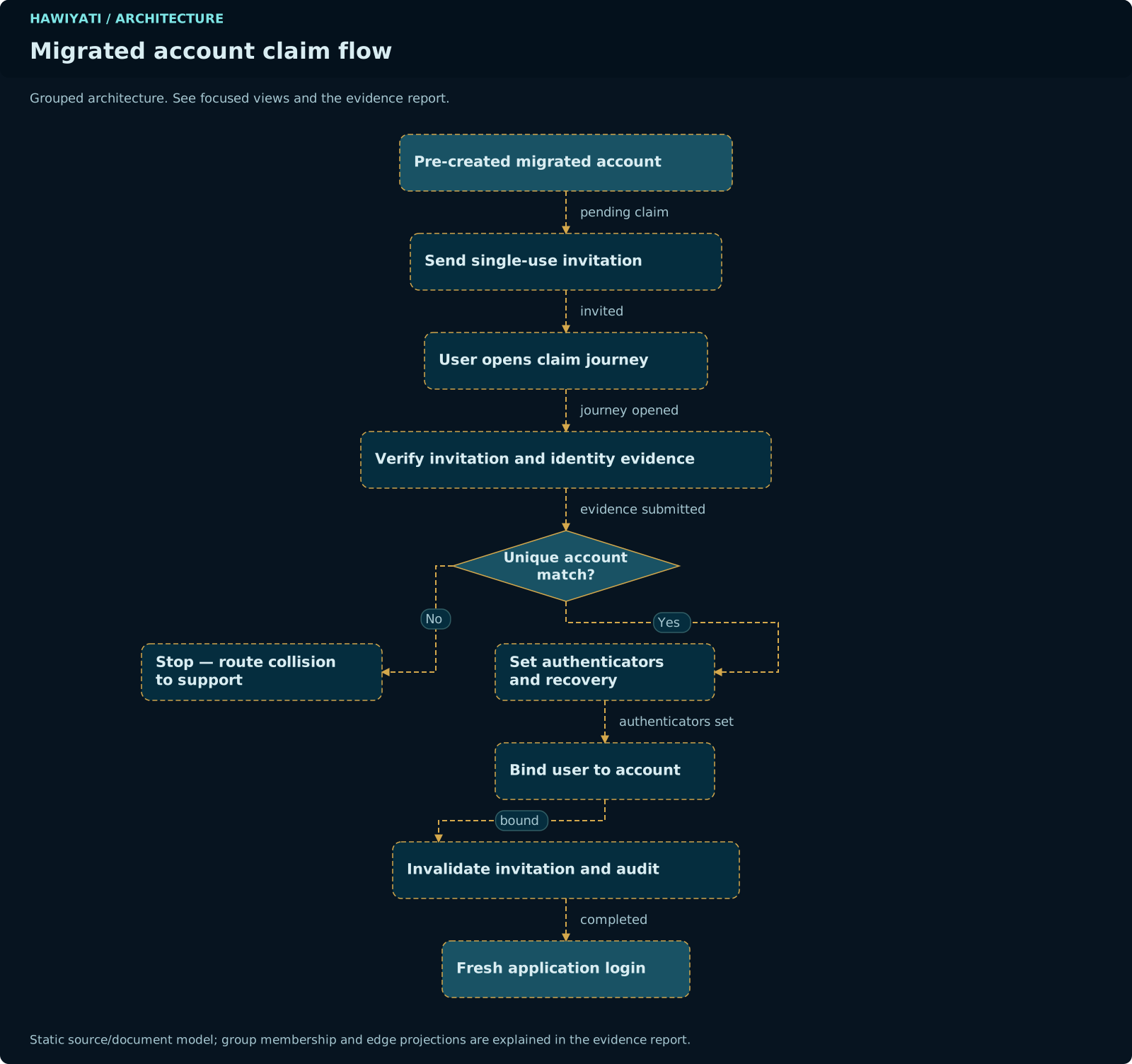
After bulk import, users must claim their accounts to activate them. The claim rollout involves generating claim tokens, dispatching notifications, and monitoring claim rates.
Claim Flow
active = true, pending_approval = false. Audit event ACCOUNT_CLAIMED recorded. User can now log in through any registered SP.Claim Token Mechanics
Claim tokens are the security mechanism that enables safe account claim without requiring admin intervention per user.
Token Properties
| Property | Value |
|---|---|
| Entropy | 256-bit cryptographically random (SecureRandom) |
| Storage | HMAC-SHA256 of raw token stored in DB — raw token never persisted |
| TTL | 15 minutes from the moment the link is activated |
| Single-use | Yes — token consumed atomically on first valid use; replaying returns 410 Gone |
| Scope | Bound to a single user_id — cannot be used to claim a different account |
| Delivery | URL parameter in claim link: /claim?token=<raw_token> |
If a user follows a claim link after the 15-minute TTL, they receive an expiry page with a "resend claim link" option. Admins can also resend from the admin console. Design your notification strategy to minimise TTL expirations — send claim links during business hours when users are likely to act immediately.
Batch Claim Dispatch
After bulk import, claim links can be dispatched in batches:
Re-Sending Claim Links
For users who miss the initial notification:
- Admin Console: Users page → select user → Actions → Resend Claim Link
- API:
POST /admin/users/{id}/resend-claim - Self-service: Users can request a new claim link from the login page by entering their email/phone
Claim Rate Tracking
Monitor claim progress from Admin Console → Dashboard → Migration Status:
- Total imported / Claimed / Pending / Notification failed
- Claim rate by group
- Claim rate over time (7-day chart)
- Oldest unclaimed accounts (risk indicator)
Unclaimed Account Expiry Policy
Define a policy for accounts that remain unclaimed after the rollout window. Options:
- Keep indefinitely: No automatic action. Accounts remain MIGRATED_UNCLAIMED until admin action.
- Auto-deactivate: After N days, transition to INACTIVE. Users must contact admin to reactivate.
- Notify and warn: Send reminder notifications at 7, 14, and 30 days before auto-deactivation.
Database Migration Sequence
Hawiyati uses Flyway for versioned schema migrations. The current production head is V62. The following migrations implement the registration, KYC, and account claim feature set planned in this guide (authored when head was V53 — verify and renumber starting from V63 before applying):
registration_sessions table — tracks SP-initiated registration flows with continuation token (stores sp_entity_id FK only, never raw URL), state, and expiry. Adds completion_tokens table.kyc_sessions table with workflow type (BASIC/STANDARD/STRONG/HIGH_ASSURANCE), state machine column, face_match_score DOUBLE PRECISION, document reference FK, and reviewer assignment.kyc_profiles table — source of truth for current_level (L0–L4). Adds profile_valid_until, reverification_required_at. Adds document fingerprint index on kyc_documents.account_claim_tokens table — stores HMAC-SHA256 of token, user_id FK, expires_at, used_at, revoked_at. Unique index on token_hash.scim_resources table with external_id, source_instance_id, etag. Adds scim_sync_log for idempotency tracking. No credential or assurance fields via SCIM.notification_outbox table — idempotency key, payload, scheduled_at, sent_at, error, retry_count. Supports SKIP LOCKED polling pattern and exponential backoff (30s/2m/8m/32m/128m).bulk_import_jobs and bulk_import_rows tables. Tracks per-row import status, error messages, and claim dispatch state. Enables migration status dashboard queries.Zero-Downtime Migration Strategy
Database migrations must be safe to run against a live production database. Follow these rules:
- Additive-only in V54–V59: All migrations add new tables or nullable columns. No existing table is altered in a breaking way.
- No NOT NULL without defaults: If a column is added to an existing table, it must have a DEFAULT or be nullable. Backfill in a separate step.
- Index creation with CONCURRENTLY: Large table indexes use
CREATE INDEX CONCURRENTLYin PostgreSQL to avoid table locks. - Test against a production data copy: Run all migrations against a recent production dump before applying to production. Verify migration duration and lock contention.
- Rollback scripts: Each migration has a corresponding V-rollback script (e.g.,
V54__rollback.sql) that drops only the objects added by V54. Rollback is tested in the same environment as the migration.
Migrations V54–V60 must be applied and verified before the application code that references the new tables is deployed. Deploy the migration first, verify schema, then roll out the new application version. Never deploy application code that references tables that don't yet exist.
Phase A — Foundation
Establish the foundational data model changes required by all subsequent phases. No user-facing feature changes in this phase — focus is entirely on schema preparation and core service extensions.
Key Deliverables
- Flyway migration V54 applied: registration sessions and completion tokens tables
- Continuation token model implemented: stores
sp_entity_idFK only (no raw URL — open redirect prevention) - Completion token service: 256-bit random, HMAC-SHA256 stored, 15-min TTL, single-use validation
- Account status model documented and enforced: two-flag system (active + pending_approval)
- Source-of-truth rule codified:
kyc_profiles.current_levelis authoritative — neverusers.assurance_level
Acceptance Criteria
- V54 migration runs clean against staging database
- Completion token generated, stored as HMAC, validated, and single-use consumption verified
- Continuation token stores only
sp_entity_id; open redirect test rejects raw URL injection - All Phase A unit and integration tests pass
Rollback Point
V54 rollback script drops the two new tables. No application behaviour changes in Phase A, so rollback has no user impact.
Phase B — Registration Flows
Implement all five user registration flows: self-service, admin-driven invitation, SP-initiated, enterprise provisioning, and bulk import. Each flow is independently testable.
Key Deliverables
- Self-service registration endpoint with email/phone verification and L0 account creation
- Admin-driven invitation flow: admin creates account, invite email dispatched, user sets password
- SP-initiated registration: completion token returned to SP after successful registration
- Account status transitions: MIGRATED_UNCLAIMED → ACTIVE on claim, ACTIVE_LIMITED → ACTIVE on approval
- Registration rate limiting and duplicate account detection
- Audit events for all registration state transitions
Acceptance Criteria
- All five registration flows pass end-to-end integration tests
- Completion token delivered to SP and validated in SP demo application
- Duplicate registration rejected at email/phone level
- All registration events appear in audit log with correct actor and outcome
Rollback Point
New registration endpoints can be disabled via feature flag. Existing accounts and sessions are not affected.
Phase C — KYC Integration
Integrate the KYC verification workflows and assurance level management. Applies Flyway migrations V55 and V56 to add KYC sessions and profiles.
Key Deliverables
- V55 and V56 migrations: KYC sessions and profiles tables
- KYC state machine: NOT_STARTED → IN_PROGRESS → DOCUMENT_SUBMITTED → UNDER_REVIEW → APPROVED/REJECTED
- Basic and Standard workflows (document OCR/MRZ + optional selfie/face match)
- Document fingerprinting: HMAC-SHA256 of normalized
country|docType|docNumber - Duplicate fingerprint → manual review signal (not hard block)
- L3/L4 frozen at UNDER_REVIEW pending biometric team approval
kyc_profiles.current_levelas authoritative assurance level source
Acceptance Criteria
- Document submission transitions KYC session to DOCUMENT_SUBMITTED
- Approved session updates
kyc_profiles.current_levelto L2 (Standard) or L3 (Strong) - Duplicate document fingerprint routes to manual review queue, not rejection
- L3/L4 approval requires explicit admin action in reviewer queue
- All KYC state transitions recorded in audit log
Rollback Point
V55/V56 rollback scripts drop KYC tables. KYC workflows can be disabled at the SP policy level; existing assurance levels are unaffected.
Phase D — Account Claim
Implement the account claim flow for MIGRATED_UNCLAIMED users, claim token lifecycle management, notification outbox, and bulk claim dispatch. Applies V57 and V59 migrations.
Key Deliverables
- V57 migration:
account_claim_tokenstable with HMAC storage and single-use enforcement - V59 migration:
notification_outboxtable with idempotency key and retry state - Claim token generation and delivery endpoint
- Claim redemption flow: token validation → identity verification → credential enrollment → ACTIVE transition
- Outbox processor: SKIP LOCKED, exponential backoff (30s/2m/8m/32m/128m), dead-letter handling
- Admin console: resend claim link, view pending notifications, bulk dispatch
Acceptance Criteria
- Claim token is single-use: second redemption returns 410 Gone
- Expired token shows re-send prompt, not generic error
- Notification outbox retries on gateway failure with exponential backoff
- Bulk claim dispatch of 1,000 users completes without memory overflow
- Claim audit event records actor (user), outcome (SUCCESS/FAILURE), and token metadata
Rollback Point
V57/V59 rollback drops token and outbox tables. Unclaimed users remain in MIGRATED_UNCLAIMED — no data loss. Claim links in transit become invalid.
Phase E — SCIM Provisioning
Implement inbound SCIM 2.0 provisioning from SP systems. Applies V58 migration. SCIM creates users in MIGRATED_UNCLAIMED state, triggering the account claim flow automatically.
Key Deliverables
- V58 migration:
scim_resourcesandscim_sync_logtables - SCIM 2.0 endpoints: /Users (GET/POST/PATCH/DELETE), /Groups (GET/POST/PATCH/DELETE)
- Extension schema:
externalId,sourceInstanceId,pendingApprovalONLY — no credential or assurance fields - SCIM-created users start in MIGRATED_UNCLAIMED; claim token auto-generated on creation
- Bearer token authentication for SCIM clients
- ETag-based optimistic concurrency on PATCH operations
Acceptance Criteria
- SCIM POST /Users creates user in MIGRATED_UNCLAIMED state and generates claim token
- SCIM PATCH /Users/{id} active=false transitions account to INACTIVE
- SCIM PATCH /Users/{id} with password field returns 400 — credentials not settable via SCIM
- ETag mismatch on PATCH returns 412 Precondition Failed
- SCIM test suite (RFC 7644 compliance) passes at hawiyati-sp-scim-test
Rollback Point
V58 rollback drops SCIM tables. SCIM endpoint returns 503 after rollback. Existing users provisioned via SCIM are unaffected — they are regular Hawiyati users at that point.
Phase F — Monitoring & Hardening
Production-readiness phase: monitoring dashboards, alert rules, bulk import audit trail, operational runbooks, and security hardening for the new registration and KYC flows.
Key Deliverables
- V60 migration:
bulk_import_jobsandbulk_import_rowstables for migration status dashboard - Migration status dashboard: claim rate by group, notification failures, oldest unclaimed accounts
- Prometheus metrics for claim rate, KYC completion rate, outbox queue depth, token expiry rate
- Alert rules: claim rate below threshold, KYC review queue > N items, outbox dead-letter count > 0
- Operational runbook: resend claims, unblock manual review queue, handle notification gateway outage
- Security audit of new endpoints: claim token brute-force protection, rate limiting on resend
Acceptance Criteria
- Migration status dashboard shows accurate per-group claim rate
- Alert fires within 5 minutes when outbox dead-letter count exceeds threshold
- Claim token brute-force: 10 invalid attempts triggers account-level lockout on claim endpoint
- All Phase F acceptance tests and runbook walkthroughs completed by operations team
Rollback Point
Phase F is additive (monitoring only). V60 rollback drops audit tables — functional behaviour is unchanged. Monitoring can be disabled without affecting user-facing features.
Parallel Run
In a brownfield migration, Hawiyati operates alongside the existing IdP. Traffic is migrated SP by SP. Both systems process authentication requests during the transition window.
SP Migration Order
Recommended migration order (lowest to highest risk):
Monitoring During Parallel Run
| Metric | Target | Action if Breached |
|---|---|---|
| Login success rate (Hawiyati) | > 99.5% | Investigate errors; consider reverting SP to old IdP |
| Login latency p95 | < 500ms | Check Redis connectivity; review database query plans |
| Claim rate (7-day rolling) | Increasing week-over-week | Re-send notifications; check notification gateway delivery logs |
| Notification delivery failure | < 1% | Check email/SMS gateway; review outbox dead-letter queue |
| Support tickets related to login | No spike vs baseline | Categorize tickets; prioritize user-facing issues |
Cutover Sequence
Cutover Decision Criteria
Do not proceed with cutover until all of the following conditions are met:
- All SPs migrated to Hawiyati and tested in production
- Claim rate > 80% across all user groups
- Login success rate > 99.5% sustained over 7 days
- Zero open P1/P2 defects against Hawiyati
- On-call runbook reviewed and signed off by operations team
- Rollback plan tested (not just documented) in staging environment
- TLS certificates valid for 12+ months on all Hawiyati endpoints
- Backup verified within 24 hours of cutover date
Cutover Steps
Post-Cutover Decommission Checklist
- Old IdP sessions fully expired (wait for configured session TTL + 1 hour)
- Old IdP audit logs exported and archived to long-term storage
- Old IdP database backed up and stored per retention policy
- Old IdP infrastructure decommissioned (VMs stopped, DNS entries removed)
- SP owners notified that old IdP is fully decommissioned
- Old IdP certificates revoked
Rollback Plan
Rollback Triggers
Execute the rollback plan if any of the following occur during cutover or the 48-hour monitoring window:
Login success rate drops below 95% for more than 5 minutes. P0 defect discovered (data loss, credential exposure, session fixation). More than 10% of SP owners report authentication failures. Hawiyati service becomes unresponsive for more than 2 minutes.
Rollback Procedure
Data Consistency After Rollback
Users who claimed their accounts during the cutover window will have their credentials stored in Hawiyati. If rolled back:
- Claimed users can log in to the old IdP only with their old credentials (the ones before claim). If they had no Argon2id hash imported, they cannot log in to old IdP and must use the password reset flow there.
- New user registrations created during the cutover window exist only in Hawiyati and will not be available in the old IdP.
- Re-migration will pick up where it left off — claimed users retain their Hawiyati accounts; only the SP routing changes.
The rollback plan must be tested in staging before cutover, not just documented. Record the exact commands, DNS change IDs, and Redis flush commands. During an incident is not the time to figure out the procedure.