Deployment & Infrastructure
Hawiyati is a sovereign, on-premises identity platform. No runtime component makes outbound calls to external services after installation. All fonts, UI assets, geolocation data, and cryptographic material are bundled locally, enabling air-gapped operation.
Hawiyati is a sovereign, on-premises identity platform. No runtime component makes outbound calls to external services after installation. All fonts, UI assets, geolocation data, and cryptographic material are bundled locally, enabling air-gapped operation.
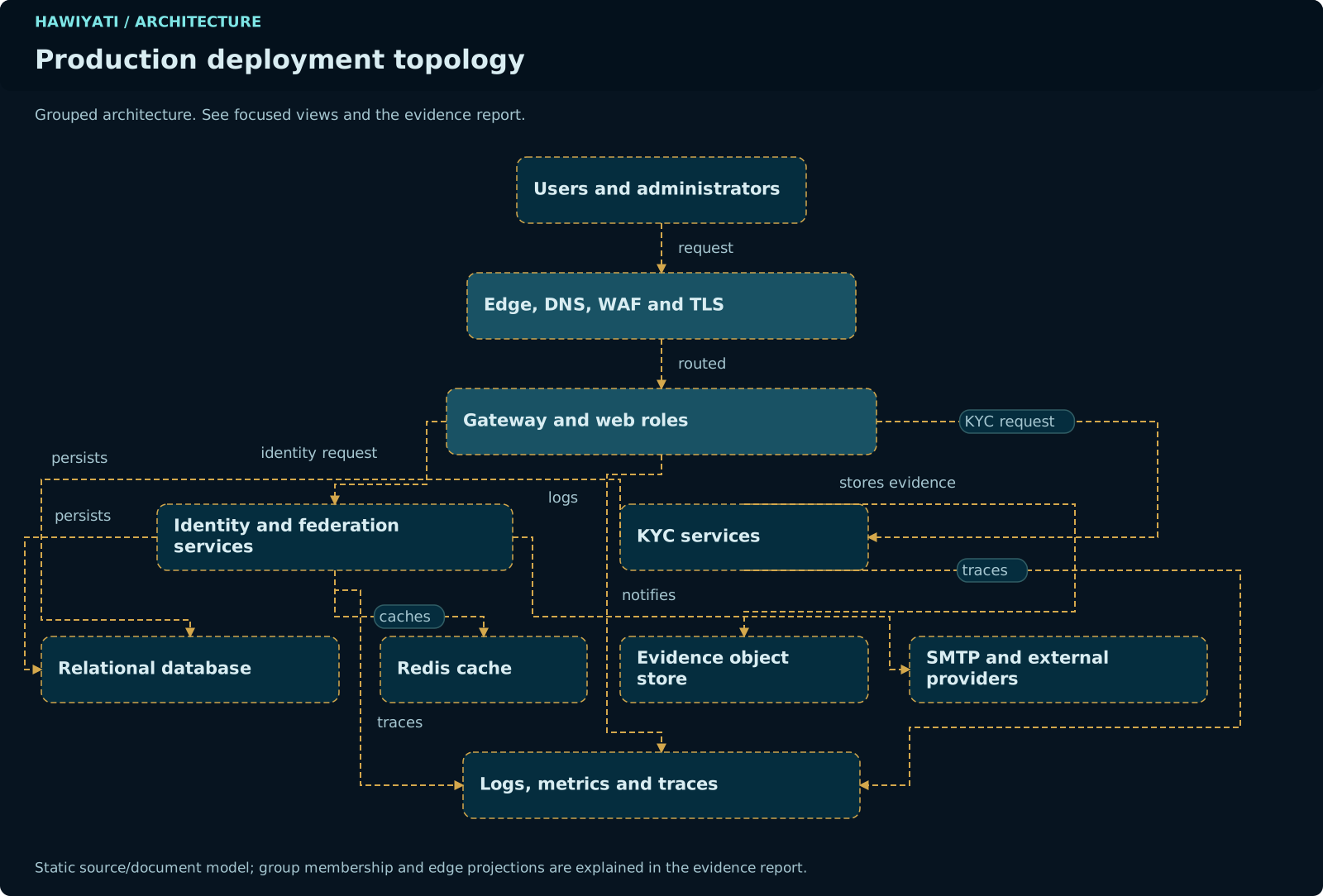
1. Architecture Overview
Hawiyati is a sovereign, on-premises identity platform. No runtime component makes outbound calls to external services after installation. All fonts, UI assets, geolocation data, and cryptographic material are bundled locally, enabling air-gapped operation.
The sections below cover deployment configuration and infrastructure requirements. For a full module map with ports, gRPC boundaries, and deployment topology, see the Implementation Guide.
Design Principles
Sovereign by design. The platform operates correctly with zero internet connectivity after initial installation. Cryptographic operations, session management, and federation all run entirely on customer infrastructure.
Defense in depth. Identity data and configuration data live in separate PostgreSQL schemas and can be placed on separate physical servers. Browser-facing services are isolated from internal gRPC services. Authentication logic is separated from protocol encoding.
Stateless federation layer. The authentication state machine runs on the IdP. Sessions are stored in Redis with an opaque token issued to the browser. The SAML/OIDC federation layer is stateless — it reads the session, builds the assertion or token, and discards it.
Pluggable auth pipeline. The authenticator pipeline is a registry of named providers. Login flow steps are determined by the authentication policy bound to the target application.
Service Map
HTTP-Facing Services
| Service | Port | Type | Role |
|---|---|---|---|
hawiyati-gateway |
8080 |
HTTP | Edge router — Spring Cloud Gateway. Routes inbound requests to downstream services by path prefix. No authentication enforced at the edge. |
hawiyati-http-server |
8085 |
HTTP | IdP browser entry point. Hosts login, MFA, registration, and password-reset flows. Handles SAML SSO and ACS endpoints. |
hawiyati-federation |
8087 |
HTTP | Federation orchestrator. Hosts all OIDC endpoints: /oidc/authorize, /oidc/token, /oidc/userinfo, /oidc/jwks, /.well-known/openid-configuration, /oidc/logout. Drives SAML response building over gRPC. |
hawiyati-admin |
8095 |
HTTP | Administrator console (WebFlux + Thymeleaf) and REST API (/api/v1/**). Manages users, applications, policies, audit logs, and system settings. Role-gated — internal access only. |
hawiyati-account |
8096 |
HTTP | End-user self-service portal (BFF pattern). Users manage profile, security factors, devices, sessions, activity log, and privacy settings. |
hawiyati-scim |
8098 |
HTTP | SCIM 2.0 inbound provisioning API. External systems push user records using Bearer token authentication. |
hawiyati-sp-scim-test |
8099 |
Demo | SCIM relying-party test console. Validates provisioning integration during setup. Not deployed in production. |
hawiyati-saml-sp-demo |
8090 |
Demo | Demo SAML 2.0 SP (saml.spdemo.org:8090). End-to-end testing only — not deployed in production. |
hawiyati-oidc-sp-demo |
8092 |
Demo | Demo OIDC relying party (oidc.spdemo.org:8092). End-to-end testing only — not deployed in production. |
Internal gRPC Services
| Service | Type | Role |
|---|---|---|
hawiyati-infra |
gRPC | SP registry and configuration service. Loads SP registry from sp-registry.yml on first boot, persists to database. Other services call it to look up application configurations and signing keys. |
hawiyati-session |
gRPC | Session lifecycle manager. Creates, reads, and destroys sessions in Redis. Centralises session serialisation so all services share a consistent schema. |
hawiyati-cache |
gRPC | Redis cache facade. Provides consistent caching interface for rate-limit counters, OTP state, and SP config caching with pub/sub invalidation. |
Shared Libraries
| Library | Type | Role |
|---|---|---|
hawiyati-utils |
Library | PKI helpers, RSA/SHA-256 utilities, common cryptographic primitives. |
hawiyati-persistence |
Library | JPA entities, Flyway migrations (V1–V62), and EncryptionService (AES-256-GCM). All services that read/write PostgreSQL embed this library. |
hawiyati-audit |
Library | Structured audit event writer: NDJSON to disk, CEF/syslog forwarder, Prometheus counters, OpenTelemetry traces. JPA sink writes to audit_events table. |
hawiyati-saml-federation |
Library | Custom SAML 2.0 implementation: AuthnRequest/Response encoding, metadata, RSA-SHA256 signing, full SLO chain. |
hawiyati-openid-federation |
Library | Custom OIDC implementation: authorization request parsing, PKCE validation, RS256 ID token building, claims mapping, token response. |
hawiyati-directory |
Library | AD/LDAP integration: pass-through bind authentication and periodic directory sync. Embedded in http-server (login) and admin (management). |
2. Infrastructure Requirements
Hawiyati is a standard Spring Boot application stack. Hardware requirements scale with concurrent user load and audit log retention period.
Minimum (Development / POC)
| Component | Minimum Spec |
|---|---|
| CPU | 4 cores (x86-64) |
| RAM | 8 GB |
| Disk | 50 GB SSD (application + DB + logs) |
| Java | Java 25 (OpenJDK or Oracle JDK) |
| PostgreSQL | 16.x or later |
| Redis | 7.x or later (Valkey 7.x compatible) |
| OS | Linux (Ubuntu 22.04 LTS / RHEL 9) or Windows Server 2022 |
| Network | 100 Mbps internal |
Recommended (Production)
| Component | Recommended Spec | Notes |
|---|---|---|
| CPU | 8+ cores | More cores benefit concurrent SAML/OIDC request processing |
| RAM | 16 GB+ | Allow headroom for audit log caching and JVM heap |
| Disk | 200 GB NVMe SSD | Audit logs grow ~1 GB/100k events; plan retention period |
| PostgreSQL | Primary + warm standby replica | Streaming replication; automated failover via Patroni or pgBouncer |
| Redis | Sentinel (3 nodes) or Cluster | Sessions are transient; AOF persistence recommended for OTP durability |
| Load balancer | HAProxy, nginx, or cloud LB | TLS termination at LB; forward X-Forwarded-For |
| OS | Ubuntu 22.04 LTS / RHEL 9 | Long-term support for multi-year deployments |
| Network | 1 Gbps internal, 10 Gbps storage | gRPC service mesh is high-throughput |
Java Runtime
Hawiyati requires Java 25. The Maven build target is Java 25 class files. Running on an older JVM will fail at startup. Recommended distributions: Eclipse Temurin 25, Oracle JDK 25, GraalVM 25.
UnsupportedClassVersionError at startup. Use java -version to confirm before deploying.3. PostgreSQL Configuration
PostgreSQL is the source of truth for all durable identity and configuration state. Two schemas partition the data by security domain.
Database Initialisation
-- Create database
CREATE DATABASE hawiyati
  ENCODING 'UTF8'
  LC_COLLATE 'en_US.UTF-8'
  LC_CTYPE 'en_US.UTF-8';

-- Create application user
CREATE USER hawiyati_app WITH PASSWORD 'changeme';
GRANT CONNECT ON DATABASE hawiyati TO hawiyati_app;

-- Schemas are created by Flyway on first startup:
--   hawiyati_config   (IdP configuration — 24 tables)
--   hawiyati_identity (end-user directory — 13 tables)
GRANT USAGE, CREATE ON SCHEMA public TO hawiyati_app;hawiyati_config Schema (24 tables)
Holds everything administrators configure: SP registrations, authentication policies, network zones, admin operator accounts, LDAP configurations, SCIM tokens, system settings, audit events, and attribute definitions.
| Category | Tables |
|---|---|
| Application registry | service_providers, sp_saml_config, sp_saml_allowed_attributes, sp_oidc_config, sp_oidc_redirect_uris, sp_oidc_logout_uris, sp_oidc_scopes, sp_oidc_grant_types, sp_oidc_response_types, sp_auth_methods |
| Authentication policies | auth_policies, policy_rules, rule_conditions, rule_actions, rule_action_methods, network_zones, network_zone_cidrs |
| Administration | admin_operators, admin_roles, admin_totp_credentials, admin_recovery_codes |
| Directory integration | ldap_directories, external_sql_stores, user_store_config |
| System | instance_settings, identity_db_connection, scim_tokens, attribute_definition, registration_policy, audit_events |
hawiyati_identity Schema (13 tables)
Holds all end-user data: user accounts, credentials, group memberships, session history, MFA devices, consent records, and risk signals.
| Category | Tables |
|---|---|
| Users and groups | users, user_groups, user_group_members |
| Credentials | user_totp_credentials, user_recovery_codes, user_fido2_credentials |
| Session and risk | login_attempts, user_known_devices, user_auth_geo |
| Self-service and governance | consent_record, user_unique_attribute_value, user_notification_prefs, invitation_tokens, user_kyc_submissions |
Connection Pool Sizing
Each Hawiyati service that connects to PostgreSQL uses HikariCP. Recommended pool sizes:
| Service | Recommended max-pool-size |
|---|---|
| hawiyati-http-server | 20 |
| hawiyati-admin | 10 |
| hawiyati-federation | 10 |
| hawiyati-scim | 10 |
| hawiyati-infra | 5 |
Total max connections required: ~55 + PostgreSQL overhead. Size max_connections in postgresql.conf accordingly (recommend 200).
Encrypted Columns
Sensitive fields are encrypted at rest using AES-256-GCM via hawiyati-persistence's EncryptionService. Encrypted fields include: TOTP secrets, recovery codes (Argon2id hashed), FIDO2 credential data, and session tokens. The encryption key is configured via hawiyati.security.encryption-key and must be at least 256 bits.
Backup Strategy
Recommended backup configuration:
- Continuous WAL archiving using
archive_commandto durable storage (NFS, S3-compatible, or tape) - Daily full base backup using
pg_basebackupor Barman - Point-in-time recovery (PITR) target: 15-minute RPO
- Retention: 30 days of WAL, 7 daily base backups
- Test restores monthly on a separate server — never assume backups work until tested
4. Redis Configuration
Redis (or Valkey 7.x) is used for transient data only. No durable identity or configuration state is stored in Redis — all of that lives in PostgreSQL. Redis loss is recoverable: active sessions expire naturally, OTP codes become invalid, and SP config caches are rebuilt on next request.
Key Namespaces
| Key Pattern | Content | TTL |
|---|---|---|
session:{sessionId} | Serialised IdP session (Jackson JSON) | Configurable (default 30 min) |
otp:{type}:{userId} | OTP code hash + attempt count | 5 minutes (email/SMS OTP) |
rl:{key} | Rate limit counter (login attempts) | Rolling window (1–15 min) |
sp:{entityId} | SP configuration cache | No TTL — invalidated via pub/sub |
device:{userId} | Known device set (hashed fingerprints) | 400 days |
SP Config Cache Invalidation
When an administrator modifies an SP's configuration via the admin console, Hawiyati publishes an invalidation message to the hawiyati:sp:invalidate Redis pub/sub channel. All running services subscribed to this channel evict the affected SP's entry from their local cache within approximately 10 seconds. This ensures configuration changes propagate without requiring service restarts.
Production Redis Configuration
# /etc/redis/redis.conf (production)
bind 127.0.0.1 ::1
requirepass YourStrongRedisPassword
maxmemory 2gb
maxmemory-policy allkeys-lru

# Persistence — RDB + AOF for durability
save 900 1
save 300 10
save 60 10000
appendonly yes
appendfsync everysec

# TLS (recommended for production)
tls-port 6380
tls-cert-file /etc/ssl/hawiyati/redis.crt
tls-key-file /etc/ssl/hawiyati/redis.key
tls-ca-cert-file /etc/ssl/hawiyati/ca.crt
High Availability — Redis Sentinel
# /etc/redis/sentinel.conf
sentinel monitor hawiyati-redis 127.0.0.1 6379 2
sentinel auth-pass hawiyati-redis YourStrongRedisPassword
sentinel down-after-milliseconds hawiyati-redis 5000
sentinel failover-timeout hawiyati-redis 60000
sentinel parallel-syncs hawiyati-redis 15. Network Topology
Hawiyati uses a layered trust-zone model. Only two HTTP ports (8080 and 8085) need to be reachable from the internet. The admin console, SCIM API, and all gRPC services are internal-only.
nginx / HAProxy / cloud LB — terminates TLS, validates certs, forwards X-Forwarded-For. WAF rules recommended for SAML POST endpoints.
🔒 = internal/VPN only — not exposed via gateway or public LB
Firewall Rules Summary
| Port | Service | Access | Notes |
|---|---|---|---|
8080 | hawiyati-gateway | Public (via LB) | Routes to 8085/8087 |
8085 | hawiyati-http-server | Public (via LB) or Direct | Main IdP login and SAML endpoints |
8087 | hawiyati-federation | Public (via LB) | OIDC endpoints |
8095 | hawiyati-admin | Internal / VPN only | Admin console — never expose publicly |
8096 | hawiyati-account | Internal / optional public | Self-service portal |
8098 | hawiyati-scim | Internal / SP network only | SCIM provisioning — restrict to SP source IPs |
8099 | hawiyati-sp-scim-test | Dev / internal only | Not deployed in production |
5432 | PostgreSQL | Internal only | Firewall from all external traffic |
6379 | Redis | Internal only | Firewall from all external traffic |
6. TLS & Certificate Management
All external-facing endpoints must be served over HTTPS. Hawiyati uses TLS for browser-to-server connections and recommends TLS for gRPC service-to-service channels (planned for Phase 4 with mutual TLS).
Production Certificate Requirements
| Endpoint | Certificate Type | Subject / SAN |
|---|---|---|
| hawiyati-gateway (8080) / http-server (8085) | Public CA (DigiCert, Let's Encrypt, etc.) | idp.hawiyati.yourorg.com |
| hawiyati-federation (8087) | Public CA | federation.hawiyati.yourorg.com |
| hawiyati-admin (8095) | Internal CA or self-signed | admin.hawiyati.internal |
| hawiyati-scim (8098) | Public CA or Internal CA | scim.hawiyati.yourorg.com |
| gRPC channels (Phase 4) | Internal CA (mTLS) | Service-to-service |
Development Certificates (mkcert)
For development use mkcert to generate locally-trusted certificates. The development hostname map:
| Hostname | Port | Service |
|---|---|---|
dev.hawiyati.org | 8085 | IdP (http-server) |
localhost | 8095 | Admin console |
federation.dev.hawiyati.org | 8087 | Federation / OIDC |
saml.spdemo.org | 8090 | SAML SP Demo |
oidc.spdemo.org | 8092 | OIDC SP Demo |
# Install mkcert, then:
mkcert -install
mkcert dev.hawiyati.org localhost federation.dev.hawiyati.org \
       saml.spdemo.org oidc.spdemo.org
SAML Signing Key Rotation
The SAML IdP signing key is used to sign all assertions. Rotating it requires coordination with all SPs:
- Generate a new RSA-2048 or RSA-4096 key pair
- Add the new certificate to the IdP metadata (alongside the old one) — SPs must re-import metadata
- Wait for all SPs to update their trusted certificate list (rolling window: 48–72 hours)
- Switch the active signing key to the new one in admin console → Settings → SAML Signing
- Remove the old certificate from metadata after all SPs have confirmed acceptance of new signatures
JVM Truststore
When Hawiyati makes outbound HTTPS calls (email gateways, SMS providers, LDAP/LDAPS), the target certificates must be trusted by the JVM. Add custom CA certificates:
# Add custom CA to the JVM truststore
keytool -importcert \
  -alias internal-ca \
  -file /etc/ssl/hawiyati/internal-ca.crt \
  -keystore $JAVA_HOME/lib/security/cacerts \
  -storepass changeit -noprompt
7. Configuration Reference
Hawiyati is configured via Spring Boot's standard application.yml file hierarchy. Environment variables override any YAML value using the standard Spring property naming convention (spring.datasource.url → SPRING_DATASOURCE_URL).
Key Configuration Properties
spring:
  datasource:
    url: jdbc:postgresql://localhost:5432/hawiyati?currentSchema=hawiyati_config
    username: hawiyati_app
    password: ${DB_PASSWORD}           # inject from env or vault
    hikari:
      maximum-pool-size: 20
      connection-timeout: 30000

  redis:
    host: localhost
    port: 6379
    password: ${REDIS_PASSWORD}
    ssl.enabled: true                  # recommended for production

hawiyati:
  security:
    encryption-key: ${ENCRYPTION_KEY}  # 32-byte hex — keep in vault
    signing-key-alias: idp-signing
    signing-key-store: /etc/hawiyati/keystore.p12
    signing-key-store-password: ${KEYSTORE_PASSWORD}

  session:
    ttl: 1800                          # seconds (30 min default)
    cookie-name: HAWIYATI_SESSION
    cookie-secure: true
    cookie-same-site: Strict

  oidc:
    issuer-uri: https://idp.hawiyati.yourorg.com

  saml:
    idp-entity-id: https://idp.hawiyati.yourorg.com/saml/metadata
    signing-key-alias: idp-signing

  password:
    min-length: 12
    require-uppercase: true
    require-digit: true
    require-special: true
    history-count: 10                  # reject last N passwords

  lockout:
    max-attempts: 5
    lockout-duration: 900              # seconds (15 min)

  risk:
    mode: MONITOR                      # OFF | MONITOR | ENFORCE
    new-device-weight: 30
    velocity-weight: 40
    geoip-weight: 20
    ip-reputation-weight: 10

logging:
  level:
    hawiyati: INFO
    org.springframework.security: WARN
Secrets Management
Never store secrets in YAML files committed to version control. Use one of:
- Environment variables: inject at container/process startup via systemd
EnvironmentFileor Docker secrets - HashiCorp Vault: use Spring Vault integration (
spring-cloud-vault) to pull secrets at startup - Cloud KMS: wrap encryption keys in a cloud KMS envelope (supported via custom
EncryptionServiceimplementation) - Kubernetes Secrets: mount as environment variables or projected volumes in pod spec
ENCRYPTION_KEY (decrypts all sensitive DB columns), KEYSTORE_PASSWORD (grants access to the SAML/OIDC signing key), DB_PASSWORD, REDIS_PASSWORD. Loss of the encryption key means all encrypted data becomes unreadable.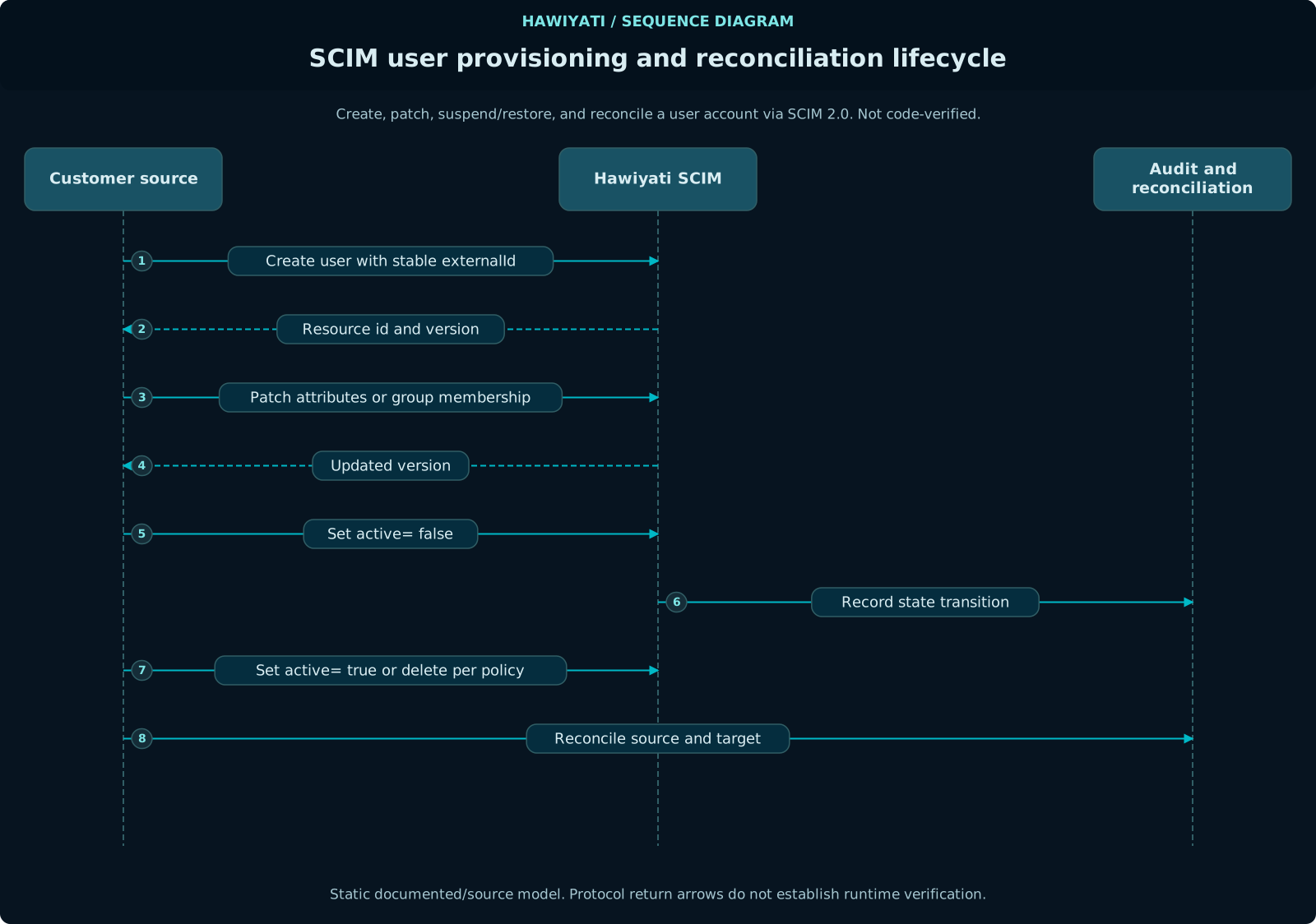
8. SCIM Provisioning Setup
Hawiyati implements SCIM 2.0 as an inbound provisioning server. External identity governance, HR systems, or Active Directory sync tools push user records to Hawiyati's SCIM endpoint.
Enabling SCIM
The SCIM module (hawiyati-scim) is deployed as a separate service on port 8098. Ensure it is started alongside the core services.
Generating a SCIM Bearer Token
- Log in to the admin console (
https://localhost:8095) - Navigate to Settings → SCIM Provisioning
- Click Generate Token — copy the token immediately (shown only once)
- Optionally set an expiry date for the token
SP SCIM Client Configuration
# SCIM client settings (SP side)
scim.base-url=https://scim.hawiyati.yourorg.com/scim/v2
scim.auth-header=Authorization: Bearer {your-token}
scim.content-type=application/scim+json
Verify Connectivity
curl -s \
  -H "Authorization: Bearer {your-token}" \
  https://scim.hawiyati.yourorg.com/scim/v2/ServiceProviderConfig \
  | python3 -m json.tool
Expected response: 200 OK with SCIM server capability document listing supported operations.
SCIM Provisioning Flow
When a SCIM client creates a user via POST /scim/v2/Users:
- Hawiyati creates the user account in
hawiyati_identity.users - Account starts in MIGRATED_UNCLAIMED state (
active=false,pendingApproval=true) - A claim token (256-bit random, HMAC-SHA256 stored, 15-min TTL) is generated
- Admin or notification system sends claim link to the user
- User follows the link, verifies identity, sets password/MFA → account becomes ACTIVE
SCIM Test Simulator
The hawiyati-sp-scim-test service (port 8099) provides a web UI to test SCIM operations against your Hawiyati deployment during integration. It is development-only and must not be deployed in production.
externalId, sourceInstanceId, and pendingApproval are supported in the SCIM extension schema. Credential fields and assurance level cannot be set via SCIM.9. AD/LDAP Integration
Hawiyati's LDAP connector (the hawiyati-directory library) supports pass-through bind authentication and periodic directory sync. Users can be authenticated against an AD or LDAP server without storing passwords in Hawiyati's local database.
Configuration
hawiyati:
  ldap:
    enabled: true
    url: ldaps://dc.corp.example.com:636
    bind-dn: CN=hawiyati-svc,OU=ServiceAccounts,DC=corp,DC=example,DC=com
    bind-password: ${LDAP_BIND_PASSWORD}
    user-search-base: OU=Users,DC=corp,DC=example,DC=com
    user-search-filter: (sAMAccountName={0})
    group-search-base: OU=Groups,DC=corp,DC=example,DC=com
    group-search-filter: (member={0})
    sync:
      enabled: true
      cron: "0 0 2 * * *"             # daily at 02:00
      page-size: 1000
Attribute Mapping
| LDAP Attribute | Hawiyati Field | Notes |
|---|---|---|
sAMAccountName | username | Used as login identifier |
mail | email | Must be unique |
telephoneNumber | phone | E.164 format expected |
displayName | displayName | Optional |
memberOf | Group membership | Synced to user_group_members |
userAccountControl | active | Disabled AD accounts → INACTIVE in Hawiyati |
Authentication Modes
Pass-through bind: When a user authenticates, Hawiyati binds to the LDAP server using the user's credentials. No password is stored in Hawiyati. If LDAP is unreachable, authentication fails (no fallback by default).
Local fallback: Configure hawiyati.ldap.fallback-to-local: true to allow locally-stored Argon2id passwords when LDAP is unavailable. Only recommended for resilience in controlled environments.
Testing the LDAP Connection
Admin console → Settings → Directory → LDAP → Test Connection performs a bind test and shows the number of users/groups found with the configured search base and filter.
10. Build & Start
Hawiyati is a Maven monorepo. All modules are built together, then services are started in the correct dependency order.
Build
# Full build (all modules, skip integration tests)
mvn clean install -DskipITs

# Build with integration tests (requires running PostgreSQL + Redis)
mvn clean install

# Build a single module
mvn clean install -pl hawiyati-http-server -am
Run Tests for a Single Module
# Unit tests only
mvn test -pl hawiyati-http-server

# Integration tests for SAML SP Demo
mvn test -pl hawiyati-saml-sp-demo

# OIDC SP Demo
mvn test -pl hawiyati-oidc-sp-demo
Deploy & Start (Windows)
# Deploy configuration and JARs to dist/
.\deploy.bat

# Start all services
.\start.bat
Startup Order
Services must start in dependency order. The recommended sequence:
- PostgreSQL (Flyway migrations run on first service startup)
- Redis
hawiyati-infra(gRPC SP registry — must be up before http-server)hawiyati-session(gRPC — must be up before http-server)hawiyati-cache(gRPC)hawiyati-persistencelibrary — embedded, starts with each servicehawiyati-http-server(depends on infra + session + cache gRPC)hawiyati-federation(depends on infra + session gRPC)hawiyati-gatewayhawiyati-adminhawiyati-scim
Health Check Endpoints
| Service | Health Endpoint | Expected Response |
|---|---|---|
| hawiyati-http-server | GET :8085/actuator/health | {"status":"UP"} |
| hawiyati-federation | GET :8087/actuator/health | {"status":"UP"} |
| hawiyati-admin | GET :8095/actuator/health | {"status":"UP"} |
| hawiyati-scim | GET :8098/actuator/health | {"status":"UP"} |
| hawiyati-gateway | GET :8080/actuator/health | {"status":"UP"} |
Docker Compose (Development Stack)
version: "3.9"
services:
  postgres:
    image: postgres:16-alpine
    environment:
      POSTGRES_DB: hawiyati
      POSTGRES_USER: hawiyati_app
      POSTGRES_PASSWORD: dev_password
    ports:
      - "5432:5432"
    volumes:
      - pgdata:/var/lib/postgresql/data

  redis:
    image: redis:7-alpine
    command: redis-server --requirepass dev_redis_pass
    ports:
      - "6379:6379"

volumes:
pgdata:Successfully applied N migration(s) and Admin account created. Default admin credentials are in dist/config/admin-bootstrap.yml — change them immediately.Monitoring & Observability
Each service exposes Prometheus metrics at /actuator/prometheus and OpenTelemetry traces via the OTel Java agent. Key metrics to monitor:
hawiyati_auth_attempts_total— login attempt rate (label: outcome=success/failure)hawiyati_saml_requests_total— SAML SSO request ratehawiyati_oidc_token_requests_total— OIDC token exchange ratehawiyati_session_active— active session countspring_datasource_connections_active— DB connection pool utilisationredis_connected_clients— Redis client count
See Operations Guide for full monitoring setup, alerting thresholds, and Grafana dashboard configuration.