Integration Guide
Hawiyati supports SAML 2.0 and OpenID Connect (OIDC) for application federation. Choose the protocol that best fits your application type and existing infrastructure.
Hawiyati supports SAML 2.0 and OpenID Connect (OIDC) for application federation. Choose the protocol that best fits your application type and existing infrastructure.
Protocol Comparison
Hawiyati supports SAML 2.0 and OpenID Connect (OIDC) for application federation. Choose the protocol that best fits your application type and existing infrastructure.
The sections below cover integration patterns. For a full module map with ports, gRPC boundaries, and deployment topology, see the Implementation Guide.
| Dimension | SAML 2.0 | OIDC |
|---|---|---|
| Best for | Enterprise web apps, legacy portals, SharePoint, SAP, Salesforce | Modern web apps, SPAs, mobile apps, APIs |
| Config exchange | XML metadata files (/saml/metadata) |
JSON discovery document (/.well-known/openid-configuration) |
| Response format | Signed XML assertion (browser POST) | JWT ID Token (back-channel token exchange) |
| Token transport | Browser form POST to ACS URL | Back-channel (server-to-server token request) |
| Session termination | SAML SLO (fan-out to all SPs) | RP-initiated logout (/oidc/logout) |
| Signature algorithm | RSA-SHA256 (XML-DSig) | RS256 (JWT) |
| PKCE support | Not applicable | Required (S256); prevents auth code interception |
| Library ecosystem | Extensive for enterprise platforms; more complex | Broad and modern; simpler to implement |
| Mobile/SPA suitability | Poor (browser-only) | Excellent (Authorization Code + PKCE) |
| Clock sensitivity | ±30 seconds tolerance on assertion timestamps | ±60 seconds tolerance on exp |
| Hawiyati status | Production (custom stack — not OpenSAML) | Production (custom stack — not Nimbus) |
SAML 2.0 — Use when
- Target app already has SAML SP config (Salesforce, SAP, SharePoint)
- Browser-based SSO required and OIDC is unavailable
- Legacy vendor integration without OIDC support
- Organisation policy mandates SAML for all SSO
OIDC — Use when
- Building a new web app, SPA, or mobile app
- Service-to-service authentication needed
- Standard JWT library support preferred
- Token refresh and offline access required
SAML 2.0 — Overview & Metadata
Hawiyati implements a custom SAML 2.0 Identity Provider stack. The first step in any SAML integration is exchanging metadata between the IdP and your Service Provider.
IdP Metadata Endpoint
Hawiyati publishes its IdP metadata at a well-known URL. Configure this URL in your SP, or download and upload the XML manually.
GET https://<idp-host>/saml/metadata
Content-Type: application/xml

# Development example:
GET https://dev.hawiyati.org:8085/saml/metadata| Metadata Field | Value |
|---|---|
| Entity ID | Configured via HAWIYATI_IDP_ENTITY_ID (dev default: http://localhost:8085) |
| SSO endpoint (HTTP-POST) | https://<idp-host>/saml/sso |
| SSO endpoint (HTTP-Redirect) | https://<idp-host>/saml/sso |
| SLO endpoint (HTTP-Redirect) | https://<idp-host>/saml/slo |
| SLO endpoint (HTTP-POST) | https://<idp-host>/saml/slo |
| WantAuthnRequestsSigned | false (signed requests accepted but not required by default) |
SAML 2.0 — SP Registration
Register your Service Provider in Hawiyati using the admin console UI or by editing sp-registry.yml directly. Both methods write to the same underlying store.
Method A — Admin Console
Navigate to https://<admin-host>/ and sign in with an admin operator account.
Navigate to Applications in the left sidebar and click New Application.
Choose the SAML 2.0 protocol type and fill in the SP registration fields.
The SP is registered immediately. Changes propagate via Redis pub/sub within ~10 seconds.
Method B — sp-registry.yml (Infrastructure as Code)
Add the SP entry directly to dist/config/hawiyati-infra/sp-registry.yml. The infra service reloads on startup.
Minimal SAML entry
service-providers:
  - type: SAML
    entityId: https://app.example.com/saml/metadata
    displayName: Example Application
    active: true
    saml:
      acsUrl: https://app.example.com/saml/acs
      nameIdFormat: urn:oasis:names:tc:SAML:1.1:nameid-format:emailAddress
      wantAssertionsSigned: true
Full SAML entry with all options
service-providers:
  - type: SAML
    entityId: https://app.example.com/saml/metadata   # Must match SP's entityID exactly
    displayName: Example Application
    description: Finance department intranet portal
    logoUri: https://app.example.com/assets/logo.png
    contacts: [email protected]
    active: true
    acceptedAuthMethods: [pwd, totp, fido2]           # Empty = all methods
    saml:
      acsUrl: https://app.example.com/saml/acs
      metadataUrl: https://app.example.com/saml/metadata
      nameIdFormat: urn:oasis:names:tc:SAML:1.1:nameid-format:emailAddress
      assertionConsumerServiceBinding: urn:oasis:names:tc:SAML:2.0:bindings:HTTP-POST
      singleLogoutServiceUrl: https://app.example.com/saml/logout
      singleLogoutServiceBinding: urn:oasis:names:tc:SAML:2.0:bindings:HTTP-Redirect
      allowedAttributes: [email, displayName, groups]
      signatureRequired: false        # Require signed AuthnRequests
      wantAssertionsSigned: true      # Hawiyati signs the Assertion
      encryptAssertions: false        # Encrypt assertion for this SP
      signingCertPath:                # SP signing cert path (PEM)
      encryptionCertPath:             # SP encryption cert path (PEM)
SP Registration Reference
| Field | Required | Description |
|---|---|---|
entityId | Yes | The SP's Entity ID. Must match exactly what the SP sends in its AuthnRequest Issuer. |
displayName | Yes | Human-readable name shown in the admin console |
active | Yes | Set to false to disable the SP without removing it |
acceptedAuthMethods | No | Restricts auth methods: pwd, totp, email_otp, sms_otp, fido2. Empty = all. |
saml.acsUrl | Yes | Assertion Consumer Service URL. Hawiyati POSTs the SAMLResponse here. |
saml.nameIdFormat | No | NameID format URI. Default: unspecified. See NameID formats below. |
saml.singleLogoutServiceUrl | No | SP SLO endpoint. Required for SLO to work. |
saml.wantAssertionsSigned | No | Default true. Signs the Assertion element with IdP private key. |
saml.signatureRequired | No | Default false. Reject unsigned AuthnRequests when true. |
saml.encryptAssertions | No | Default false. Encrypts assertion with SP's public cert (AES-256-GCM + RSA-OAEP). |
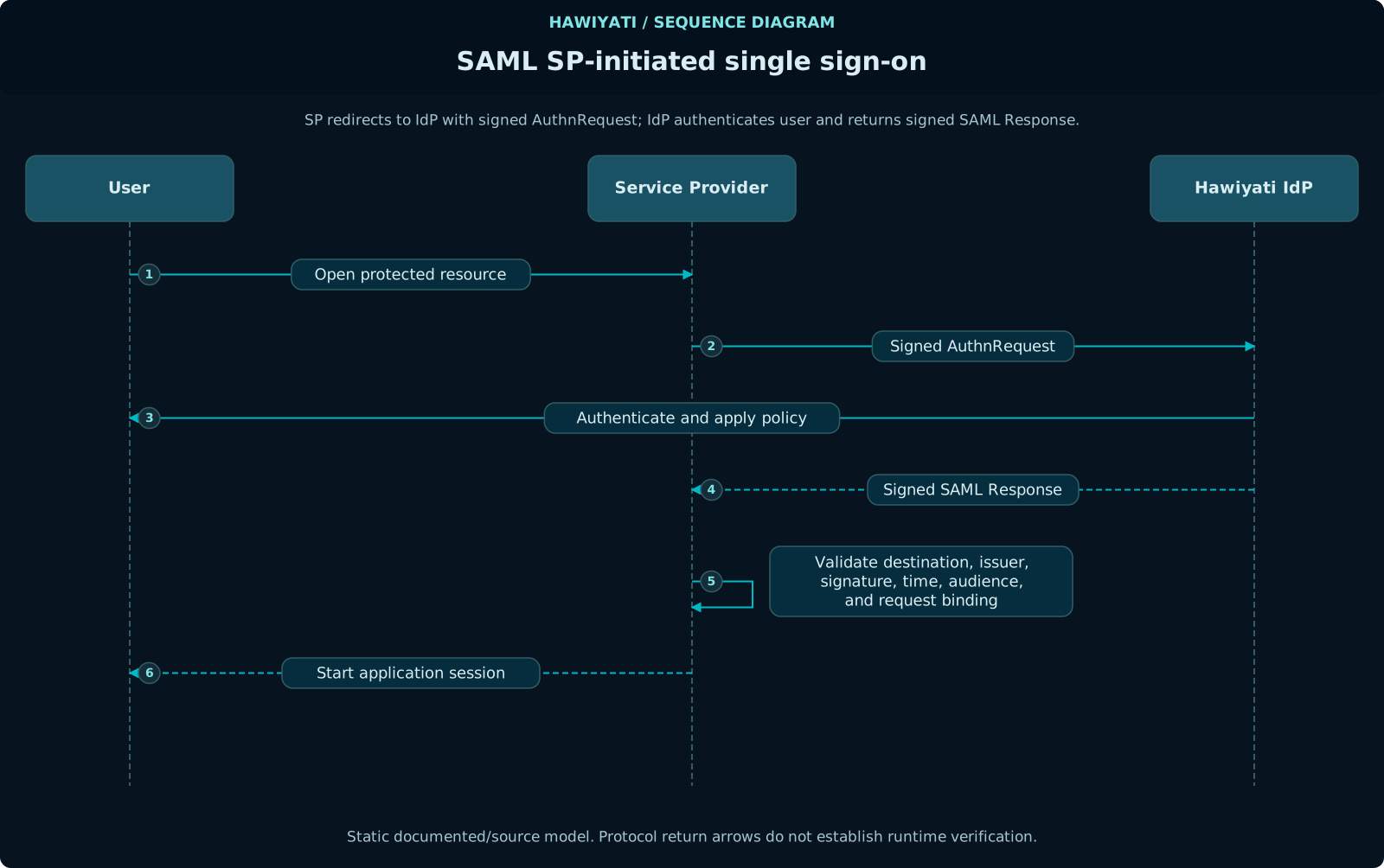
SAML 2.0 — SP-Initiated SSO Flow
The standard SP-initiated SSO flow in 7 steps. Understanding each step is essential for debugging integration issues.
GET /app/resource — User requests a protected page; SP detects no active session302 Redirect — SP constructs AuthnRequest (Base64+Deflate), redirects to IdP: GET /saml/sso?SAMLRequest=…&RelayState=…POST /saml/acs — SAMLResponse contains Base64-encoded XML with RSA-SHA256 signed Assertion (NameID, attributes, AuthnContext, audience restriction, time bounds) and original RelayStateNotOnOrAfter, InResponseTo matches request ID, replay detection → creates local session → redirects to original resource via RelayStateUser navigates to a protected resource on the Service Provider (e.g., https://app.example.com/dashboard). The SP detects no active session.
The SP constructs a SAML AuthnRequest (Base64 + deflate encoded) and redirects the browser to the IdP SSO endpoint with the SAMLRequest and optional RelayState parameters.
GET https://<idp>/saml/sso
  ?SAMLRequest=<base64-deflate-encoded-authnrequest>
&RelayState=<opaque-sp-state>Hawiyati decodes and validates: issuer (SP entityId), destination, format. Checks if an IdP session already exists for the browser cookie.
- SSO fast path: existing valid session → issue assertion immediately
- No session: store AuthnRequest, redirect to
/idp/login
User enters credentials on the Hawiyati login page. The authentication policy for this SP is evaluated. The user completes any required MFA steps (TOTP, FIDO2, OTP, etc.).
Hawiyati constructs the assertion with: random Assertion ID, current timestamps, configured NameID, AuthnContext class, attribute statements, and XML-DSig signature (RSA-SHA256).
Assertion fields:
  NotBefore:    now − 30 seconds (clock-skew tolerance)
  NotOnOrAfter: now + 3600 seconds (1 hour)
  Recipient:    the SP's ACS URL
  Audience:     the SP's entityId
Signature: XML-DSig on the Assertion element (RSA-SHA256)Hawiyati sends an auto-submitting HTML form to the browser:
POST https://app.example.com/saml/acs
  SAMLResponse=<base64-encoded-xml>
RelayState=<original-opaque-value>The SP validates: assertion signature, audience restriction (must match entityId), recipient (must match ACS URL), time conditions (NotOnOrAfter), InResponseTo matches original request ID, replay detection (store and reject seen assertion IDs). On success, creates a local session.
/saml/sso without an InResponseTo value. The SP must be configured to accept unsolicited responses for IdP-initiated flows to work.
SAML 2.0 — Attributes & NameID Formats
NameID Formats
| Format | URI | Value | When to use |
|---|---|---|---|
| Unspecified (default) | ...nameid-format:unspecified | Username | SP accepts any string identifier |
| Email address | ...nameid-format:emailAddress | User's email | SP uses email as primary identifier and it is stable |
| Persistent | ...nameid-format:persistent | Internal user UUID | Durable opaque identifier; does not expose PII |
| Transient | ...nameid-format:transient | Random per-session | Privacy-preserving; SP must be stateless |
Attribute Mapping
Only attributes listed in allowedAttributes are released. If the list is empty, no attributes are released — only the NameID subject is asserted.
| Attribute Name | Content |
|---|---|
email | User's email address |
displayName | First + last name, or username if not set |
firstName | Given name |
lastName | Family name |
username | Account username |
groups | Comma-separated list of group names |
Attribute format in assertion
<saml:AttributeStatement>
  <saml:Attribute Name="email"
      NameFormat="urn:oasis:names:tc:SAML:2.0:attrname-format:basic">
    <saml:AttributeValue xsi:type="xs:string">[email protected]</saml:AttributeValue>
  </saml:Attribute>
  <saml:Attribute Name="displayName"
      NameFormat="urn:oasis:names:tc:SAML:2.0:attrname-format:basic">
    <saml:AttributeValue xsi:type="xs:string">Alice Martin</saml:AttributeValue>
  </saml:Attribute>
</saml:AttributeStatement>email, displayName). If your SP expects claim URIs (e.g., http://schemas.xmlsoap.org/ws/2005/05/identity/claims/emailaddress), configure the mapping on the SP side.
SAML 2.0 — Single Logout (SLO)
Hawiyati supports both SP-initiated and IdP-initiated Single Logout. SLO terminates the IdP session and sends logout requests to all registered SPs that participated in the session.
LogoutRequest to GET /saml/slo?SAMLRequest=… (HTTP-Redirect binding) or user clicks logout on IdP portalLogoutRequest to each participating SP's SLO endpoint. SPs destroy their local session and respond with LogoutResponse.LogoutResponse (Status: Success) back to initiating SP. User is now fully logged out across all applications.SP-Initiated SLO
The SP sends a SAML LogoutRequest to /saml/slo (HTTP-Redirect or HTTP-POST binding) including the SessionIndex from the original assertion.
The IdP session is invalidated in Redis. All session tokens are revoked.
Hawiyati sends logout requests to all other SPs associated with the same IdP session that have singleLogoutServiceUrl configured. SP non-response is tolerated — IdP logout is not conditional on SP acknowledgment.
Hawiyati returns a LogoutResponse to the initiating SP, completing the SLO flow.
SessionIndex or use a different binding than configured — check the audit log for the actual request content if logout does not work.
SLO Requirements
- SP registration must include
singleLogoutServiceUrl - SP must implement the SLO receiver endpoint and terminate its local session
- SP must store the
SessionIndexfrom the SSO assertion and include it in LogoutRequests
SAML 2.0 — Security Checklist
Before going to production, verify all of these on the SP side:
- Validate assertion signature on every SSO response — never skip in production
- Validate the
Audiencerestriction matches your entityId exactly - Validate the
Recipientin SubjectConfirmationData matches your ACS URL - Enforce time conditions: reject assertions where
NotOnOrAfterhas passed (±30s tolerance) - Implement replay detection: store and reject previously seen assertion IDs
- Use HTTPS for your ACS URL in production — HTTP allows assertion interception
- Never log raw assertion XML in production (contains PII)
- Test SLO end-to-end — broken SLO allows sessions to persist after IdP logout
- Plan for IdP certificate rotation — configure SP to accept two certs during overlap
SAML Troubleshooting
| Symptom | Likely Cause | Resolution |
|---|---|---|
missing_saml_request | AuthnRequest not sent by SP | Verify SP constructs and sends the SAMLRequest parameter |
AudienceRestrictionViolation | SP entityId mismatch | Compare Audience in assertion to entityId in Hawiyati registration |
RecipientMismatch | ACS URL mismatch | Update acsUrl in SP registration to exactly match SP's ACS URL |
SignatureValidationFailure | Wrong signing certificate in SP | Download IdP cert from /saml/metadata and re-upload to SP |
InResponseToMismatch | Session or cache mismatch | Ensure SP stores AuthnRequest ID per browser session |
| SLO doesn't log out other apps | Missing singleLogoutServiceUrl | Add SLO URL to all SP registrations that should participate |
Clock failures (NotYetValid) | Server clock skew | Synchronize server clocks with NTP; Hawiyati applies ±30s tolerance |
OIDC — Overview & Discovery
Hawiyati acts as an OpenID Connect Provider implementing OIDC Core 1.0 with the Authorization Code flow. Applications delegate authentication and receive a signed RS256 ID Token.
OIDC Discovery Document
Hawiyati publishes a discovery document — always use automatic discovery over hardcoded URLs.
GET https://federation.dev.hawiyati.org:8087/.well-known/openid-configuration| Field | Value |
|---|---|
issuer | Configured per deployment (hawiyati.oidc.issuer) |
authorization_endpoint | {base-url}/oidc/authorize |
token_endpoint | {base-url}/oidc/token |
userinfo_endpoint | {base-url}/oidc/userinfo |
jwks_uri | {base-url}/oidc/jwks |
end_session_endpoint | {base-url}/oidc/logout |
Supported Features
| Feature | Value |
|---|---|
| Response types | code |
| Grant types | authorization_code, refresh_token |
| Scopes | openid, profile, email, phone, address, offline_access |
| Signing algorithm | RS256 |
| PKCE methods | S256 (required), plain (not recommended) |
| Client auth methods | none, client_secret_basic, client_secret_post |
| Subject type | public (stable UUID per user) |
| Dynamic registration | Not supported — register via sp-registry.yml or admin console |
OIDC — Client Registration
Every relying party must be registered in the SP registry before initiating authentication. Hawiyati does not support dynamic client registration.
Registration via sp-registry.yml
- type: OIDC
  entityId: my-app                          # unique identifier
  displayName: My Application
  description: Internal HR portal
  active: true

  oidc:
    clientId: my-app                        # sent in authorization requests
    clientName: My Application
    redirectUris:
      - https://app.example.com/callback    # exact match enforced — no wildcards
    postLogoutRedirectUris:
      - https://app.example.com/
    scopes: [openid, profile, email]
    responseTypes: [code]
    tokenEndpointAuthMethod: client_secret_basic
    clientSecret: ${MY_APP_CLIENT_SECRET}   # leave blank for public clients
    requirePkce: true
    frontchannelLogoutUri: https://app.example.com/logout/fc
Public Client (SPA/Mobile)
tokenEndpointAuthMethod: none
clientSecret:         # blank
requirePkce: true     # always required
Confidential Client (Server-side)
tokenEndpointAuthMethod: client_secret_basic
clientSecret: ${SECRET}
requirePkce: true # still recommendedhttp://localhost:8080/callback for development.
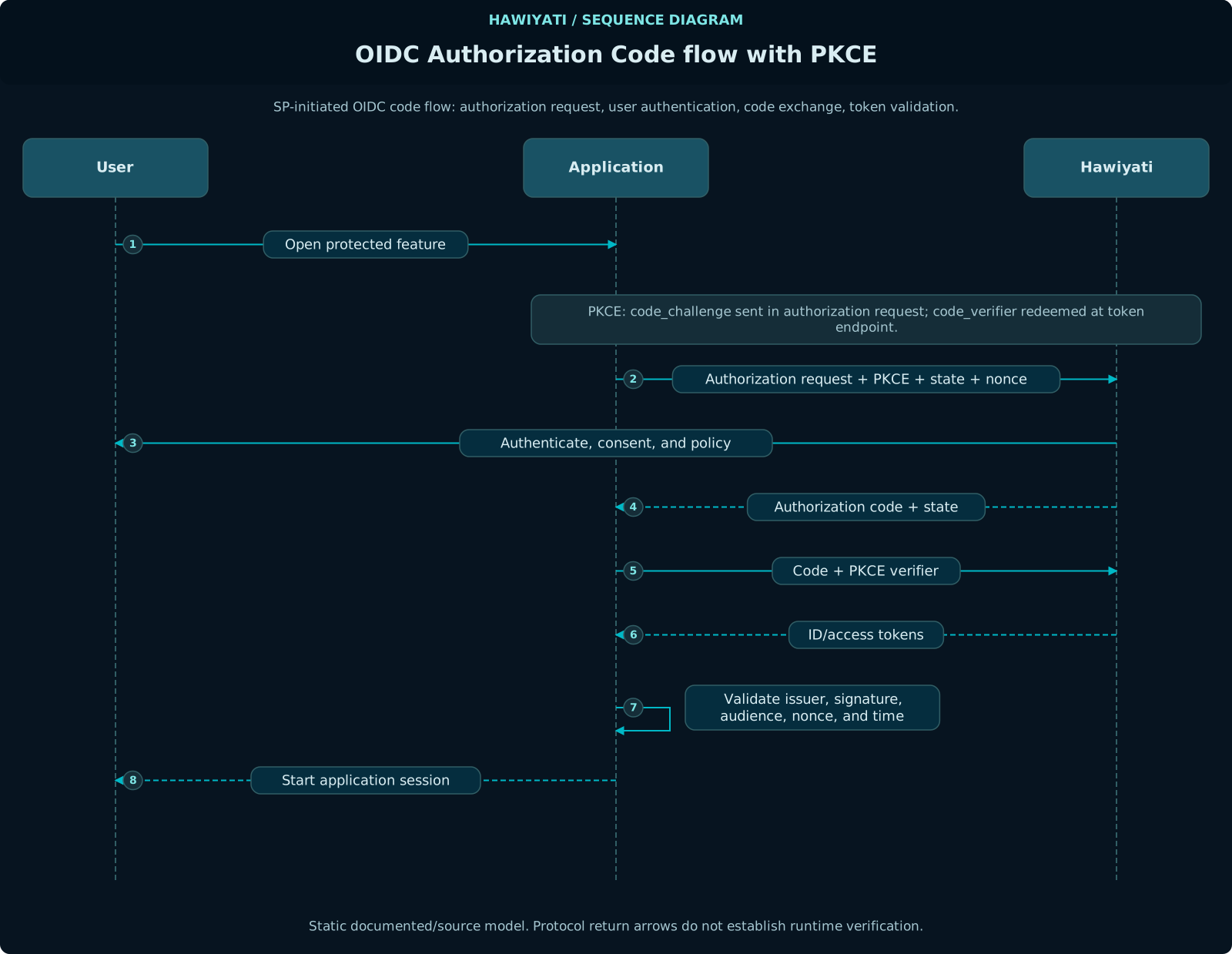
OIDC — Authorization Code Flow with PKCE
The only flow Hawiyati supports. PKCE (S256) is required for all public clients and strongly recommended for confidential clients.
code_verifier (32 random bytes, base64url-encoded, 43 chars). Compute code_challenge = BASE64URL(SHA-256(verifier)). Generate state (CSRF) and nonce (replay). Store all in server-side session — never in browser.GET /oidc/authorize?response_type=code&client_id=…&redirect_uri=…&scope=openid profile&state=…&nonce=…&code_challenge=…&code_challenge_method=S256302 Redirect → redirect_uri?code=AUTH_CODE&state=… — App must verify state matches stored value (CSRF check) before proceedingPOST /oidc/token — body: grant_type=authorization_code&code=…&redirect_uri=…&client_id=…&code_verifier=… — confidential clients add Basic Auth headerSHA-256(code_verifier) == stored code_challenge; checks code not expired, not reused; loads session claims; signs ID Token (RS256){"access_token":"…", "id_token":"…", "token_type":"Bearer", "expires_in":3600, "refresh_token":"…"}/oidc/jwks → verify signature → check iss (matches discovery document), aud (matches client_id), exp (not expired), nonce (matches stored value, prevents replay)Before redirecting, generate PKCE pair, state (CSRF), and nonce (replay) on the server. Store them in the server-side session — never in the browser.
// code_verifier: 32 random bytes, base64url-encoded without padding (43 chars)
byte[] bytes = new byte[32];
new SecureRandom().nextBytes(bytes);
String codeVerifier = Base64.getUrlEncoder().withoutPadding()
    .encodeToString(bytes);

// code_challenge: SHA-256 of ASCII bytes of verifier, base64url-encoded
byte[] digest = MessageDigest.getInstance("SHA-256")
    .digest(codeVerifier.getBytes(StandardCharsets.US_ASCII));
String codeChallenge = Base64.getUrlEncoder().withoutPadding()
    .encodeToString(digest);

String state = UUID.randomUUID().toString();
String nonce = UUID.randomUUID().toString();GET /oidc/authorize
?response_type=code
&client_id=my-app
&redirect_uri=https%3A%2F%2Fapp.example.com%2Fcallback
&scope=openid%20profile%20email
&state=<random-state>
&nonce=<random-nonce>
&code_challenge=<base64url-sha256-of-verifier>
&code_challenge_method=S256Hawiyati displays the login page, evaluates the authentication policy for this client, and prompts for any required MFA. On success, redirects back with an authorization code.
GET /callback?code=<authorization-code>&state=<your-state>

// Verify state matches session — this is the CSRF check
// Authorization codes expire in 60 seconds — exchange immediatelyPOST /oidc/token
Content-Type: application/x-www-form-urlencoded
Authorization: Basic <base64(client_id:client_secret)> # confidential clients
grant_type=authorization_code
&code=<received-code>
&redirect_uri=https%3A%2F%2Fapp.example.com%2Fcallback
&client_id=my-app
&code_verifier=<original-code-verifier>{
"access_token": "eyJhbGciOiJSUzI1NiIsInR5cCI6IkpXVCJ9...",
"id_token": "eyJhbGciOiJSUzI1NiIsInR5cCI6IkpXVCJ9...",
"refresh_token": "rt_...", // only with offline_access scope
"token_type": "Bearer",
"expires_in": 3600,
"scope": "openid profile email"
}| Token | Lifetime |
|---|---|
| Authorization code | 60 seconds |
| Access token | 3600 seconds (1 hour) |
| ID token | 3600 seconds (1 hour) |
| Refresh token | 2,592,000 seconds (30 days) |
Never skip validation. Perform all checks before establishing a user session.
- Decode JWT header; verify
algisRS256 - Fetch public key from JWKS using
kidfrom header - Verify RS256 signature against the public key
- Verify
issmatches the discovery document issuer - Verify
audequals yourclient_id - Verify
exp > now(±60s clock skew tolerance) - Verify
noncematches value stored in session - Use
sub(not email) as the stable user identifier
For additional claims or fresher data, call the UserInfo endpoint with the access token.
GET /oidc/userinfo
Authorization: Bearer <access_token>
OIDC — Token Claims & Key Management
Standard ID Token Claims
| Claim | Description |
|---|---|
iss | Issuer — Hawiyati's configured OIDC issuer |
sub | Subject — stable internal user UUID (use this as the user identifier) |
aud | Audience — your client_id |
exp | Expiry (Unix epoch) |
iat | Issued-at (Unix epoch) |
auth_time | When the user actually authenticated |
azp | Authorized party — your client_id |
nonce | Echo of the nonce from the authorization request |
at_hash | Left-most 128 bits of SHA-256(access_token), base64url-encoded |
Scope-Driven Claims
| Scope | Claims Included |
|---|---|
profile | name, given_name, family_name, preferred_username, picture, locale, birthdate |
email | email, email_verified |
phone | phone_number, phone_number_verified |
address | address (structured: formatted, street_address, locality, region, postal_code, country) |
JWKS Key Management
GET /oidc/jwks

{
  "keys": [
    {
      "kty": "RSA",
      "alg": "RS256",
      "use": "sig",
      "kid": "hawiyati-signing-key-1",
      "n": "...",
      "e": "AQAB"
    }
  ]
}
Use the kid from the JWT header to select the matching key. Cache the JWKS response and refresh only on encountering an unknown kid.
Attribute Mapping (LDAP / AD Compatibility)
| OIDC Claim | Attribute Keys Checked (first non-blank wins) |
|---|---|
name | name, displayName, cn |
given_name | given_name, firstName, givenName |
family_name | family_name, lastName, familyName, sn |
preferred_username | preferred_username, username, uid, samAccountName |
email | email, mail |
phone_number | phone_number, phoneNumber, mobile, telephoneNumber |
OIDC — Logout
RP-Initiated Logout
To terminate the Hawiyati session, redirect the user's browser to the end-session endpoint:
GET /oidc/logout
  ?id_token_hint=<id_token>
  &post_logout_redirect_uri=https%3A%2F%2Fapp.example.com%2F
&state=<optional-state>post_logout_redirect_uri must be registered in your client's postLogoutRedirectUris — unregistered URIs are silently ignored. Hawiyati identifies your client from id_token_hint (or a client_id parameter); without either, the user ends on the Hawiyati sign-in page instead of your URI.
Back-Channel Logout
Implemented (2026-06-20). When a user logs out of Hawiyati, the IdP POSTs a signed logout_token JWT to the backchannelLogoutUri registered for your application. Register the URI on the SP configuration form in the admin console. Your endpoint must return 200 OK; errors are logged but do not abort the logout flow.
Token Refresh
POST /oidc/token
Content-Type: application/x-www-form-urlencoded
Authorization: Basic <base64(client_id:client_secret)>

grant_type=refresh_token
&refresh_token=<stored-refresh-token>
&client_id=my-app
Refresh tokens expire after 30 days. If expired, the user must re-authenticate. The refresh token may be rotated — always store the latest one returned.
OIDC — Integration Examples
Spring Boot (Confidential Client)
# application.yml
spring:
  security:
    oauth2:
      client:
        registration:
          hawiyati:
            client-id: my-app
            client-secret: ${MY_APP_CLIENT_SECRET}
            authorization-grant-type: authorization_code
            redirect-uri: "{baseUrl}/login/oauth2/code/hawiyati"
            scope: openid, profile, email
            client-authentication-method: client_secret_basic
        provider:
          hawiyati:
            issuer-uri: https://federation.dev.hawiyati.org:8087
Node.js (Public Client with PKCE)
import { generators, Issuer } from 'openid-client';

const issuer = await Issuer.discover(
  'https://federation.dev.hawiyati.org:8087'
);

const client = new issuer.Client({
  client_id: 'my-spa',
  redirect_uris: ['https://app.example.com/callback'],
  response_types: ['code'],
  token_endpoint_auth_method: 'none',
});

// Step 1 — generate authorization URL
const codeVerifier  = generators.codeVerifier();
const codeChallenge = generators.codeChallenge(codeVerifier);
const state         = generators.state();
const nonce         = generators.nonce();

req.session.pkce = { codeVerifier, state, nonce };

const authUrl = client.authorizationUrl({
  scope: 'openid profile email',
  state, nonce,
  code_challenge: codeChallenge,
  code_challenge_method: 'S256',
});
res.redirect(authUrl);

// Step 2 — on callback
const { codeVerifier, state, nonce } = req.session.pkce;
const params   = client.callbackParams(req);
const tokenSet = await client.callback(
  'https://app.example.com/callback',
  params,
  { code_verifier: codeVerifier, state, nonce }
);
const claims = tokenSet.claims();
// Use claims.sub as the stable user identifier
OIDC — Security Checklist
stateparameter validated on every callback — CSRF protectionnoncevalidated in the ID Token — replay protectionaudvalidated against your ownclient_id- Token signature verified using JWKS public key — never skipped in any code path
code_verifiergenerated with ≥32 bytes entropy, stored server-side only- Token exchange (POST
/oidc/token) made server-to-server — never from browser client_secretin environment variables or secrets manager — not in source code- All redirect URIs are HTTPS in production
- ID Token
expchecked before accepting the token sub(not email) used as the stable user identifier- Logout terminates both Hawiyati session and your own application session
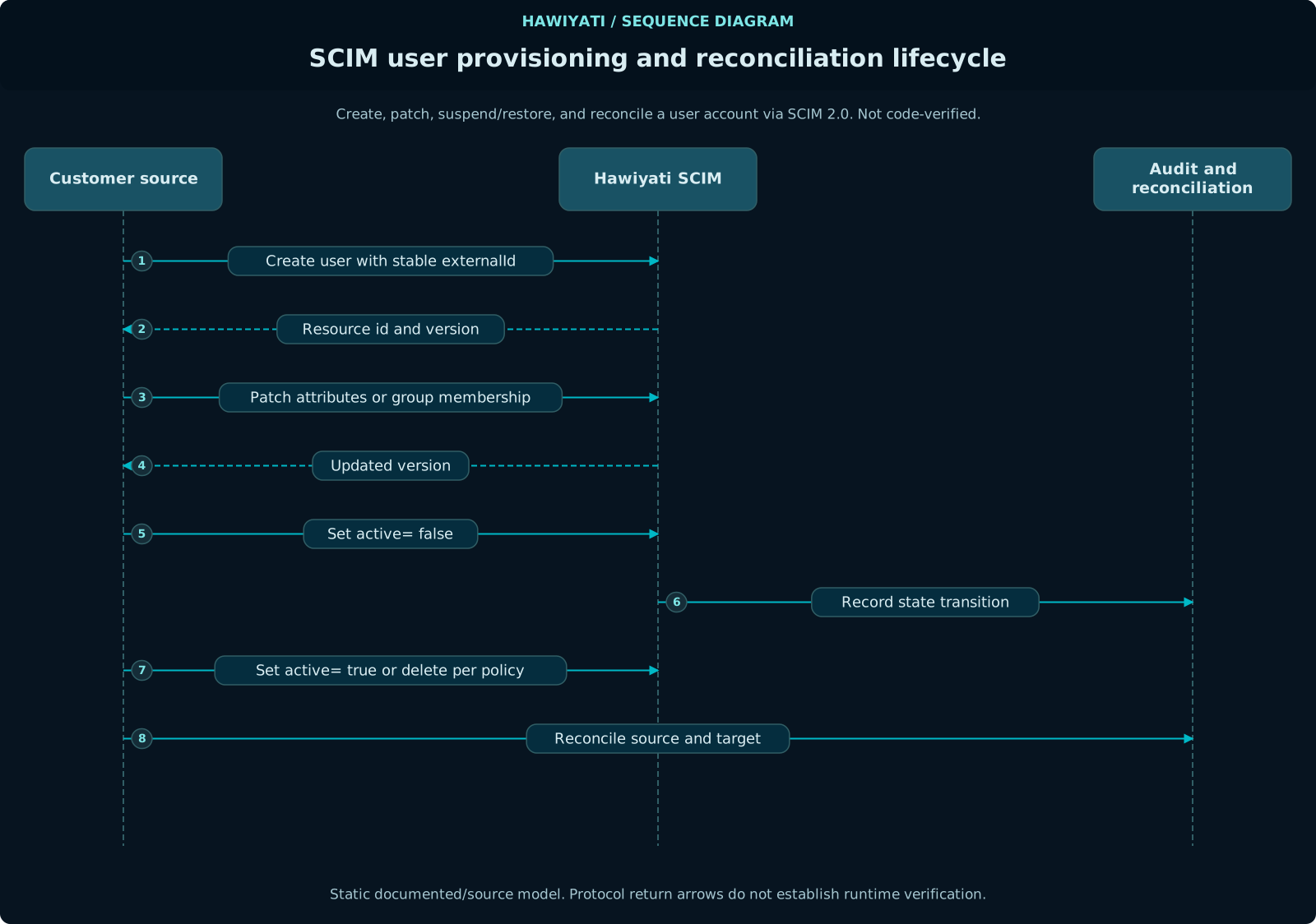
SCIM 2.0 — Inbound Provisioning & Outbound Push
Hawiyati acts as a SCIM 2.0 server for inbound user and group provisioning, and as a SCIM 2.0 client for outbound push to downstream applications. Your Identity Governance tool (e.g., AD, Okta, or a custom provisioner) acts as the upstream SCIM client; Hawiyati then fans out lifecycle events to configured downstream SCIM targets.
Supported Endpoints
| Endpoint | Methods | Description |
|---|---|---|
/scim/v2/Users | GET, POST, PATCH, DELETE | User resource management |
/scim/v2/Users/{id} | GET, PUT, PATCH, DELETE | Individual user operations |
/scim/v2/Groups | GET, POST, PATCH, DELETE | Group resource management |
/scim/v2/Groups/{id} | GET, PUT, PATCH, DELETE | Individual group operations |
/scim/v2/ServiceProviderConfig | GET | SCIM server capabilities |
/scim/v2/Schemas | GET | Schema definitions |
SCIM Extension Schema
Hawiyati exposes a custom SCIM extension schema. Only the following extension attributes are supported:
| Extension Field | Type | Description |
|---|---|---|
externalId | string | SP's own user identifier; stored in users.external_id |
sourceInstanceId | string | Identifies which SP instance provisioned this user |
pendingApproval | boolean | Sets the pendingApproval flag on the user account |
Provisioning Flow
The user account is created in Hawiyati with active=false, pendingApproval=true — the MIGRATED_UNCLAIMED state.
A 256-bit random claim token is generated (HMAC-SHA256 stored, 15-minute TTL, single-use). A claim link is returned or emailed to the user.
User arrives at Hawiyati, completes identity verification, enrolls credentials, and claims the account.
active=true, pendingApproval=false. User can now authenticate to registered SPs.
Authentication
Authorization: Bearer <scim-bearer-token>Configure the bearer token in the Hawiyati admin console under SCIM settings. Rotate tokens regularly and store them in a secrets manager.
Example: Create User
POST /scim/v2/Users
Authorization: Bearer <token>
Content-Type: application/json

{
  "schemas": [
    "urn:ietf:params:scim:schemas:core:2.0:User",
    "urn:hawiyati:scim:extension"
  ],
  "userName": "[email protected]",
  "name": { "givenName": "Alice", "familyName": "Martin" },
  "emails": [{ "value": "[email protected]", "primary": true }],
  "phoneNumbers": [{ "value": "+213555001234", "primary": true }],
  "active": true,
  "urn:hawiyati:scim:extension": {
    "externalId": "ext-user-9876",
    "sourceInstanceId": "sp-finance-prod",
    "pendingApproval": true
  }
}
Deactivating a User
PATCH /scim/v2/Users/{id}
Authorization: Bearer <token>
Content-Type: application/json

{
  "schemas": ["urn:ietf:params:scim:api:messages:2.0:PatchOp"],
  "Operations": [{ "op": "replace", "path": "active", "value": false }]
}
FIDO2 / WebAuthn / Passkeys
Hawiyati supports FIDO2/WebAuthn for phishing-resistant authentication. Only the public key is stored — the private key never leaves the authenticator device.
Registration Flow
Hawiyati generates a random challenge and a PublicKeyCredentialCreationOptions object including the RP ID, user handle, and supported algorithms.
navigator.credentials.create()
The browser (or platform) invokes the authenticator (hardware key or platform authenticator — Face ID, Touch ID, Windows Hello) to generate a new key pair.
The authenticator returns the public key credential including: credential ID, public key, attestation statement, client data JSON. The private key never leaves the device.
Hawiyati verifies the attestation, stores the public key and credential ID in user_credentials. Registration complete.
Authentication Flow
Hawiyati generates a random challenge and a PublicKeyCredentialRequestOptions object with the list of allowed credential IDs for this user.
navigator.credentials.get()
The browser invokes the authenticator to sign the challenge with the private key. User gesture required (biometric or PIN).
Hawiyati verifies the signature against the stored public key, checks the challenge, origin, and RP ID binding, and increments the signature counter (replay detection). Authentication succeeds.
Authenticator Types
| Type | Examples | Notes |
|---|---|---|
| Hardware security key | YubiKey 5, FIDO2-compliant tokens | Cross-device; requires physical possession; phishing-resistant |
| Platform authenticator | Face ID, Touch ID, Windows Hello, Android biometrics | Passkey; bound to device; may sync to cloud (iCloud/Google) |
Browser Support
| Browser/Platform | Hardware Key | Platform Auth / Passkey |
|---|---|---|
| Chrome 89+ (Windows/macOS/Linux) | Yes | Yes (Windows Hello / Touch ID) |
| Firefox 60+ | Yes | Partial (platform auth varies by OS) |
| Safari 14+ (macOS/iOS) | Yes | Yes (Touch ID / Face ID) |
| Edge 18+ | Yes | Yes (Windows Hello) |
| Android Chrome | Yes (via USB OTG / NFC) | Yes (Android biometrics) |
| iOS Safari 16+ | Yes (NFC/Lightning) | Yes (Face ID / Touch ID passkey) |
Admin Management
Administrators can view and manage registered FIDO2 credentials for a user in the admin console under Users → [user] → Credentials. Available actions: view credential list (name, registration date, last used), deregister a credential, force re-enrollment, send enrollment invitation.
Go-Live Checklist
Use this checklist before cutting over to production. All items must pass before go-live.
Pre-Production
- IdP metadata exchanged with all SPs and verified in staging
- SP-initiated SSO tested end-to-end for each SP
- Attribute mapping verified (NameID, email, groups reach SP correctly)
- SAML SLO tested — logout propagates to all SPs
- OIDC discovery document fetched and all endpoints verified
- OIDC token exchange tested — ID token validated server-side
- PKCE flow tested for public clients
- MFA enrolled on all test accounts; MFA challenge flow verified
- Risk engine mode confirmed (MONITOR for initial rollout recommended)
- Authentication policy rules reviewed and tested
- Audit log streaming to SIEM configured and verified
- TLS certificates valid (not self-signed in production); HSTS configured
- SCIM provisioning tested — create, update, deactivate flows verified
- FIDO2 registration and authentication tested on target browsers/devices
Production Cutover
- DNS records updated to production hostname
- SP metadata updated with production IdP URLs
- Monitoring alerts configured (login failure rate, error rate, latency)
- Rollback plan documented and tested
- On-call runbook available and team briefed
- First-user test login performed post-cutover
First-Week Post Go-Live
- Review audit logs daily for unexpected auth failures or patterns
- Confirm risk engine is not producing false positives (CRITICAL risk on legitimate users)
- Verify SLO is working correctly across all SPs
- Check that SCIM provisioning events are processing without queue backlog
- Confirm IdP signing certificate rotation plan is documented
- Review support tickets for integration issues and resolve within SLA