Implementation Guide
This guide walks your team from initial planning through production go-live. A standard Hawiyati deployment takes 4–8 weeks depending on the number of SP integrations and the complexity of your identity infrastructure.
This guide walks your team from initial planning through production go-live. A standard Hawiyati deployment takes 4–8 weeks depending on the number of SP integrations and the complexity of your identity infrastructure.
Onboarding Overview
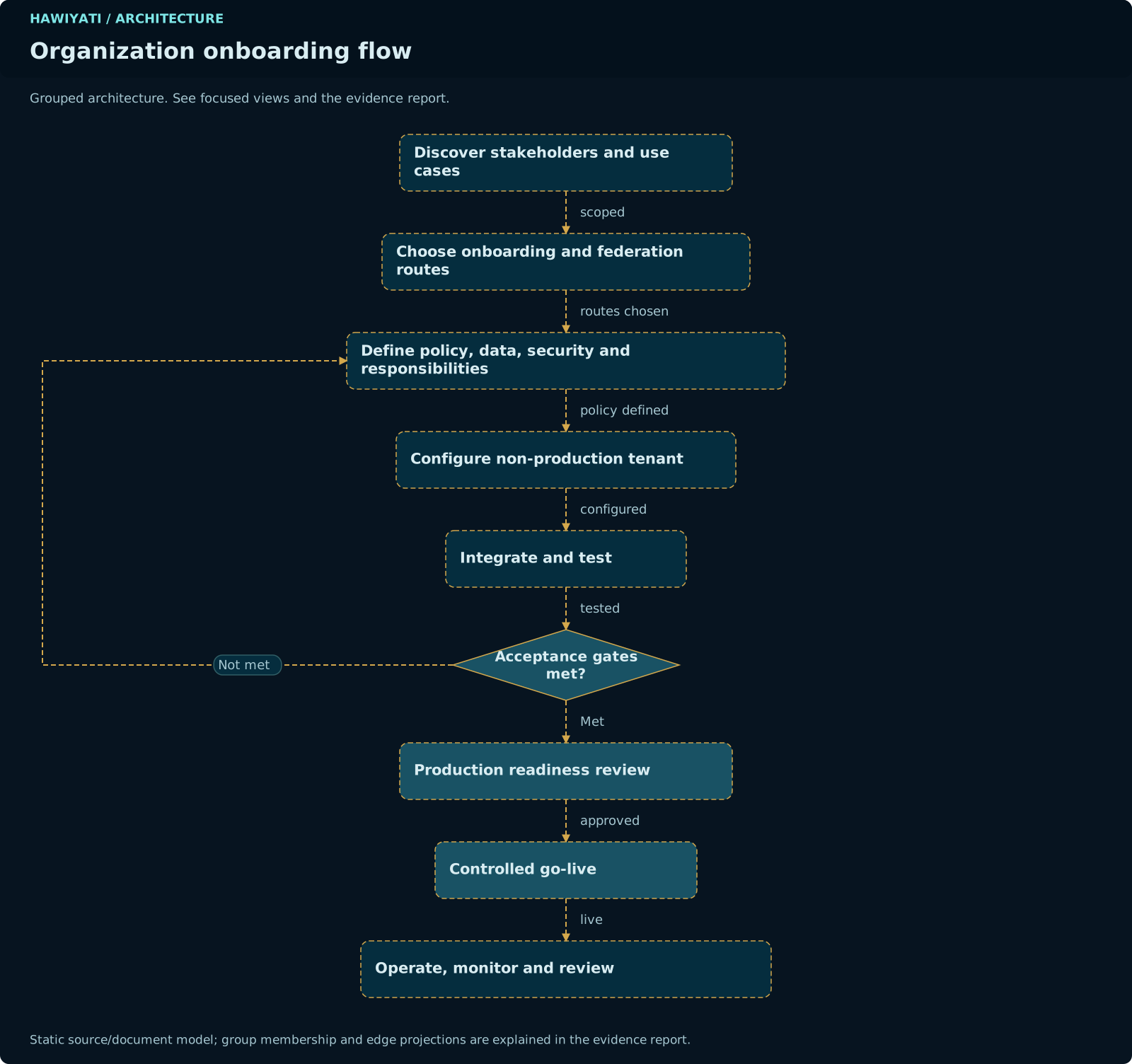
This guide walks your team from initial planning through production go-live. A standard Hawiyati deployment takes 4–8 weeks depending on the number of SP integrations and the complexity of your identity infrastructure.
The sections below cover the implementation lifecycle and configuration steps. For a conceptual walkthrough of each zone, see the Core Concepts guide.
Hawiyati is an on-premises platform — every deployment is owned and operated by the customer. Hawiyati provides the software, documentation, and support contracts. Your team owns the infrastructure, secrets, user data, and compliance obligations.
SSO (SAML 2.0 and OIDC), full MFA stack, adaptive access engine, LDAP/AD integration, SCIM 2.0, self-service account portal, and admin console are all production-capable. See the product overview for the complete maturity assessment.
gRPC mutual TLS between internal services (currently plain gRPC in dev), secrets management integration (currently config-file secrets), and formal vulnerability assessment are required before processing production traffic.
Implementation Lifecycle
Stakeholders & Roles
A successful Hawiyati deployment requires coordination across four key roles. Identify a named owner for each before starting.
| Role | Primary Responsibilities | Involvement Phases |
|---|---|---|
| IT Administrator | Infrastructure provisioning, JAR deployment, system configuration, certificate management, backup, upgrades | All phases |
| Security Officer | MFA policy decisions, risk engine thresholds, audit log retention policy, vulnerability assessment sign-off | Plan, Configure, Test, Go-Live |
| SP Developer / Application Owner | SP metadata exchange, attribute mapping, integration testing, application-side session handling | Integrate, Test |
| Compliance Officer | KYC policy ownership, audit retention requirements, regulatory alignment, data residency confirmation | Plan, Go-Live |
Infrastructure Sizing
| Resource | Minimum (Pilot) | Recommended (Production) | Notes |
|---|---|---|---|
| CPU | 4 vCPU | 8 vCPU | Argon2id hashing is CPU-intensive. More cores = faster parallel logins. |
| RAM | 8 GB | 16 GB | Java heap + Redis + PostgreSQL shared_buffers. OS needs headroom too. |
| Disk | 50 GB SSD | 200 GB SSD | Audit logs grow. Provision for 12-month retention before resizing. |
| OS | Linux (RHEL 8+, Ubuntu 22+) | RHEL 9 / Ubuntu 24 | SELinux enforcing recommended on RHEL. |
| Java | Java 25 (OpenJDK or GraalVM) | Java 25 LTS | Hawiyati is built and tested on Java 25. Java 21 is NOT supported. |
| PostgreSQL | 16+ | 16 HA (streaming replication) | Two schemas: hawiyati_config (24 tables) and hawiyati_identity (13 tables). |
| Redis / Valkey | Redis 7+ (single node) | Valkey 8 cluster (3 nodes) | Session state and rate-limiting only. Transient data — loss on restart is acceptable if TTLs are short. |
Hawiyati requires Java 25. The minimum listed in earlier documentation (Java 21) is outdated. Confirm java -version shows 25 before attempting startup.
High-Availability Architecture
For production deployments handling >1,000 active users or requiring 99.9%+ uptime:
Network Planning
Service Ports
| Service | Port | Protocol | Exposure | Purpose |
|---|---|---|---|---|
hawiyati-gateway |
8080 | HTTPS | External (users + SPs) | Primary entry point; routes to all internal services |
hawiyati-http-server |
8085 | HTTPS | Via gateway or direct | IdP login flows, SAML ACS, OIDC endpoints |
hawiyati-federation |
8087 | HTTPS | Via gateway | OIDC discovery, token issuance, SAML responses |
hawiyati-admin |
8095 | HTTPS | Internal only (admin network) | Admin console — restrict to admin VLAN or VPN |
hawiyati-account |
8096 | HTTPS | Via gateway | End-user self-service portal |
hawiyati-scim |
8098 | HTTPS | SP-facing (provisioning) | SCIM 2.0 inbound provisioning API |
| Internal gRPC | Various | gRPC (plaintext in dev) | Internal only (loopback or private network) | Service-to-service communication (session, cache, infra) |
Port 8095 (admin console) must never be exposed to the public internet. Restrict it to an admin VLAN or require VPN access. Compromise of the admin console = full platform compromise.
Firewall Rules (minimum required)
| Source | Destination | Port | Reason |
|---|---|---|---|
| Internet / SP servers | hawiyati-gateway | 443 → 8080 | SSO login and SCIM provisioning |
| Admin workstations | hawiyati-admin | 8095 | Admin console |
| Hawiyati services | PostgreSQL | 5432 | Database access |
| Hawiyati services | Redis | 6379 | Cache and session |
| hawiyati-http-server | Email SMTP relay | 587 | OTP and notification email |
| hawiyati-http-server | SMS gateway (HTTP) | 443 | SMS OTP delivery |
TLS & Hostname Planning
Development Environment
Use mkcert to create locally-trusted certificates. The dev profile ships with pre-configured hostnames — add them to your hosts file:
| Service | Dev hostname | Port |
|---|---|---|
| IdP (HTTP server) | dev.hawiyati.org | 8085 |
| Gateway | dev.hawiyati.org | 8080 |
| Admin console | localhost | 8095 |
| SAML SP demo | saml.spdemo.org | 8090 |
| OIDC SP demo | oidc.spdemo.org | 8092 |
| Federation | federation.dev.hawiyati.org | 8087 |
Production TLS Requirements
- Use a publicly-trusted CA (Let's Encrypt, DigiCert, or your org's internal CA) for the IdP hostname.
- The IdP certificate must be available to all SP applications — SPs embed or download the IdP's signing certificate from the SAML metadata or OIDC JWKS endpoint.
- Certificate validity: minimum 12 months. Plan certificate rotation 30 days before expiry.
- SAML signing key rotation requires updating the IdP metadata and coordinating re-configuration with all connected SPs.
- Store private keys in a secrets manager (HashiCorp Vault or equivalent); never commit to version control.
SP Inventory
Before starting integration work, complete a SP inventory. Gather the following for each application that will integrate with Hawiyati:
| Field | SAML 2.0 | OIDC | Notes |
|---|---|---|---|
| Application name | Required | Required | Friendly name shown in admin console |
| Entity ID / Client ID | EntityID (URI, must be unique) | client_id (string) | Hawiyati assigns OIDC client_id; SP provides SAML EntityID |
| ACS URL / Redirect URI | ACS URL (HTTPS required) | redirect_uri list | Where Hawiyati sends the authentication response |
| Logout URL | SLO URL (optional) | post_logout_redirect_uri | Required for SLO chain to function |
| Required attributes/claims | NameID + attribute statements | Scopes + claims | e.g., email, groups, assurance_level, employee_id |
| MFA requirement | ALLOW / MFA_REQUIRED / MFA_STRONG / DENY | Drives authentication policy assignment | |
| Network zone | Corporate / Remote / Any | If different policies apply by network location | |
Register SPs one at a time. Start with a low-criticality test application before touching production systems. Confirm the full login + logout cycle before moving to the next SP.
User Store Decision
Hawiyati supports three user store modes. Choose one before configuration — changing user store mode after deployment requires data migration.
| Mode | Description | When to use | Limitations |
|---|---|---|---|
| LOCAL | Users managed entirely in Hawiyati's PostgreSQL database. Passwords hashed with Argon2id. | Greenfield deployments with no existing directory. New user populations (e.g., citizen-facing portals). | No sync with existing directory. Users managed only through Hawiyati admin console or SCIM. |
| LDAP / AD | Hawiyati binds to your LDAP/Active Directory. Authentication is pass-through bind; user attributes synced on login. | Organizations with existing AD/LDAP directory. Employees already in AD who need SSO. | Password reset and lockout must be managed in AD. LDAP connectivity is a runtime dependency. |
| SQL (external) | Hawiyati reads users from an external SQL table via a read-only bridge. Partial support. | Existing applications with their own user database. Migration bridge while transitioning. | Partial support only — not all features available. Verify capabilities before committing to this mode. |
SCIM 2.0 inbound provisioning is available with the LOCAL user store. When using LDAP, provisioning is managed from AD; SCIM is not required but can co-exist for specific user populations.
MFA Policy Matrix
Before configuring authentication policies, define your MFA requirements per user population and application. Use this matrix as a starting point:
| User Group | Network | Application Sensitivity | Recommended Action |
|---|---|---|---|
| Employees | Corporate network | Low / Standard | ALLOW (password only) |
| Employees | Remote / VPN | Low / Standard | MFA_REQUIRED (TOTP or email OTP) |
| Employees | Any | High (finance, HR) | MFA_STRONG (TOTP or FIDO2 required) |
| Administrators | Any | Admin console | MFA_STRONG (FIDO2 recommended) |
| Contractors | After hours | Any | DENY |
| External / Citizens | Any | Self-service portal | MFA_REQUIRED (email OTP for low-friction) |
| High-assurance users (L3/L4) | Any | Regulated systems | MFA_STRONG (FIDO2 or TOTP) |
Authentication policies use first-match semantics. The risk engine may override with a stricter action. Final effective action follows strictness order: ALLOW < MFA_ANY < MFA_STRONG < DENY. The strictest wins.
application.yml Configuration Guide
Each Hawiyati service reads its configuration from application.yml (and profile-specific overlays). Key sections to configure before first startup:
Database Connection
Redis Connection
Session Configuration
Password Policy
Email Gateway
SMS Gateway
Database Migrations (Flyway)
Hawiyati uses Flyway for schema management. Migrations run automatically on service startup. Never use spring.jpa.hibernate.ddl-auto=create or update — Flyway is the sole schema authority.
As of this release, the current Flyway migration head is V62. A fresh install runs all migrations from V1 to V62. Upgrades run only the new migrations since the last installed version.
Two Database Schemas
| Schema | Tables | Purpose |
|---|---|---|
hawiyati_config |
24 tables | SP registry, authentication policies, admin operators, LDAP configuration, system settings, risk engine rules, network zones |
hawiyati_identity |
13 tables | Users, credentials, sessions, consent records, KYC profiles and sessions, FIDO2 credentials, audit events |
Backup Before Migration
Always take a PostgreSQL backup before deploying a new Hawiyati version:
SP Registry Configuration
Service Providers can be registered via the admin console (recommended) or by editing config/hawiyati-infra/sp-registry.yml for bulk registration.
SAML SP Entry
OIDC Client Entry
Secrets Management
Passwords, API keys, signing keys, and OIDC client secrets must never be committed to version control. Use environment variables, HashiCorp Vault, or your organization's secrets manager.
Required Secrets
| Secret | Description | Rotation |
|---|---|---|
HAWIYATI_DB_PASSWORD |
PostgreSQL application user password | Annually or on compromise |
HAWIYATI_REDIS_PASSWORD |
Redis authentication password | Annually |
HAWIYATI_SMTP_PASSWORD |
Email relay authentication credential | Per SMTP provider policy |
HAWIYATI_SMS_API_KEY |
SMS gateway API key | Per gateway provider policy |
| SAML signing key (PEM) | RSA private key for signing SAML assertions | Every 2 years (coordinate with SPs) |
| OIDC signing key (JWK) | RSA private key for signing ID tokens (RS256) | Annually (rolling rotation, old keys kept 24h for in-flight tokens) |
| Encryption key (AES-256) | Symmetric key for encrypting TOTP secrets and sensitive fields at rest | Planned — not yet externalized to vault |
Environment Variable Injection
Dev vs Production Profile Differences
| Setting | Dev Profile | Production Profile |
|---|---|---|
| TLS certificates | mkcert self-signed | Public CA or internal CA |
| gRPC transport | Plaintext | Mutual TLS (when hardened) |
| Secrets | Config file (application-dev.yml) | Environment variables / Vault |
| Logging level | DEBUG | WARN / ERROR |
| CORS | Permissive | Strict allowlist |
| Demo SPs | hawiyati-saml-sp-demo (8090), hawiyati-oidc-sp-demo (8092) | Not deployed |
| Risk engine mode | MONITOR (logs, does not block) | ENFORCE |
| Admin console | localhost:8095 (HTTP) | Internal hostname (HTTPS, restricted) |
SP Integration Checklist
Repeat this checklist for each Service Provider being integrated:
- ☐Identify protocol — confirm SAML 2.0 or OIDC based on SP capability
- ☐Gather SP metadata — for SAML: EntityID, ACS URL, SLO URL, SP certificate; for OIDC: redirect URIs, required scopes
- ☐Register in admin console — create application entry; supply required fields; save
- ☐Exchange IdP metadata — for SAML: download IdP metadata from
/saml/metadataand upload to SP; for OIDC: share discovery URL/.well-known/openid-configuration - ☐Configure attribute mapping — map Hawiyati user attributes to SP's expected attribute names or claims
- ☐Assign authentication policy — select or create the correct policy (MFA level, network zone conditions)
- ☐Test SP-initiated login — start login from the SP and verify end-to-end authentication
- ☐Test logout — verify SLO chain invalidates both IdP and SP sessions
- ☐Verify attribute values — confirm the SP receives correct attribute values (email, groups, assurance_level)
- ☐Check audit log — confirm AUTH events appear in Hawiyati audit log for test logins
SCIM Provisioning Setup
Hawiyati's SCIM 2.0 inbound API allows external systems (HR platforms, enterprise directories) to provision and manage users automatically.
https://idp.hawiyati.org/scim/v2, Authentication = Bearer token, Provisioning = Users and Groups.{"active": false}. Verify the user's Hawiyati account transitions to INACTIVE and all active sessions are terminated.Hawiyati's SCIM extension supports only: externalId, sourceInstanceId, pendingApproval. Credential fields, assurance level, and KYC data are explicitly excluded from the SCIM API surface by design.
LDAP / Active Directory Setup
Configure LDAP integration in application.yml under the hawiyati.ldap namespace. The bind account requires read access to the user subtree.
Always use ldaps:// (port 636) in production. Plain ldap:// sends credentials over the network in clear text.
Responsibility Matrix
Hawiyati is an on-premises platform. The table below defines clear ownership boundaries between Hawiyati (the vendor) and the customer.
| Area | Hawiyati Provides | Customer Responsible For |
|---|---|---|
| Platform Software | JAR packages, configuration templates, Flyway migrations, release notes, upgrade guides | Deploying and upgrading the software, applying patches promptly |
| Infrastructure | Minimum requirements, sizing guidance, architecture reference | Servers, VMs, containers, OS, PostgreSQL, Redis, network, load balancers |
| TLS Certificates | Documentation, mkcert scripts for dev, certificate format requirements | Obtaining, installing, monitoring, and renewing production TLS certificates |
| User Data | Encryption at rest for sensitive fields (TOTP secrets, credentials), secure session handling | Data residency compliance, backup, retention policy, GDPR/regulatory obligations |
| SP Integration | SAML/OIDC/SCIM protocol implementation, integration documentation, SP demo environments | SP metadata exchange, attribute mapping decisions, SP-side configuration, end-to-end testing |
| KYC Compliance | KYC workflow engine, OCR/MRZ tooling, document capture UI, reviewer queue | Lawful purpose, applicant notice, acceptable document policy, reviewer authority, appeal process, regulatory equivalence claims |
| Audit Retention | Structured audit log with database storage, export to CSV/JSON, CEF/syslog output | Audit retention period, archival, deletion schedule, regulatory reporting |
| Incident Response | Support contract (tiered response times), security advisory notifications, CVE patching | Incident response plan, on-call runbook, forensic investigation, breach notification obligations |
| Business Continuity | High-availability architecture guidance, upgrade/rollback procedures | DR plan, backup automation, failover testing, RTO/RPO targets |
Testing & Acceptance
Acceptance Checklist
All items must pass before go-live approval. Run with a dedicated test user account and a test SP application separate from production systems.
| Test Case | Steps | Expected Result | Pass? |
|---|---|---|---|
| SAML SSO Login | Navigate to SAML SP → click login → authenticate at Hawiyati IdP | User redirected back to SP, authenticated, correct attributes in assertion | ☐ |
| OIDC SSO Login | Navigate to OIDC SP → click login → authenticate at Hawiyati IdP with PKCE | ID token received, claims correct, SP session established | ☐ |
| TOTP Enrollment | Login → security settings → enroll TOTP → scan QR with authenticator app → verify first code | TOTP enrolled, subsequent logins require TOTP code | ☐ |
| FIDO2 Enrollment | Login → security settings → add security key → follow browser prompts → verify | FIDO2 credential stored, subsequent logins accept key tap | ☐ |
| Password Reset | Click "Forgot password" → enter email → receive reset email → set new password → login | Password reset completes, old password rejected, new password accepted | ☐ |
| Account Lockout | Enter wrong password 5 times consecutively | Account locked; lockout message shown; login blocked for configured duration (15 min default) | ☐ |
| SAML SLO | Log in via SAML SP → logout from SP | SLO request received by IdP, Hawiyati session terminated, user cannot reuse SAML session | ☐ |
| OIDC Logout | Log in via OIDC SP → logout (RP-initiated) | Hawiyati session invalidated, user redirected to post-logout URI | ☐ |
| SCIM User Provision | POST /scim/v2/Users with required fields | User created in MIGRATED_UNCLAIMED state; appears in admin console | ☐ |
| SCIM User Deactivate | PATCH /scim/v2/Users/{id} with active=false | User's account set to INACTIVE; active sessions terminated | ☐ |
| Audit Log Capture | Perform test login → open admin console → Audit Logs → search for test user | AUTH.LOGIN event appears with correct actor, outcome, timestamp | ☐ |
| Admin Console Access | Navigate to localhost:8095 → login as admin → verify all sections accessible | Admin console loads, users/groups/applications/policies/audit all visible | ☐ |
| Risk Engine (MONITOR mode) | Login from unrecognized browser → check risk engine logs | NEW_DEVICE signal logged; MONITOR mode does not block; risk score calculated | ☐ |
Performance Baseline
Run a load test before go-live to establish your performance baseline. Minimum requirements:
hawiyati.scim.rate-limit if needed.hikaricp.connections.pending in Prometheus metrics.Go-Live Readiness
All of the following must be confirmed before cutting DNS to production:
- ☐All acceptance tests pass — every item in the acceptance checklist marked as passed
- ☐TLS certificates valid — production certificates from a trusted CA, validity period ≥12 months from go-live date
- ☐Monitoring alerts configured — Prometheus alerts for service down, error rate spike, login failure rate spike, certificate expiry
- ☐Backup verified — automated PostgreSQL backup running, last backup restored and verified on test environment
- ☐Rollback plan documented — step-by-step procedure to revert DNS and restore previous identity infrastructure within RTO
- ☐On-call runbook published — runbook covers: service down, user lockout, certificate expired, LDAP connectivity failure, high error rate
- ☐SP owners notified — all SP application owners informed of go-live date, contact information for issues, expected maintenance windows
- ☐Risk engine set to ENFORCE — switch from MONITOR to ENFORCE in production configuration
- ☐Secrets rotated from dev values — confirm all production secrets are different from dev/test values
- ☐Admin console access restricted — confirm port 8095 is not reachable from the public internet; VPN or admin VLAN required
DNS Cutover Sequence
Post Go-Live Monitoring
The first 48 hours after go-live are the highest-risk period. A named on-call person should be monitoring actively.
First 48 Hours Checklist
- ☐Login success rate — monitor login:success / login:failure ratio in Prometheus. Sudden spike in failures = likely misconfiguration or attack
- ☐MFA fallout — watch for users unable to complete MFA. Have admin contact ready to assist with TOTP reset or backup code
- ☐SP connectivity — verify each registered SP receives login events. No events from an expected SP = likely ACS URL or attribute mapping issue
- ☐Audit log streaming — confirm events are flowing to SIEM if configured
- ☐Database growth — monitor disk usage; confirm Flyway migration completed cleanly
- ☐Redis memory — watch
redis_memory_used_bytes; session accumulation at peak should be within capacity - ☐Error log review — review application ERROR-level logs daily for the first week; unknown errors need root cause analysis
First-Week Review
After the initial stabilization period, see the Operations Guide for routine maintenance procedures: certificate renewal, database vacuuming, Hawiyati upgrades, and backup verification schedules.