Security
Security Architecture Overview
Hawiyati implements a layered security model. No single control is relied upon exclusively; controls at each layer compensate for weaknesses in adjacent layers.
The sections below cover security controls and hardening. For a full module map with ports, gRPC boundaries, and deployment topology, see the Implementation Guide.
Defence-in-Depth Layers
| Layer | Controls | Where enforced |
|---|---|---|
| Perimeter | TLS termination, WAF rules, IP blocklist, rate limiting at edge | Reverse proxy / load balancer |
| Authentication | Password hashing (Argon2id), TOTP, FIDO2/WebAuthn, OTP, recovery codes, step-up MFA, account lockout | hawiyati-http-server |
| Risk Engine | NEW_DEVICE, GEO_VELOCITY, LOGIN_VELOCITY, IP_REPUTATION signals; adaptive MFA escalation or deny | hawiyati-federation |
| Authorization | Authentication policies (first-match rules), group-based access, network zone conditions, time windows | hawiyati-federation |
| Data | AES-256-GCM encryption for sensitive fields, Argon2id for passwords, TLS for transport, encrypted backups | hawiyati-persistence, hawiyati-utils |
| Audit | Structured CEF/JSON audit events for every auth, admin, KYC, and SCIM action; immutable append-only log | hawiyati-audit |
Trust Boundary Zones
Hawiyati is deployed across five logical trust zones. Controls at each boundary limit the blast radius of a compromise.
Shared Responsibility
| Responsibility | Hawiyati | Customer |
|---|---|---|
| Platform software security | ✓ Provides secure defaults, patches | Applies updates promptly |
| Infrastructure hardening | Guidance (this document) | ✓ Owns OS, hypervisor, network |
| TLS certificates | Configuration support | ✓ Procures, rotates, monitors expiry |
| User data protection | ✓ Encryption at rest and in transit | ✓ Data governance, retention policy |
| KYC compliance | ✓ Workflow tooling | ✓ Lawful purpose, regulatory compliance |
| Audit log retention | ✓ Produces structured audit events | ✓ Retention duration, SIEM integration |
| Incident response | Support escalation | ✓ IR plan, on-call runbook |
Cryptography & Key Management
Hawiyati applies purpose-fit cryptographic primitives at every sensitivity boundary. No MD5, SHA-1, or DES is used anywhere in the platform.
Cryptographic Primitive Reference
| Data / Operation | Algorithm | Parameters / Notes |
|---|---|---|
| Password hashing | Argon2id | memory=64 MB, iterations=3, parallelism=1; OWASP recommended minimum |
| SAML assertion signing | RSA-SHA256 (RS256) | 2048-bit key minimum; 4096-bit recommended for production |
| OIDC ID token signing | RS256 | Same key infrastructure as SAML; served via /oauth2/jwks |
| TOTP secret storage | AES-256-GCM | Secret encrypted at rest in PostgreSQL; per-installation key from hawiyati-utils |
| FIDO2 credentials | Device-native (P-256 / Ed25519) | Public key only stored; private key never leaves the authenticator device |
| Session tokens | CSPRNG 256-bit | Opaque bearer token; stored reference in Redis with short TTL |
| OTP codes (email / SMS) | CSPRNG | 6-digit numeric; 5-minute TTL; per-MSISDN / per-address rate-limited |
| Claim tokens | CSPRNG 256-bit + HMAC-SHA256 | 256-bit random; HMAC-SHA256 stored; 15-min TTL; single-use |
| Completion tokens | CSPRNG 256-bit + HMAC-SHA256 | Same mechanics as claim tokens; narrow route allowlist enforced at redemption |
| Document fingerprints | HMAC-SHA256 | Of normalised country|docType|docNumber; duplicate = review signal, not hard block |
| Database column encryption | AES-256-GCM | Applied to PII fields (national ID numbers, biometric scores); key managed by hawiyati-utils |
| gRPC transport (recommended) | TLS 1.3 | mTLS recommended for internal gRPC zone |
Key Rotation Procedures
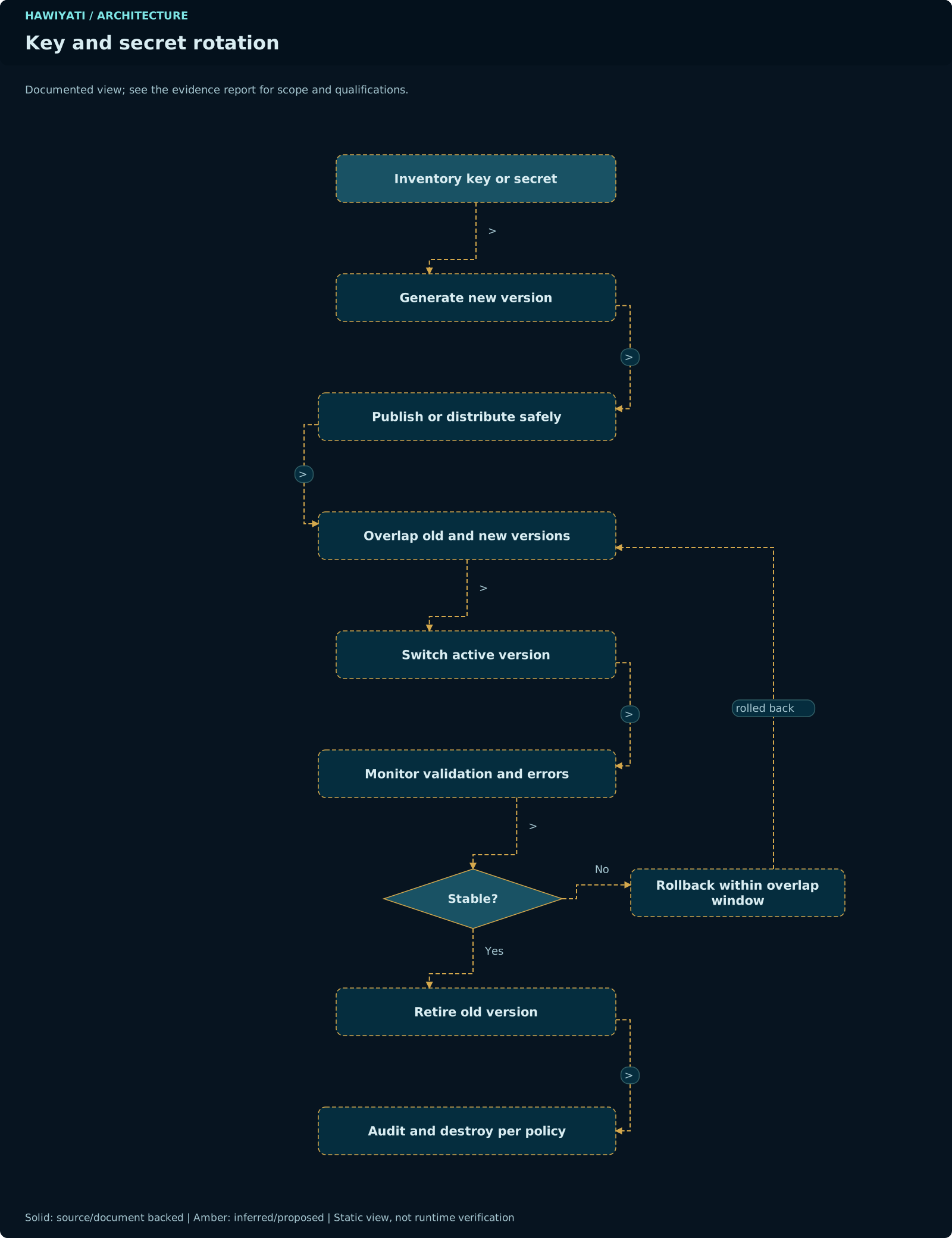
SAML Signing Key Rotation
- Generate new RSA key pair and self-signed certificate.
- Add new certificate to IdP metadata (dual-certificate mode) — share updated metadata with all SPs.
- Wait for SP metadata propagation (typically 24–48 hours for enterprise SPs).
- Switch signing to new key; retain old key for assertion validation during overlap window (recommend 7 days).
- Remove old certificate from metadata after overlap window closes.
Switching signing keys without a grace period causes SP signature validation failures for any in-flight assertions signed with the old key. Always run dual-certificate mode for at least one business day.
OIDC JWKS Key Rotation
- Generate new RSA key pair.
- Add new key to JWKS endpoint (
/oauth2/jwks) — the endpoint will serve both old and new keys. - Begin signing new tokens with the new key (set
kidin JWT header to new key ID). - Retain old key in JWKS for token validation during overlap (recommend 24 hours — cover maximum token TTL).
- Remove old key from JWKS after overlap window.
Encryption Key Rotation (AES-256-GCM)
For TOTP secrets and encrypted database columns, rotation requires a re-encryption pass over affected rows. Run during a maintenance window; hawiyati-persistence supports dual-key mode during the transition. Contact support for assisted key rotation procedures.
Storing private keys in a Hardware Security Module (HashiCorp Vault, cloud KMS, or a dedicated HSM appliance) prevents key extraction even if the application server is compromised. Configure hawiyati-utils to delegate signing operations to the HSM rather than loading keys into JVM memory.
RBAC Reference
Admin console access is governed by three built-in admin operator roles. There is no per-SP or per-group scoping at this time.
| Role | User Management | SP / Policy Management | Risk & Audit | Admin Management |
|---|---|---|---|---|
| SUPER_ADMIN | Full (create, edit, delete, lock, unlock, approve) | Full (create, edit, delete, assign) | Full (view, export, configure) | ✓ Can create / modify / delete other admins |
| ADMIN | Full (create, edit, delete, lock, unlock, approve) | Full (create, edit, delete, assign) | Full (view, export, configure) | ✗ Cannot modify admin operators |
| VIEWER | Read-only (view user list and status) | Read-only (view SP and policy list) | Read-only (view audit log, no export) | ✗ Cannot modify anything |
Admin Audit Trail
Every admin console action — user creation, policy modification, SP registration, role assignment, audit log export — generates a structured audit event with the operator's identity, timestamp, action, target object, and outcome. These events cannot be deleted through the admin console and are included in audit log exports.
Grant VIEWER to audit staff who only need to review logs. Grant ADMIN to operators who manage users and SPs. Reserve SUPER_ADMIN for the one or two individuals who need to manage admin accounts. Avoid sharing admin credentials — each operator should have an individual account.
Admin Operator Management
- Navigate to Admin → Operators to view and manage admin accounts.
- Create operators with a username, email, initial password, and role assignment.
- Operators log in at the admin console URL (default:
https://localhost:8095). - Admin sessions are separate from end-user sessions (different cookie domain and TTL).
- Admin accounts are subject to the same lockout policy as end users (configurable).
- SUPER_ADMIN can force-reset any operator's password or revoke their session.
Authentication Security
Hawiyati applies multiple compensating controls to prevent credential theft, session hijacking, and brute-force attacks.
Session Cookie Security
| Attribute | Value | Purpose |
|---|---|---|
HttpOnly | true | Prevents JavaScript access; mitigates XSS-based session theft |
Secure | true | Cookie sent only over HTTPS; prevents interception on plain HTTP |
SameSite | Strict | Prevents CSRF by blocking cross-site cookie transmission |
| Host binding | Exact hostname match | Cookie scoped to dev.hawiyati.org, not .hawiyati.org |
| Path | / | Available across all IdP paths |
Session cookies with Secure flag are silently dropped by browsers over plain HTTP. Running Hawiyati without TLS renders all session management ineffective. Never deploy to production without TLS.
CSRF Protection
Hawiyati uses the Double Submit Cookie pattern combined with SameSite=Strict. All state-changing POST endpoints require a valid CSRF token in the request body that matches the value stored in the CSRF cookie. SAML and OIDC protocol endpoints are exempt (they validate cryptographic assertions instead).
Session Token Lifecycle
- Issuance: 256-bit CSPRNG token issued on successful authentication; stored in Redis with the configured TTL (default 8 hours, configurable).
- Rotation on step-up: When MFA is satisfied after an initial username/password step, the session token is rotated to prevent session fixation.
- Concurrent sessions: Multiple simultaneous sessions are permitted by default. Configure a maximum-session limit per user in Admin → Settings → Session Policy.
- Explicit logout: Token deleted from Redis immediately on logout; any subsequent request with the revoked token is rejected.
- Expiry: TTL enforced server-side in Redis; client-side cookie expiry is advisory only.
Account Lockout
| Threshold | Default | Consequence | Resolution |
|---|---|---|---|
| Failed login attempts (1st lockout) | 5 failures | Account locked for 15 minutes | Auto-unlocks; user can retry after TTL |
| Failed login attempts (2nd lockout) | 5 more failures after 1st unlock | Account locked for 30 minutes | Auto-unlocks after TTL |
| Persistent failures | Configurable escalation | Account locked indefinitely | Admin must manually unlock via admin console |
Thresholds and TTLs are configurable in Admin → Settings → Security → Lockout Policy. The risk engine's LOGIN_VELOCITY signal provides complementary IP-level rate limiting.
Brute-Force Detection
The risk engine's LOGIN_VELOCITY signal detects brute-force and credential-stuffing patterns at the IP level, independent of per-user lockout. When the signal fires, the risk action (MFA_STRONG or DENY) applies even if the individual user account has not reached its lockout threshold. This provides protection against slow-and-low attacks spread across many accounts.
Network Security
Secure network configuration is the customer's responsibility. These are the required controls and recommended configurations.
TLS Requirements
| Endpoint | Minimum | Recommended |
|---|---|---|
| External HTTP (8080, 8085) | TLS 1.2 | TLS 1.3 |
| Admin console (8095) | TLS 1.2 | TLS 1.3 |
| SCIM API (8098) | TLS 1.2 | TLS 1.3 |
| Internal gRPC | TLS 1.2 | mTLS (mutual authentication) |
| PostgreSQL connection | TLS (require mode) | TLS 1.3 + client cert |
| Redis connection | TLS | TLS 1.3 + AUTH password |
Cipher Suite Hardening
Disable the following weak cipher suites at the reverse proxy / TLS terminator:
# Ciphers to disable
RC4 variants (RC4-SHA, RC4-MD5)
3DES (DES-CBC3-SHA)
Export-grade ciphers (EXP-*)
NULL ciphers
Anonymous key exchange (aNULL, eNULL)
MD5-based MACs

# Recommended TLS 1.3 ciphers (preferred order)
TLS_AES_256_GCM_SHA384
TLS_CHACHA20_POLY1305_SHA256
TLS_AES_128_GCM_SHA256

# TLS 1.2 fallback (if 1.2 required)
ECDHE-ECDSA-AES256-GCM-SHA384
ECDHE-RSA-AES256-GCM-SHA384
ECDHE-ECDSA-AES128-GCM-SHA256
Security Headers
| Header | Recommended Value | Purpose |
|---|---|---|
Strict-Transport-Security | max-age=31536000; includeSubDomains | Enforce HTTPS for 1 year |
X-Content-Type-Options | nosniff | Prevent MIME type sniffing |
X-Frame-Options | SAMEORIGIN | Prevent clickjacking (SAML login UI) |
Referrer-Policy | strict-origin-when-cross-origin | Limit referrer leakage from SAML redirects |
Content-Security-Policy | Configure per-endpoint (strict CSP for admin console) | Mitigate XSS |
Firewall Rules
Only ports 8080 (gateway) and 8085 (IdP HTTP) should be reachable from the external network. The admin console (8095) and SCIM API (8098) must be restricted to internal networks or VPN-only access.
| Port | Service | External | Internal | Admin/VPN |
|---|---|---|---|---|
| 8080 | Gateway | ✓ Open | ✓ | ✓ |
| 8085 | IdP HTTP Server | ✓ Open | ✓ | ✓ |
| 8087 | Federation (gRPC) | ✗ Blocked | ✓ | ✓ |
| 8095 | Admin Console | ✗ Blocked | ✗ | ✓ VPN only |
| 8098 | SCIM API | ✗ Blocked | ✓ Allow from provisioner IPs | ✓ |
| 5432 | PostgreSQL | ✗ Blocked | ✓ App servers only | ✗ |
| 6379 | Redis | ✗ Blocked | ✓ App servers only | ✗ |
Reverse Proxy Configuration
- Strip incoming
X-Forwarded-Forheaders and set only trusted proxy IPs. - Strip internal headers (
X-Internal-*,X-Admin-*) before forwarding to application services. - Configure connection timeouts (recommend: read 30s, write 30s, idle 60s).
- Enable WAF rules for OWASP Top 10 — particularly SQL injection and XSS. Whitelist SAML/OIDC XML/JWT payloads to avoid false positives.
KYC Security & Assurance Policy
Identity assurance levels are safety-critical data. Incorrect assurance claims can lead to regulatory violations and security incidents.
Assurance Level Source of Truth
kyc_profiles.current_level
The assurance level for any access control decision must be read from kyc_profiles.current_level in the database. The users.assurance_level column is a denormalised cache used for display only and may be stale. Any integration, policy evaluation, or report that reads assurance level from users.assurance_level is incorrect.
| Level | NIST 800-63A Alignment | Verification Required | Current Status |
|---|---|---|---|
| L0 | IAL1 — Self-asserted | Email or phone ownership only | Available |
| L1 | IAL1 — Remote unattended | Email + phone verified | Available |
| L2 | IAL2 — Remote unattended | Document capture + OCR/MRZ validation | Available |
| L3 | IAL2 — Remote attended | L2 + selfie + liveness detection | Frozen — pending biometric approval |
| L4 | IAL3 — Supervised | L3 + human review gate | Frozen — pending biometric approval |
Document Fingerprinting
When a document is captured during KYC, Hawiyati computes a fingerprint using HMAC-SHA256 of the normalised string country|docType|docNumber. The normalisation step lowercases all fields and strips whitespace before hashing.
If the computed fingerprint matches an existing record, the session is flagged for manual review — it is not automatically rejected. This prevents hard blocks on legitimate shared documents (family members with the same passport number in some jurisdictions) while still surfacing potential fraud for human review.
Biometric Data Handling
- Face match score is stored as
DOUBLE PRECISIONinkyc_sessions.face_match_score. - Raw biometric images (selfie frames, liveness challenge video) are not persisted by Hawiyati by default — vendor-specific retention depends on the configured biometric provider.
- Define your data retention and deletion policy for biometric data before going live with L3/L4 workflows.
Reviewer Accountability
Every manual KYC review decision (APPROVE / REJECT / REQUEST_MORE_INFO) generates an audit event containing the reviewer's operator ID, the KYC session ID, the decision, and the timestamp. Reviewer decisions cannot be edited after the fact. The audit trail is available in the audit log export.
Biometric-level workflows (L3 Strong and L4 High Assurance) are not active in the current release pending biometric provider integration approval. KYC sessions requesting L3/L4 remain in UNDER_REVIEW state until the biometric team manually approves them. Do not rely on automated L3/L4 outcomes for production workflows.
Risk Controls Configuration
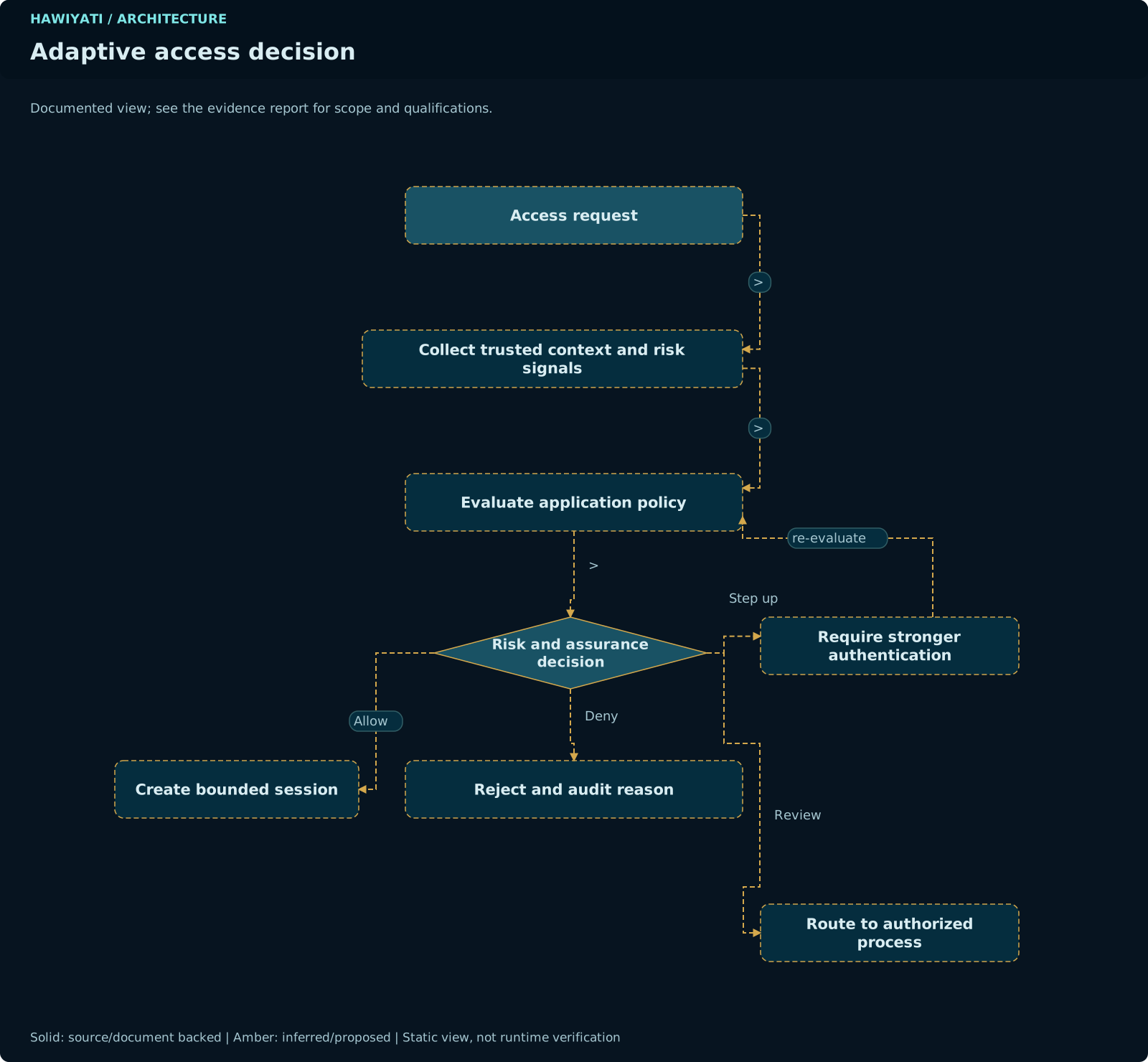
The adaptive risk engine evaluates contextual signals on every login and can escalate the required authentication or block access entirely, independently of static policy rules.
Operating Modes
Risk assessment skipped entirely. No signals evaluated. No performance overhead. Use only when risk engine is not applicable.
Signals evaluated and scored; results recorded in audit log. Risk action never overrides policy. Ideal for initial tuning without user impact.
Risk action overrides policy when stricter. This is the required production mode. Run MONITOR first; switch to ENFORCE once thresholds are tuned.
Risk Action Strictness Order
The final action applied to a login is always the stricter of the policy action and the risk action. The order from least to most restrictive:
No additional step
Any enrolled factor
FIDO2 only
Login blocked
Risk Scoring
Each enabled signal contributes 0–30 points. Points from all signals are summed and capped at 100. The total is mapped to a risk level using configurable thresholds:
In addition to the numeric score, signals can set a minimum-level override that forces the risk level to be at least a given value regardless of score (e.g., IMPOSSIBLE_TRAVEL forces HIGH regardless of other signals).
Signals
Checks the hwd_id cookie (UUID, 400-day TTL) against the user's known devices. A new or revoked device contributes MEDIUM or HIGH risk. First-time users are exempt (enrollment baseline).
Detects physically implausible travel (Haversine distance ÷ elapsed time > 900 km/h = IMPOSSIBLE_TRAVEL with HIGH override). Requires MaxMind GeoIP database. Skipped for private IPs.
Counts failed logins per username and per IP within a 15-minute sliding window. Detects brute-force and credential stuffing. ≥5 user failures or ≥10 IP failures raises MEDIUM; combined ≥25 raises HIGH.
Checks client IP against admin-maintained CIDR blocklists (malicious IPs, TOR exits, anonymous proxies, datacenter ranges). Points and override levels configurable per category. Skipped if no blocklist loaded.
Signal Fail Modes
| Fail Mode | Behaviour on Signal Error | Use Case |
|---|---|---|
OPEN (default) | Signal skipped; no points added; assessment continues with other signals | High-availability scenarios where a GeoIP DB outage should not block users |
CLOSED | Signal contributes a HIGH minimum-level override; user must satisfy FIDO2 MFA until error resolved | High-security environments where unknown risk = deny |
Recommended Production Configuration
- Mode: ENFORCE
- NEW_DEVICE: OPEN fail mode; MEDIUM risk on first new device; HIGH on revoked device
- GEO_VELOCITY: OPEN fail mode (requires GeoIP DB); load MaxMind GeoLite2 City database
- LOGIN_VELOCITY: CLOSED fail mode (brute-force protection is core security); default thresholds are reasonable starting points
- IP_REPUTATION: Import known-bad CIDR lists; review and update monthly
- Monitor MONITOR mode output for 1–2 weeks before switching to ENFORCE; adjust score thresholds to match false-positive tolerance
Open Redirect Prevention
Hawiyati applies specific design controls to prevent open redirect vulnerabilities, which are a common attack vector in SSO implementations.
Continuation Token Design
When a user initiates a SAML or OIDC flow, the SP context (which application the user is trying to reach) must be preserved across multiple redirects. A naive implementation stores the sp_initiation_url directly, which creates an open redirect: an attacker can craft a login URL that redirects the user to an arbitrary destination after authentication.
Hawiyati instead stores only the sp_entity_id foreign key in the continuation token. At redemption time, the destination URL is looked up from the registered SP record in the database — it cannot be supplied by the user or the SP's AuthnRequest for redirection purposes.
If you extend the continuation token schema, do not add a raw URL field. Store the entity ID and look up the registered destination from the SP registry at redemption time. An unvalidated URL in a token is an open redirect waiting to happen.
Claim and Completion Token Route Allowlist
Claim tokens (enterprise account claim) and completion tokens (SP-initiated registration) are 256-bit random values with HMAC-SHA256 stored. They are accepted only on a narrow list of routes that have been explicitly configured to accept them. Any other endpoint that receives a claim or completion token returns a 400 error. This prevents token confusion attacks where a token is submitted to an unintended endpoint.
Relay State Validation
SAML RelayState values are validated against the registered ACS URL prefix for the SP before being used in any redirect. An AuthnRequest that includes a RelayState pointing to a different domain than the registered ACS URL is rejected.
Header Injection Prevention
All HTTP response headers set by Hawiyati are constructed from validated, registered values (SP entity IDs, registered redirect URIs). No user-supplied input is interpolated directly into Location or other redirect headers without prior validation against the SP registry.
Secure Configuration Checklist
Complete this checklist before going live. Each item maps to a specific risk; leaving any CRITICAL item incomplete significantly increases your attack surface.
-
TLS 1.3 enabled on all external endpoints Ports 8080 and 8085 must use TLS 1.3 minimum; configure at the reverse proxy layerCritical
-
Weak cipher suites disabled Remove RC4, 3DES, export-grade, and NULL ciphers from TLS configurationCritical
-
HSTS configured with minimum 1-year max-ageHigh
Strict-Transport-Security: max-age=31536000; includeSubDomains -
Admin console (8095) restricted to VPN or internal network Admin console must never be reachable from the public internetCritical
-
Default admin password changed on first login The factory admin credential must be replaced before any SP is connectedCritical
-
Redis AUTH password set and TLS transport enabled Redis stores active sessions and OTP codes — an unprotected Redis is a critical vulnerabilityCritical
-
PostgreSQL pg_hba.conf restricted to application server IPs Only hawiyati-persistence hosts should be permitted to connect to the databaseCritical
-
Flyway baseline migration confirmed on startup Review Flyway logs on first start to confirm V62 (or later) is the current baseline; no migration errorsHigh
-
Audit log streaming to SIEM configured Configure syslog forwarding so audit events are preserved in a system the application cannot modifyHigh
-
Argon2id parameters reviewed Default (memory=64MB, iterations=3, parallelism=1) meets OWASP minimums; increase for higher-assurance deploymentsMedium
-
Session TTL configured per organisational policy Recommend ≤8 hours for standard deployments; ≤4 hours for high-assurance environmentsMedium
-
Account lockout thresholds reviewed Default 5-failure threshold is suitable for most deployments; review against your brute-force risk toleranceMedium
-
Risk engine in ENFORCE mode MONITOR mode provides visibility only; switch to ENFORCE before go-live to activate adaptive controlsHigh
-
mTLS configured for internal gRPC services Mutual TLS prevents a compromised application-zone host from calling internal gRPC services without a valid certificateHigh
-
Key rotation schedule documented and calendared SAML signing key and OIDC JWKS should be rotated at least annually; add calendar reminders 60 days before due dateMedium
-
No default or shared service accounts enabled Each admin operator should have an individual account; shared credentials prevent attribution in audit logsHigh
-
Database backup encryption confirmed pg_dump backups and WAL archives must be encrypted at rest (AES-256) in the backup storage locationHigh
-
Certificate expiry monitoring configured Alert at 60 days remaining; alert again at 14 days; automate renewal where possibleHigh
-
IP blocklist loaded for IP_REPUTATION signal An empty blocklist means the signal always returns clean; import known-bad CIDR ranges before enabling the signalMedium
-
Penetration test scheduled post go-live Arrange a third-party pen test within 90 days of production launch; include SAML/OIDC token security in scopeMedium
High and Medium items should be completed before go-live where feasible, and remediated within 30 days otherwise. Document any deferred items with an accepted-risk owner and target remediation date.