KYC & Identity Verification
Hawiyati's Know Your Customer (KYC) engine provides identity verification workflows that elevate end-user accounts from unverified (L0) to high-assurance verified (L4). Verification is performed locally — no documents or biometrics are sent to cloud services.
Hawiyati's Know Your Customer (KYC) engine provides identity verification workflows that elevate end-user accounts from unverified (L0) to high-assurance verified (L4). Verification is performed locally — no documents or biometrics are sent to cloud services.
The sections below cover KYC workflows, identity verification, and assurance levels. For a full module map with ports, gRPC boundaries, and deployment topology, see the Implementation Guide.
What is KYC in Hawiyati
Hawiyati's Know Your Customer (KYC) engine provides identity verification workflows that elevate end-user accounts from unverified (L0) to high-assurance verified (L4). Verification is performed locally — no documents or biometrics are sent to cloud services.
KYC in Hawiyati is a multi-stage workflow system that captures document evidence, performs automated OCR and MRZ validation, optionally captures selfie and liveness data, and — for the highest assurance levels — routes sessions to a human reviewer queue. The outcome is a verified assurance level stored in kyc_profiles.current_level, which service providers can query to gate access to sensitive features.
KYC workflows are initiated by end users through the account portal, by service providers redirecting users for verification, or by administrators triggering reverification. The customer organization owns the operational decisions: which documents are acceptable, what assurance level is required per use case, who may serve as a human reviewer, and how to handle appeals.
Hawiyati implements Basic, Standard, Strong, High Assurance, and Reverification workflows. Workflow names and L2/L3/L4 implementation outcomes do not by themselves establish regulatory equivalence for any specific jurisdiction.
Assurance Levels L0–L4
Hawiyati uses five assurance levels aligned with NIST SP 800-63A-4. Each level represents a higher degree of confidence in the claimed identity.
| Level | Badge | Name | Evidence Required | KYC Workflow | What it enables |
|---|---|---|---|---|---|
| L0 | L0 | Unverified | None — account created, email or phone present | — | Basic SP access where no identity assurance is required |
| L1 | L1 | Basic | Email and phone number both verified via OTP | Basic | SP access requiring verified contact information; reduced velocity limits |
| L2 | L2 | Standard | Government-issued photo ID (OCR + MRZ validation) | Standard | Regulated services, financial applications, government portals |
| L3 | L3 | Strong | Photo ID + selfie with passive liveness + face match | Strong | High-value transactions, healthcare, sensitive government services — frozen until biometric review approved |
| L4 | L4 | High Assurance | L3 evidence + human reviewer approval gate | High Assurance | Critical national infrastructure access, high-value financial operations — frozen until human review complete |
Accounts that complete L3 or L4 verification steps remain in UNDER_REVIEW status until a biometric reviewer (L3) or human reviewer (L4) grants approval. The user's assurance level in kyc_profiles.current_level is not elevated until the reviewer action is recorded. Service providers must handle the UNDER_REVIEW intermediate state gracefully.
Assurance Level and SP Policy
Service providers declare a minimum assurance level in their policy configuration. When a user authenticates to an SP with a minimum assurance requirement, Hawiyati evaluates kyc_profiles.current_level against the SP's configured minimum:
- If
current_level >= minimum_level→ authentication proceeds - If
current_level < minimum_level→ user is redirected to the KYC portal to complete verification before access is granted - If a KYC session is
UNDER_REVIEW→ SP receives an intermediate response; it should display a "verification pending" message
Source of Truth for Assurance Level
The users.assurance_level column exists for historical reasons and must never be used as the authoritative assurance level. It may be stale or inconsistent. The only authoritative source is kyc_profiles.current_level in the hawiyati_identity schema.
| Column | Table | Schema | Use |
|---|---|---|---|
current_level |
kyc_profiles |
hawiyati_identity |
Authoritative. Always use this. |
assurance_level |
users |
hawiyati_identity |
Legacy column. Do not read or write. Pending deprecation. |
All Hawiyati services that need the assurance level must query kyc_profiles joined on user_id. The kyc_profiles row is created when the first KYC session is initiated and updated each time a session reaches a terminal approved state.
KYC Workflow Overview
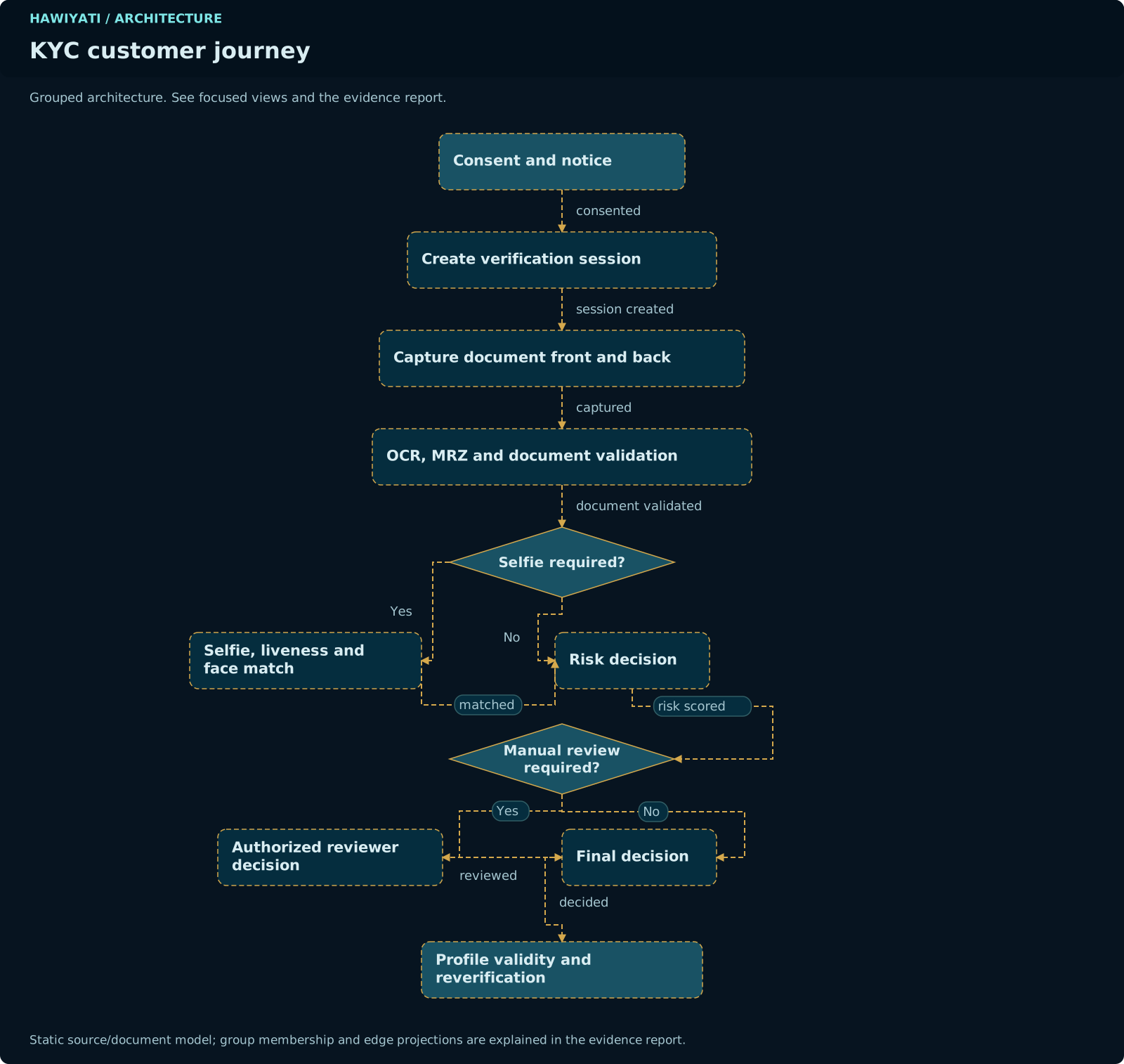
All KYC workflows share a common skeleton. They differ in which verification steps are mandatory and whether a human review gate is included before the final decision.
kyc_sessions row created with status IN_PROGRESS for the selected workflow type.DOCUMENT_SUBMITTED.face_match_score). Strong and L4 also run passive liveness detection. Skipped for Basic (L1) workflow.UNDER_REVIEW.kyc_profiles.current_level updated to target assurance level; session → APPROVED. Completion token issued to SP. Audit event emitted.REJECTED: session →
REJECTED; assurance level unchanged; retry per policy.Common Flow Steps
kyc_sessions row is created in state IN_PROGRESS with the configured workflow type (BASIC, STANDARD, STRONG, HIGH_ASSURANCE, REVERIFICATION). The session binds to the authenticated user and the originating SP context.DOCUMENT_SUBMITTED.kyc_sessions.face_match_score (DOUBLE PRECISION).kyc_profiles.current_level is updated to the workflow's target assurance level. The session enters APPROVED state. An audit event is emitted. On REJECTED: session enters REJECTED state; kyc_profiles is unchanged.Basic Workflow (L1)
The Basic workflow elevates an account to L1 by verifying both email address and phone number via one-time codes. No document capture is required.
IN_PROGRESS.users.email_verified = true is set and the email verification event is audited.users.phone_verified = true is set.kyc_profiles.current_level set to L1. Session state: APPROVED. Audit event emitted.Standard Workflow (L2)
The Standard workflow elevates an account to L2 by verifying a government-issued photo ID and capturing a selfie for face matching.
face_match_score. Threshold is configurable per policy.kyc_profiles.current_level set to L2. Session: APPROVED.Strong Workflow (L3)
The Strong workflow elevates an account to L3 by adding passive liveness detection to the selfie step. L3 sessions enter UNDER_REVIEW pending biometric team approval.
Even when all automated checks pass, the session remains in UNDER_REVIEW and kyc_profiles.current_level remains at its prior value until a biometric reviewer explicitly approves the session in the admin console.
The Strong workflow follows the same steps as Standard, with the addition of passive liveness detection at step 4. The liveness module analyzes the selfie image for indicators of a live subject (anti-spoofing). If liveness fails, the session is immediately rejected; the user may retry after a configured cooling-off period.
L3 Biometric Review Queue
After all automated checks pass, the session enters the Biometric Review Queue in the admin console. A reviewer with the BIOMETRIC_REVIEWER role sees the session evidence: ID front/back images, the selfie, the face match score, and the liveness signal result. The reviewer can:
- APPROVE —
kyc_profiles.current_levelupdated to L3 - REJECT — session moves to REJECTED;
kyc_profilesunchanged - REQUEST_MORE_INFO — session remains in UNDER_REVIEW; user receives notification
High Assurance Workflow (L4)
The High Assurance workflow elevates an account to L4. It includes all Strong workflow steps plus a mandatory human reviewer gate before any approval is granted.
High Assurance sessions can never be auto-approved. Every L4 session must pass through the human review gate. The review queue must be staffed during business hours. Unreviewed sessions remain in UNDER_REVIEW indefinitely until a reviewer acts.
The High Assurance workflow collects the same evidence as Strong (document + liveness selfie + face match), then unconditionally routes to the human reviewer queue. The reviewer sees the full evidence package and applies their judgment before an approval decision is recorded. All reviewer actions are audit-logged with the reviewer's identity, timestamp, and any notes provided.
Reverification Workflow
Reverification allows an already-verified user to re-submit evidence to renew their assurance level or to re-verify after a document expiry or a security event.
Reverification is triggered when:
- The user's identity document captured during a previous verification session has expired
- An SP requires re-verification at a configured interval (e.g., annually for financial services)
- An administrator marks the user's KYC profile as
REVERIFICATION_REQUIRED - A security event (e.g., suspected account takeover) triggers re-verification as a protective measure
During reverification, the user follows the same steps as their original workflow type. If the reverification succeeds, kyc_profiles.current_level is refreshed (the timestamp updated). If the reverification fails or is rejected, kyc_profiles.current_level may be downgraded depending on the configured downgrade policy.
The user may re-submit the same document type or switch to a different accepted document. The document fingerprint is re-computed. If the new fingerprint matches a previously seen fingerprint from a different user, the duplicate signal routes the session to manual review.
KYC Session States
Each KYC session has a lifecycle tracked in kyc_sessions.status. States are named constants defined in KycWorkflowCode.java.
kyc_profiles.current_level has been updated to the target assurance level. Terminal state.State Transition Flow
The diagram below shows how a KYC session moves through states for each workflow type. ⇢ indicates a conditional branch.
⇢ OCR/MRZ fail, liveness fail →
REJECTED
⇢ 30 min inactivity →
EXPIRED⇢ All checks pass (Basic/Standard, no risk flag) →
APPROVED
⇢ Duplicate fingerprint, low face score, or L3/L4 workflow →
UNDER_REVIEW⇢ Reviewer approves →
APPROVED
⇢ Reviewer rejects →
REJECTED
⇢ Reviewer requests more info → stays in
UNDER_REVIEWkyc_profiles.current_level updated to the target assurance level atomically with last_verified_at. Audit event KYC_SESSION_APPROVED emitted. Notification dispatched. Terminal state.State Transition Flow
kyc_profiles.current_level updated to the workflow's target assurance level. Completion token issued to SP. Audit event emitted.State Transitions
| From | To | Trigger | Actor |
|---|---|---|---|
| — | IN_PROGRESS |
User initiates KYC, consent given, session created | End user / system |
IN_PROGRESS |
DOCUMENT_SUBMITTED |
Document upload and OCR processing complete | System |
DOCUMENT_SUBMITTED |
APPROVED |
All automated checks pass (Basic/Standard without risk flag) | System (automated) |
DOCUMENT_SUBMITTED |
UNDER_REVIEW |
Risk flag triggered (duplicate fingerprint, low face score), or workflow is Strong/High Assurance | System → reviewer queue |
UNDER_REVIEW |
APPROVED |
Reviewer grants approval | Human reviewer |
UNDER_REVIEW |
REJECTED |
Reviewer rejects; or automated checks fail on re-analysis | Human reviewer / system |
IN_PROGRESS |
REJECTED |
OCR validation fails, MRZ check digits invalid, document expired, liveness failed (Strong+) | System |
IN_PROGRESS |
EXPIRED |
Session inactivity TTL exceeded (30 min default) | System (scheduled cleanup) |
DOCUMENT_SUBMITTED |
EXPIRED |
Session inactivity TTL exceeded | System |
On REJECTED — Retry Policy
When a session is rejected, the user may start a new KYC session subject to the configured retry limits:
- Default: maximum 3 attempts per 24-hour period
- After 3 rejections: account flagged; admin review required before another attempt is permitted
- Rejection reason codes are included in the audit event; the user-facing message is generic (no specific failure detail exposed to prevent enumeration)
On APPROVED — Profile Update
When a session is approved, the following updates occur atomically:
kyc_profiles.current_levelupdated to target levelkyc_profiles.last_verified_atupdated to current timestampkyc_profiles.last_session_idupdated to the approved session ID- Audit event emitted:
KYC_SESSION_APPROVEDwith session ID, workflow type, target level, actor (system or reviewer ID) - Notification dispatch queued (subject to notification delivery configuration)
Frozen L3/L4 States
Service providers that support L3 or L4 access must implement handling for the UNDER_REVIEW intermediate state. An account in UNDER_REVIEW has completed all automated steps but has not yet received reviewer approval. The account's current assurance level remains at its pre-verification value during this period.
The UNDER_REVIEW state is a required intermediate step for all L3 and L4 verifications. It exists because biometric and human review cannot be fully automated — a reviewer must inspect the evidence and make a judgment call. During this period:
- The user's
kyc_profiles.current_levelremains at its previous value (e.g., L2 if the user was previously L2-verified) - The user can continue using services at their existing assurance level
- Services that require L3 or L4 must display a "verification under review" message and defer access
- The review SLA is defined by the customer organization's operations team — Hawiyati does not enforce a specific SLA
The admin console provides a dedicated review queue view filtered to UNDER_REVIEW sessions. Reviewers are notified via the configured notification channel when new sessions enter the queue.
Supported Documents
Hawiyati's OCR engine supports MRZ-bearing identity documents following ICAO 9303 specifications. Non-MRZ documents may be captured but receive OCR-only validation without MRZ cross-reference.
| Document Type | Format | MRZ Standard | Fields Extracted | Notes |
|---|---|---|---|---|
| Passport | TD3 (booklet) | ICAO 9303 TD3 (2-line MRZ) | Surname, given names, nationality, DOB, sex, expiry, document number, issuing country | Most reliable MRZ format; preferred document type |
| National ID Card | TD1 (card ID-1) | ICAO 9303 TD1 (3-line MRZ) | Surname, given names, nationality, DOB, sex, expiry, document number, optional fields | Front + back capture required; optional field content varies by issuing country |
| National ID Card (larger) | TD2 (card ID-2) | ICAO 9303 TD2 (2-line MRZ) | Surname, given names, nationality, DOB, expiry, document number | Less common; supported where issued |
| Driver's Licence | Jurisdiction-specific | OCR only (no standard MRZ) | Name, DOB, licence number, expiry (jurisdiction-dependent field layout) | No MRZ cross-validation; lower confidence; not recommended for L3/L4 |
The supported country list is jurisdiction-dependent and configured per deployment. Not all countries' national ID formats are pre-trained in the OCR model. The customer must confirm which document types are acceptable for their use case and configure the accepted-documents policy accordingly.
Document Expiry Enforcement
Hawiyati enforces document expiry at the point of capture. If the extracted expiry date (from OCR or MRZ) is in the past, the session is immediately rejected with reason code DOCUMENT_EXPIRED. The customer may configure a grace period (default: 0 days) for documents in the process of renewal.
OCR & MRZ Validation
For MRZ-bearing documents, Hawiyati performs a two-step validation:
Results of OCR and MRZ validation are stored in kyc_sessions and included in the evidence package visible to human reviewers. Field-level confidence scores (where the OCR engine provides them) are also stored.
Document Fingerprinting
Hawiyati computes a cryptographic fingerprint for each submitted document to detect reuse of the same physical document across multiple accounts.
How It Works
After successful OCR/MRZ extraction, Hawiyati computes:
The normalized input is case-folded, whitespace-stripped, and canonicalized. The resulting HMAC-SHA256 digest is stored in kyc_documents.fingerprint. This means Hawiyati never stores the raw document number — only the fingerprint.
A duplicate fingerprint (same document used across multiple accounts) is a manual review signal, not an automatic rejection. The session is routed to the human review queue where a reviewer can determine whether the duplication represents fraud, a data entry error, or a legitimate shared-document scenario (rare).
Privacy Properties
- The raw document number is never stored in
kyc_documents - The HMAC key is deployment-specific and stored in the secrets manager
- Without the HMAC key, a fingerprint cannot be reversed to recover the document number
- Fingerprints are salted by deployment — fingerprints from different Hawiyati deployments are not comparable
Selfie & Liveness Detection
Selfie capture and face matching are required for Standard, Strong, and High Assurance workflows. Liveness detection is added in Strong and High Assurance to prevent spoofing with a photograph.
| Workflow | Selfie | Face Match | Liveness |
|---|---|---|---|
| Basic (L1) | — | — | — |
| Standard (L2) | Yes | Yes | No |
| Strong (L3) | Yes | Yes | Passive |
| High Assurance (L4) | Yes | Yes | Passive |
Face Matching
The face match algorithm compares the selfie image to the face region extracted from the identity document photo. The similarity score (0.0–1.0) is stored in kyc_sessions.face_match_score as a DOUBLE PRECISION column. The acceptance threshold is configurable per deployment (default: 0.80). Sessions with a score below the threshold are routed to manual review.
Passive Liveness
Passive liveness analyzes a single selfie frame for anti-spoofing signals (texture analysis, 3D depth cues, print/screen artifact detection). No action is required from the user. The liveness result is binary: LIVE or SPOOF. A SPOOF result immediately rejects the session with a cooling-off period before the user may retry.
Data Handling
Selfie images and document images are stored locally in the KYC evidence store. The customer is responsible for defining the retention period and deletion policy in accordance with applicable biometric data protection laws. Hawiyati provides deletion APIs; the customer must configure and trigger the retention schedule. Default policy: retain for 7 years or until user deletion request, whichever is sooner — this default must be reviewed against local law before production deployment.
Human Review Gate
The human review gate is the mandatory approval step for High Assurance (L4) sessions and the optional escalation path for sessions that triggered automated risk signals.
When the Review Gate Triggers
- Always: High Assurance (L4) workflow — every session passes through human review
- Always: Strong (L3) workflow — biometric reviewer must approve before level is elevated
- Conditional: Duplicate document fingerprint detected on any workflow
- Conditional: Face match score below threshold on Standard workflow
- Conditional: OCR/MRZ field cross-reference mismatch beyond tolerance
- Conditional: Risk score exceeds configured threshold during the KYC session
Reviewer Queue
The reviewer queue is accessible in the admin console under KYC → Review Queue. Each queue entry shows:
- Session ID, user identifier, workflow type, time in queue
- Reason for manual routing (e.g., DUPLICATE_FINGERPRINT, FACE_MATCH_BELOW_THRESHOLD, WORKFLOW_REQUIRES_REVIEW)
- Document images (front, back if applicable)
- Selfie image (if captured)
- Face match score and liveness result
- OCR/MRZ extracted fields and any cross-reference discrepancies
- Document fingerprint status (unique or duplicate)
Reviewer Actions
| Action | Session State | Level Updated | Effect |
|---|---|---|---|
| APPROVE | APPROVED |
Yes — set to target level | User's assurance level elevated; notification queued; audit event emitted |
| REJECT | REJECTED |
No | Rejection reason recorded; user may retry subject to retry policy |
| REQUEST_MORE_INFO | UNDER_REVIEW (stays) |
No | User notified with a message from the reviewer; user can submit additional evidence |
Audit Trail
Every reviewer action generates an audit event that records: reviewer operator ID, session ID, action taken, timestamp, and any notes the reviewer added. This audit trail is retained alongside the session record and forms part of the compliance evidence package for L4 verifications.
Define and staff a review SLA for your deployment. Users with sessions in UNDER_REVIEW cannot access L3/L4 services until reviewed. Common SLAs: 4 hours for business-hours submissions, 24 hours for off-hours submissions. Hawiyati does not enforce an SLA — this is an operational responsibility.
KYC Admin Operations
Viewing KYC Sessions
Navigate to Admin Console → KYC → Sessions. The sessions view supports filtering by:
- Status (IN_PROGRESS, UNDER_REVIEW, APPROVED, REJECTED, EXPIRED)
- Workflow type (Basic, Standard, Strong, High Assurance, Reverification)
- Target assurance level
- Date range (created at, completed at)
- User identifier or username
Manual Admin Actions
| Action | When | Effect |
|---|---|---|
| Approve session | Session is UNDER_REVIEW | Moves session to APPROVED; updates kyc_profiles.current_level |
| Reject session | Session is UNDER_REVIEW or IN_PROGRESS | Moves session to REJECTED; level unchanged |
| Trigger reverification | Any user | Sets kyc_profiles.status = REVERIFICATION_REQUIRED; user prompted on next login |
| Downgrade assurance level | Admin action or security event | Directly updates kyc_profiles.current_level; audit event emitted |
| Export KYC report | Any time | Exports session data as CSV or JSON (up to 50,000 rows) |
KYC Dashboard
The KYC dashboard at Admin Console → KYC → Dashboard shows real-time metrics:
- Sessions by status (pie/count view)
- Sessions in UNDER_REVIEW (queue depth)
- Average time in queue (current day, 7-day rolling)
- Approval vs rejection rate by workflow type
- Assurance level distribution across all users
Notifications
KYC decision email templates (approved, rejected) exist in the system, but automatic approved/rejected delivery is not currently a verified trigger in all deployment configurations. Define operational notification ownership and verify end-to-end delivery before production launch. Do not assume notifications will fire without explicit configuration and testing.
Hawiyati supports notification delivery via the configured email gateway and SMS gateway for KYC events. The following notification types are defined:
| Event | Channel | Template | Delivery Status |
|---|---|---|---|
| KYC session approved | kyc-approved.html |
Template exists; verify trigger configuration | |
| KYC session rejected | kyc-rejected.html |
Template exists; verify trigger configuration | |
| Reverification required | kyc-reverification.html |
Triggered on admin action | |
| Reviewer request for more info | kyc-more-info.html |
Triggered by reviewer REQUEST_MORE_INFO action |
All notifications are dispatched via the notification outbox system with exponential backoff (30s / 2m / 8m / 32m / 128m) and idempotency keys. Failed notifications are retried up to 5 times before being marked as failed and requiring manual intervention.
Data Retention & Deletion
Hawiyati stores the following KYC data subject to the customer's retention policy:
| Data | Storage | Default Retention | Customer Configurable |
|---|---|---|---|
| KYC session metadata | kyc_sessions table (PostgreSQL) |
7 years | Yes |
| Document images (front/back) | Local evidence store (filesystem or S3-compatible) | 7 years | Yes — review against local biometric law |
| Selfie images | Local evidence store | 7 years | Yes — biometric data; stricter laws may apply |
| OCR extracted fields | kyc_documents table |
7 years | Yes |
| Document fingerprint | kyc_documents table |
7 years (used for duplicate detection) | Yes |
| Face match score | kyc_sessions.face_match_score |
7 years | Yes |
Deletion requests (e.g., GDPR right to erasure) must be handled by the customer using Hawiyati's deletion APIs. Deletion of a KYC session record also triggers deletion of associated document images. The customer is responsible for ensuring that deletion fulfils all applicable legal requirements.
NIST SP 800-63A Alignment
Hawiyati's KYC assurance levels are designed with reference to NIST SP 800-63A-4 (Digital Identity Guidelines — Enrollment and Identity Proofing). The table below shows the intended alignment:
| Hawiyati Level | NIST SP 800-63A Reference | Evidence Basis | Notes |
|---|---|---|---|
| L0 | No enrollment (self-asserted) | None | Below IAL1 threshold |
| L1 | IAL1 (self-asserted with verified contact) | Email + phone OTP verified | Contact verification only; no identity document |
| L2 | IAL2 (remote identity proofing) | Government ID + face match | Automated document verification; remote proofing |
| L3 | IAL2 (strengthened) / IAL3 approach | Government ID + liveness + face match + biometric review | Liveness and reviewer gate strengthen assurance |
| L4 | IAL3 (supervised remote proofing) | All L3 evidence + mandatory human review | Human review gate analogous to IAL3 operator supervision |
Workflow names and level designations do not by themselves establish regulatory equivalence for any specific jurisdiction or regulatory framework. The customer's compliance and legal teams must assess whether Hawiyati's implementation meets the specific requirements of applicable laws, regulations, or standards in their jurisdiction before representing identity proofing results as compliant with a specific standard.
Customer Responsibilities
Hawiyati provides the KYC workflow engine, evidence capture, automated validation, and reviewer tooling. The customer organization owns the policy decisions, operational processes, and legal compliance.
| Responsibility Area | Hawiyati Provides | Customer Owns |
|---|---|---|
| Lawful purpose | Consent capture mechanism; audit log of consent | Legal basis for collecting and processing identity data; notice content; consent wording |
| Acceptable documents | Document capture and validation engine; accepted-type configuration | Which document types are acceptable for each use case; jurisdiction-specific requirements |
| Thresholds and policy | Configurable face match threshold, retry limits, session TTL | Threshold values appropriate to risk tolerance; policy review cadence |
| Reviewer operations | Reviewer queue, evidence display, reviewer actions, audit log | Staffing the reviewer queue; reviewer training; review SLA; escalation path |
| Reviewer authority | Role-based access control for reviewer and biometric reviewer roles | Who may serve as a reviewer; authorization documentation; segregation of duties |
| Data retention | Configurable retention periods; deletion APIs | Retention policy compliant with applicable law; scheduling and executing deletions |
| Appeal and escalation | REQUEST_MORE_INFO action; reviewer notes; audit trail | Appeal process for rejected applicants; escalation path for disputed decisions |
| Notification delivery | Notification outbox, email/SMS templates, retry logic | Gateway configuration; verifying delivery; operational ownership of notification failures |
Before going live with KYC: (1) confirm lawful purpose and applicant notice are in place; (2) define and document acceptable document policy; (3) configure and test face match and liveness thresholds; (4) staff the reviewer queue with trained reviewers; (5) define the review SLA; (6) verify notification delivery end-to-end; (7) confirm data retention policy is set and compliant; (8) document the appeal and escalation path; (9) run a full end-to-end KYC test for each workflow type with real documents.