User Registration & Identity Lifecycle
The sections below cover user registration, identity lifecycle management, and assurance levels. For a full module map with ports, gRPC boundaries, and deployment topology, see the Implementation Guide.
Purpose & Scope
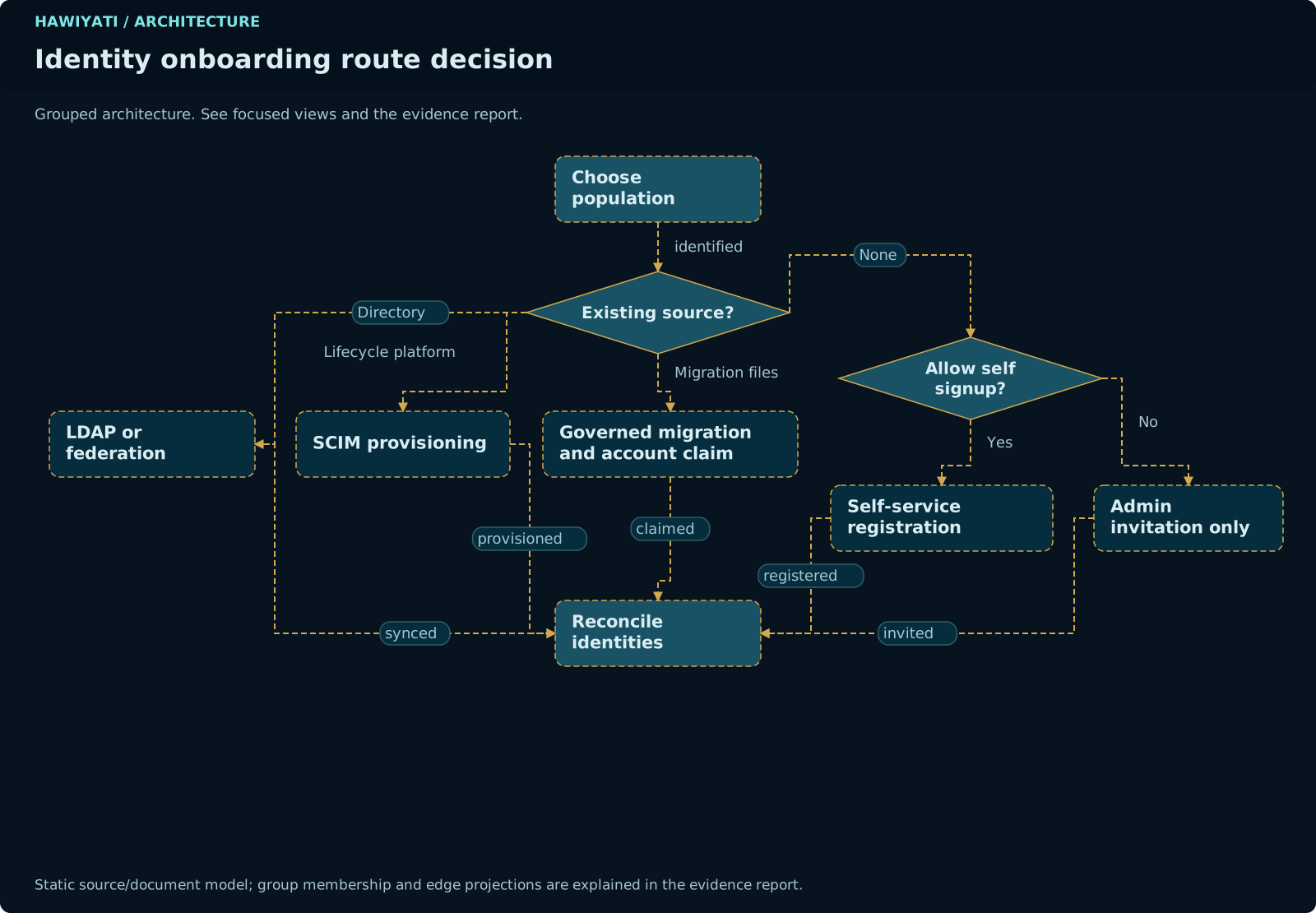
Hawiyati supports multiple registration and onboarding routes: self-service, invitation-based, SCIM provisioning, LDAP/AD, and admin-created. The choice of route determines which account states are relevant and which assurance levels apply.
lab/ocr-mrz-test must NOT be synced to hawiyati-kyc until explicitly confirmed. All other implementation actions are independent of this constraint.
Assurance Levels (L0–L4)
Hawiyati adopts a five-level identity assurance model aligned with NIST SP 800-63A-4 (Identity Assurance Level) and FATF guidance. The assurance level label appears in code, documentation, admin console UI, and API responses — replacing informal language like "verified" or "basic KYC".
kyc_profiles.current_level. It is never derived from account status flags (active, pendingApproval). Treat the assuranceLevel field on the account entity as a cached copy synced from the KYC profile.
| Level | Name | What it means | Hawiyati workflow | Typical use |
|---|---|---|---|---|
| L0 | None | No account exists. Unrecognised visitor or pre-registration state. | Anonymous / pre-registration | Anonymous access only |
| L1 | Basic | Verified channel (email or phone OTP) plus enrolled authenticator (password or passkey). Identity claim not verified against an authoritative source. | Completed self-registration flow | Consumer apps, low-risk services |
| L2 | Standard | L1 plus validated identity document (OCR + MRZ extraction) with consistency checks and reviewer approval. | KYC_APPROVED after document review | Financial services, regulated consumer apps |
| L3 | Strong | L2 plus liveness detection and biometric face match against the document photo. | KYC_APPROVED with liveness + face match confirmed | High-value transactions, AML compliance |
| L4 | High Assurance | Authoritative or supervised proofing: in-person, notarised, or trusted third party. L3 plus human review queue. | Future — manual override by privileged admin | Government, e-signature, critical infrastructure |
Assurance Level in code
A field assuranceLevel (enum L0..L4) is stored on the user account entity and returned in API responses. Authentication policies reference minimumAssuranceLevel instead of the legacy binary kycRequired flag. Existing kycRequired = true policies migrate to minimumAssuranceLevel = L2.
None
Basic
Standard
Strong
High Assurance
Assurance levels increase with each identity verification step. Stored in kyc_profiles.current_level — never derived from account flags.
Account States
The account status is determined by two boolean flags in the accounts table: active and pendingApproval. These flags, combined with the assurance level, define the full lifecycle state of an account.
ACTIVE_LIMITED is a computed state — there is no database column for it. It is derived at runtime when an account is active=true but has not yet met the minimumAssuranceLevel required by its authentication policy. Never write code that stores or persists this state.
| State | active | pendingApproval | Can Auth? | Access Scope | How Reached |
|---|---|---|---|---|---|
| PENDING_ACTIVATION | false |
false |
No | None | New self-registration, email not yet verified |
| PENDING_APPROVAL | false |
true |
No | None | Email verified, awaiting admin approval (adminApprovalRequired = true) |
| MIGRATED_UNCLAIMED (proposed) | false |
true |
No (no credential) | None until claimed | SCIM bulk import or governed import job — real person has not yet claimed account |
| ACTIVE | true |
false |
Yes — full | Full (subject to assurance gate) | Approved from PENDING; open registration auto-approved; SCIM provisioning; admin create |
| ACTIVE_LIMITED (computed) | true |
false |
Yes — limited | /account/kyc/**, /account/status only |
ACTIVE but assurance level below policy minimumAssuranceLevel. Cannot obtain SP tokens. |
| SUSPENDED | false |
false |
No | None | Admin action — temporary lock |
| LOCKED | false |
false |
No | None | Too many failed authentication attempts (brute-force protection) |
| INACTIVE | false |
false |
No | None | Long-term inactivity (scheduled job per retention policy) |
| ARCHIVED | false |
false |
No | None | Admin archived — data preserved for compliance |
| PENDING_DELETION | varies | varies | No | None | Deletion requested; retention grace period in progress |
| DELETED | — | — | No | None | Soft-deleted; audit trail preserved per data-retention policy |
Account State Machine
State transitions are recorded as audit events. Only administrators can initiate most transitions. ACTIVE_LIMITED is computed — never stored.
MIGRATED_UNCLAIMED — Three-tier credential migration
MIGRATED_UNCLAIMED differs from PENDING_APPROVAL. PENDING_APPROVAL means the person self-registered and awaits admin approval. MIGRATED_UNCLAIMED means an admin created the record from a migration data file — the real person has not yet authenticated against Hawiyati.
| Tier | When to use | User experience | What the org provides |
|---|---|---|---|
| Tier 1 — Hash migration | Org can export password hashes (bcrypt, PBKDF2, Argon2, SHA-256+salt) | User logs in with existing username + password. Fully transparent. | Hashed passwords in import manifest |
| Tier 2 — JIT proxy migration | Hash format unknown; org can expose a legacy auth endpoint (REST or LDAP) | User logs in with existing credentials. Hawiyati proxies to legacy system on first login. Transparent after that. | Legacy auth endpoint URL + credential |
| Tier 3 — Claim link | No credential migration possible (offline system, proprietary HSM, policy) | User receives a signed claim link by email/SMS; creates new password. | Email/phone addresses only |
ACTIVE_LIMITED — KYC deadlock fix
Without ACTIVE_LIMITED, a user with minimumAssuranceLevel = L2 is blocked at login but has no authenticated session to reach the KYC submission page — a deadlock. ACTIVE_LIMITED solves this: LoginController issues a limited session that grants access only to account-portal completion endpoints but cannot be used to obtain SP tokens (SAML assertions, OIDC id_token).
Policy Modes
Registration and KYC behaviour is governed by per-tenant policy flags. The three core registration modes are:
| Mode | Configuration | Behaviour | Recommended for |
|---|---|---|---|
| Open | openRegistration = trueadminApprovalRequired = false |
Anyone can self-register at /idp/register. Accounts are activated automatically upon email verification. |
Consumer apps, public services, low-risk platforms |
| Approval Required | openRegistration = trueadminApprovalRequired = true |
Self-registration is permitted but accounts enter PENDING_APPROVAL and require admin review before becoming ACTIVE. Invitation tokens bypass this gate. | Regulated services, government pilots, beta programmes |
| Invite Only | openRegistration = false |
Public /idp/register is disabled. Only invitation tokens, SCIM provisioning, or admin-created accounts can create users. |
Enterprise deployments, workforce IAM, closed systems |
| Policy flag | Effect when set |
|---|---|
openRegistration | Public /idp/register accepts new users |
adminApprovalRequired | Registered accounts start PENDING_APPROVAL; bypassed by invitation tokens |
botProtectionEnabled | CAPTCHA / challenge on identity step |
tosVersionRequired | User must accept Terms of Service; version tracked per user |
minimumAssuranceLevel | Login blocked (ACTIVE_LIMITED) until user reaches this assurance level. Replaces binary kycRequired. L2 = document review, L3 = liveness + face match. |
Use Cases
Three primary deployment scenarios determine how Hawiyati is configured and which onboarding paths are used.
Use Case A — Greenfield Deployment
Option A1 — Self-registration
Enable openRegistration = true. Users complete the multi-step form at /idp/register and are immediately ACTIVE (or PENDING_APPROVAL if approval mode is on). Recommended for consumer-facing platforms.
Option A2 — Invitation-based onboarding
Set openRegistration = false. Admin generates invitation tokens via POST /api/admin/invitations and sends users a link /idp/register?invite=<token>. Tokens bypass both openRegistration and adminApprovalRequired. Recommended for enterprise rollout and government pilots.
Option A3 — Admin or SCIM creates accounts
Leave openRegistration = false. Admin creates accounts individually via console, or provisions via SCIM 2.0 (hawiyati-scim port 8098). Users receive credentials through a welcome email activation link.
minimumAssuranceLevel for the target assurance requirement./idp/register (open/approval mode) or via a signed invitation link sent by the admin.Greenfield deployment: configure → register/invite → verify → (approve) → activate.
Use Case B — Organisation Migration
MIGRATED_UNCLAIMED.MIGRATED_UNCLAIMED → ACTIVE_LIMITED → ACTIVE.minimumAssuranceLevel = L0 initially. Schedule a future date for L2 enforcement. Send automated reminders at D-30 and D-7. On the scheduled date, toggle the level.Organisation migration using MIGRATED_UNCLAIMED state and a claim flow with a KYC grace period.
SCIM provisioning currently creates accounts as ACTIVE with no password and marks email as verified without user proof of possession. There is no claim flow, no bulk welcome email, and no grace-period mechanism for KYC. These are addressed in implementation actions P1.
Use Case C — SP-Initiated Login (new user)
Scenario C1 — User has existing account
Normal authentication. On success, IdP resumes the SP-initiated flow and issues a SAML response or OIDC token. User lands in the SP application.
Scenario C2 — No account; registration is open
SP context is preserved in the session. After registration + login, IdP resumes the SP flow automatically. User lands in SP without re-initiating from the SP side.
Scenario C3 — No account; registration is closed
User receives an invitation token. After account creation, user must re-initiate the SP flow. The SP transaction context has expired by then.
onboarding_continuation record is persisted in the DB (7-day TTL). After approval or activation, that record is consumed atomically and the browser is sent to the SP's registered initiation endpoint — the SP issues a fresh SAML AuthnRequest or OIDC request. Stale protocol messages are never replayed.
Target Registration Flow
The target self-registration flow incorporates assurance levels, the ACTIVE_LIMITED state, and the username enumeration fix. Invitation and admin-create paths share phases 2–5.
tosVersionRequired is set, user must accept the current Terms of Service. IP address, user-agent, timestamp, and ToS version are recorded for compliance.adminApprovalRequired = true, account enters PENDING_APPROVAL. Admin reviews and approves via console. If open registration, skip to next step.minimumAssuranceLevel is satisfied (usually L1 after registration), account becomes ACTIVE. If L2+ is required, account becomes ACTIVE_LIMITED and user is redirected to the KYC flow.onboarding_continuation record if applicable. User lands in their target application.Figure 7-1. Target registration flow incorporating Assurance Level gate, ACTIVE_LIMITED state, and username enumeration fix.
KYC / Identity Verification Flow
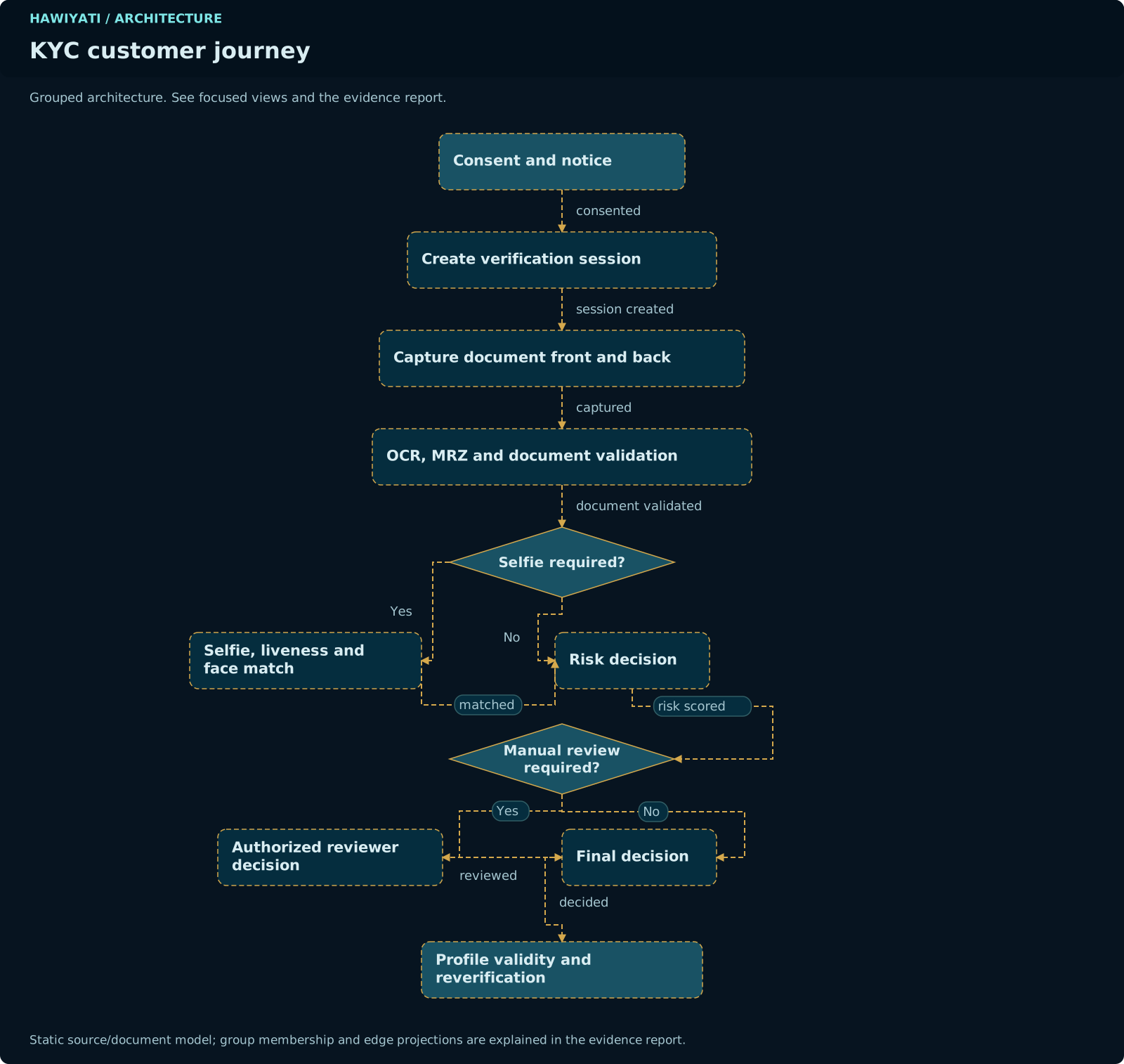
KYC verification upgrades a user's assurance level from L1 to L2 (document review) or L3 (liveness + face match). The source of truth for the current level is always kyc_profiles.current_level.
/account/kyc). User selects document type: CIN, Passport, Driving Licence, or Foreign Passport.image/jpeg, image/png, image/webp, max 10 MB per image.202 Accepted with processingId. Account portal polls for status./kyc/queue). They review OCR fields, MRZ data, conflicts, and raw text. For L3: liveness and face match results are also shown.kyc_profiles.current_level), Reject (with reason: EXPIRED_DOCUMENT, ILLEGIBLE_IMAGE, MRZ_MISMATCH, FACE_MISMATCH), or Request Re-verification.Figure 8-1. Target KYC flow. L2 = document review approved. L3 (future) = liveness + face match confirmed.
No account
Registration complete
Doc OCR/MRZ approved
Liveness + face match
Human / in-person
Each level requires all lower-level checks. Levels can expire — KYC expiry job fires at D-30 and D-7 warnings before expiry.
Migration Flow — MIGRATED_UNCLAIMED Path
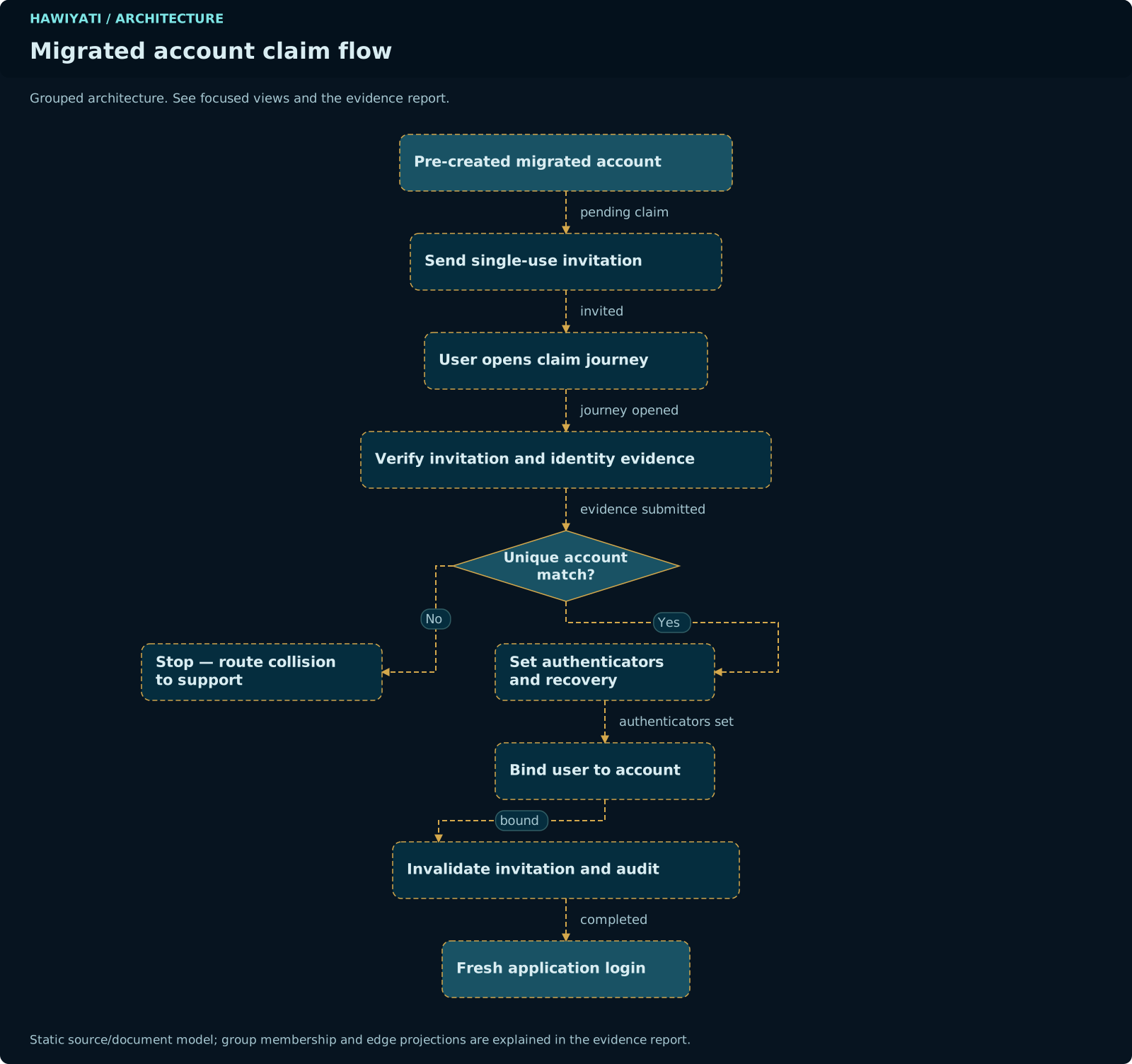
When migrating an existing user base, accounts are created with the MIGRATED_UNCLAIMED state. Users claim their accounts via a signed link rather than re-registering.
POST /api/admin/import/users. System deduplicates, validates, and creates accounts with status MIGRATED_UNCLAIMED. Import report available on completion.MIGRATED_UNCLAIMED → ACTIVE_LIMITED.minimumAssuranceLevel = L0/L1: account transitions directly to ACTIVE. If L2+ required: account stays ACTIVE_LIMITED and user is directed to KYC flow.Figure 5-1. Target migration flow using MIGRATED_UNCLAIMED state and claim flow.
Tier 1 — Hash Migration (Transparent)
MIGRATED_UNCLAIMED + TIER_1 flag. Hash and algorithm tag stored (e.g. bcrypt:$2b$12$…). Hash encrypted at rest via EncryptionService.LoginController detects MIGRATED_UNCLAIMED + TIER_1 flag. Verifies supplied password against the imported hash using the tagged algorithm.imported_credential_hash. Transition account → ACTIVE (or ACTIVE_LIMITED if KYC required). On N failures: escalate to Tier 3 claim link.Tier 1 hash migration: transparent for users. Supported algorithms: bcrypt, PBKDF2, Argon2, SHA-256+salt.
Implementation Actions
minimumAssuranceLevel = L2 has no session to reach the KYC page. Issue an ACTIVE_LIMITED session scoped to completion endpoints only.- Add
ACTIVE_LIMITEDenum toAccountStatusin hawiyati-persistence - In
LoginController: detect users needing KYC — issue limited session with scopeCOMPLETION_ONLY - Create
CompletionOnlyAuthorizationFilterblocking SP-facing endpoints (/saml/**,/oidc/token) - Allow:
/account/kyc/**,/account/status,/account/consent - Add
minimumAssuranceLeveltoAuthenticationPolicyentity; Flyway migration V54
username_taken error reveals account existence (OWASP A07). Return a generic "check your details" message for taken usernames.- In
RegistrationController: return same generic error code whether username is taken or fails other validation - Remove
username_takenerror key frommessages.properties - Add integration test: response for taken username must be identical to response for malformed email
- In
KycDocumentController: validate magic bytes — accept onlyimage/jpeg,image/png,image/webp - Enforce max 10 MB per image; validate image can be decoded as raster
- Return
HTTP 422with structured error on failure - Set
spring.servlet.multipart.max-file-sizeandmax-request-size
- After MRZ parsing: compute SHA-256 of
(documentType + documentNumber + dateOfBirth + nationality) - Store fingerprint in
kyc_document.document_fingerprint; unique partial index on approved submissions - On duplicate: auto-reject with reason
DUPLICATE_DOCUMENTand flag account for admin review - Expose duplicate alert in admin console KYC review queue
- Create
onboarding_continuationtable:id, account_id, sp_client_id, sp_initiation_endpoint, expires_at, consumed_at - At approval/KYC boundary: create continuation row; allow Redis entry to expire
- On account activation: look up unconsumed continuation; atomically consume and redirect to SP
- Scheduled cleanup for expired rows; admin can revoke
- Add to
user_consenttable:tos_version, accepted_at, ip_address, user_agent - Capture
HttpServletRequest.getRemoteAddr(), User-Agent, and server timestamp in Phase 3 handler - Expose consent audit via Admin API:
GET /api/admin/users/{id}/consents
- Add
MIGRATED_UNCLAIMEDtoAccountStatusenum - Modify SCIM
POST /scim/v2/Users: when no password provided, setMIGRATED_UNCLAIMED+emailVerified = false - Create
AccountClaimService: signed single-use claim token (HMAC-SHA256, 48h TTL) - Create
ClaimControllerat/idp/claim?token=: validate → OTP → credential enrollment → ACTIVE_LIMITED
- Add
POST /api/admin/import/users(multipart CSV or JSON) in hawiyati-admin - Async Spring Batch job: parse → validate → dedup → create MIGRATED_UNCLAIMED → write report
- Each account attributed to import job ID; rollback = deactivate all accounts from that import
- Admin console shows job progress and report download
- Create
notification_outboxtable:id, event_type, recipient, payload, status, created_at, sent_at, error - All state-transition code inserts outbox row in same transaction instead of calling notification service directly
- Create
OutboxDispatchJob: polls outbox, dispatches via SMTP/SMS gateway, marks sent/failed with retry count - Admin console: outbox monitoring page with retry button
- Add
assurance_level VARCHAR(4)touser_account; default L0, L1 after registration, L2 after KYC_APPROVED - Add
minimum_assurance_leveltoauthentication_policy; migrate fromkyc_required - KYC approval: reviewer sets assurance level on approval
- API: include
assuranceLevelin user response and OIDCid_tokenclaims
- Add
imported_credential_hash VARCHAR(512),imported_credential_algorithm VARCHAR(32),migration_tier SMALLINT; Flyway V58 - Import: parse algorithm tag; set
migration_tier = 1 - LoginController: on Tier 1 flag, verify against imported hash; on success re-encode with Argon2, null out imported columns, activate account
- On N failures: escalate to Tier 3 (generate claim token)
- Add
migration_proxy_configtable: proxy_type (REST|LDAP), endpoint_url, tls_fingerprint, credential_encrypted; Flyway V59 - Create
MigrationProxyServicefor REST and LDAP; plaintext credential never logged or persisted - On proxy success: enroll Hawiyati credential (Argon2), clear migration_tier, activate account
- All proxy calls audited (success/failure, no plaintext) in hawiyati-audit
minimumAssuranceLevel so different applications can require different identity strength.- Admin console: replace "Require KYC" toggle with "Minimum Assurance Level" dropdown (L0–L4)
- LoginController checks account's assuranceLevel against policy's minimumAssuranceLevel
- Include
acr_valuesin OIDC token (L0–L4 → standard ACR URIs);AuthnContextClassRefin SAML
- Upload endpoint returns
202 AcceptedwithprocessingIdimmediately - Background worker processes OCR; updates
kyc_document.processing_status; notifies via outbox - Account portal polls
GET /account/kyc/statusfor progress indicator
- Add
minimum_assurance_level_effective_datetoauthentication_policy - LoginController checks today ≥ effective date before enforcing; before that date, behaves as L0
- Outbox sends reminders at D-30 and D-7 to all users below required level
- Reviewer selects structured rejection reasons: EXPIRED_DOCUMENT, ILLEGIBLE_IMAGE, MRZ_MISMATCH, FACE_MISMATCH
- Reasons surfaced to user in account portal with localised guidance text
- After N rejections: account flagged
MANUAL_REVIEW_REQUIRED; further submission requires admin intervention
- Extend
KycExpiryJob: insert outbox row withKYC_EXPIRY_WARNINGat D-30 and D-7 - On expiry: transition status and insert
KYC_EXPIREDnotification
- Add one-time
/setupendpoint — available only when zero admin accounts exist - Endpoint issues time-limited setup token printed to application log on first start
- Admin provides log token + credentials via setup form; endpoint disables itself after first use
- After KYC_APPROVED: compute
person_fingerprintfrom MRZ document number + DOB + nationality - Store
person_id(UUID) on account on first L2 approval - If same fingerprint on different account: link via
identity_linktable and alert admin
- Record
deprovisioning_requested_atanddeprovisioning_completed_atonuser_account - Emit structured audit event on each SCIM DELETE with both timestamps
- Admin console: deprovisioning SLA report
- Implement
POST /scim/v2/Bulkper RFC 7644 §3.7 - Support
failOnErrorsand partial-success semantics - Each bulk operation delegates to the same service layer as individual operations
Decision Guide — Choosing a Registration Path
Use the table below to select the correct combination of registration mode, assurance level, and entry path for your deployment scenario.
| Scenario | Open reg? | Approval? | Assurance | Entry path |
|---|---|---|---|---|
| Consumer app, self-serve | Yes | No | L1 (L2 optional later) | A1 — open registration |
| Enterprise pilot, known users | No | — | L1–L2 | A2 — invitation tokens |
| Regulated service requiring strong identity | No or Yes | Yes | L2+ | A1 or A2 + KYC gate |
| Organisation migration, existing directory | No | — | L2 with grace period | B — MIGRATED_UNCLAIMED + claim flow |
| SP-initiated, account not yet created | Yes | No | L1 | C2 — open reg from SP redirect |
| SP-initiated, closed deployment | No | — | L1+ | A2 invitation first, then SP |
| First deployment, zero users | No | — | — | A3 — admin create + welcome email |
Which assurance level do I need?
| Risk level | User type | Compliance requirement | Recommended level |
|---|---|---|---|
| Low | Anonymous / general public | None | L0 / L1 |
| Medium | Registered consumer | Basic account verification | L1 |
| High | Financial service customer | KYC / AML / FATF | L2 |
| Very high | High-value transactions | Strong biometric verification | L3 |
| Critical | Government / e-signature | In-person or notarised | L4 |
OCR/MRZ fixes in lab/ocr-mrz-test must NOT be synced to hawiyati-kyc until explicitly confirmed. All other implementation actions above are independent of this constraint and may proceed.